Required files

To host your application on Upsun, a configuration file (YAML) is needed to manage the way your application behaves. This configuration file is located inside a .upsun/ folder at the root of your source code:
my-app
├── .upsun
   └── config.yaml
├── [.environment]
└── <project sources>
To pre-generate these YAML files, run the following command from the root of your project.
Terminal
upsun project:init
Follow the prompts. The upsun project:init command does the following:
  • If possible, automatically detects which framework you’re using. If not detected, you are asked which runtime language your codebase is in.
  • Asks if you want to add any services.
  • Generates the corresponding .upsun/config.yaml and .environment files.
The generated configuration varies slightly based on your answers to these prompts and whether a framework is detected. However, the structure of the configuration file remains similar to the following:
{{< code-link destination="/create-apps/app-reference/single-runtime-image.html" text="applications:" title="Top-level key for all applications" >}}
  # Configuration for all applications within an environment.
  {{< code-link destination="/create-apps/app-reference/single-runtime-image.html" text="myapp:" title="Configuration for a unique application" >}}
    # configuration for the application 'myapp'

{{< code-link destination="/add-services.html" text="services:" title="Top-level key for all services" >}}
  # Configuration for all services within an environment.
  {{< code-link destination="/add-services.html" text="db:" title="Configuration for a unique service" >}}
    # configuration for service 'db'

{{< code-link destination="/define-routes.html" text="routes:" title="Top-level key for all routes, configuring how requests are handled by the Router" >}}
  # Configuration for routing to applications
  {{< code-link destination="/define-routes.html" text="'https://{default}/':" title="Configuration for a unique service" >}}
If you want more information on the structure of this configuration file, see the dedicated YAML page.

Committing variables

An additional .environment file may be located at the root of your source code. This file contains Upsun specific environment variables.
Commit your new files:
Terminal
git add . && git commit -m "Add configuration for Upsun."
Push up to your Upsun project:
upsun push
Upsun now reads your configuration files, begins building your application image and allocates resources to your various containers.
By default, Upsun uses default resources for each of your services/apps. You can adjust these resources.

Errors on first push

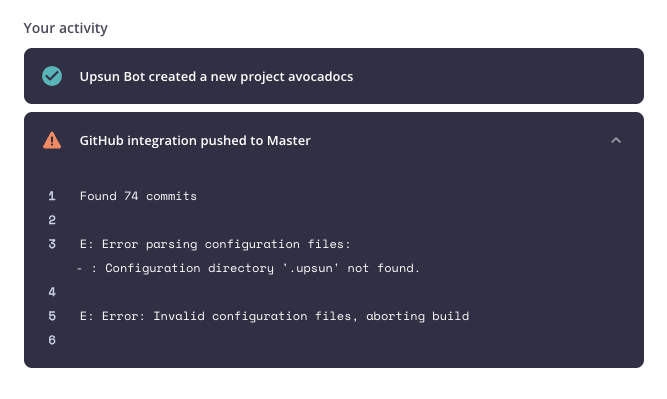
If you try to push a source code that is not Upsun ready, the following error is usually triggered at this point:
Found 749 commits

E: Error parsing configuration files:
- : Configuration directory '.upsun' not found.

E: Error: Invalid configuration files, aborting build
This error is triggered because you have not yet added Upsun configuration to your project to setup deployments.

Errors

The project:init CLI command uses your responses and some framework-detection logic to attempt to set some sane configuration for your project. Your project - like most projects - is unique, and this goal of a seamless first deployment may yet be incomplete at this stage. Have no fear! Upsun provides a highly customizable configuration schema that can be adjusted for your particular package manager, environment variables, builds, deploys, workers, crons, and other requirements to get you fully deployed. To start exploring what might still be needed, see the following language-specific configuration pages:

Next steps

With your deployment finished, you may have noticed that the resources allocated to the application and service containers of your project have been set automatically:
Each time you create a new branch, your new environment inherits its parent environment’s resource allocation.
If you need more disk for uploaded files, or less memory for rarely used services, you can adjust resources at any time.
Last modified on March 10, 2026