
Clone submodules during deployment

Upsun allows you to use submodules in your Git repository. They’re usually listed in a .gitmodules file at the root of your Git repository. When you push via Git, Upsun tries to clone them automatically. The following example is based on a Bigfoot multi-app project which uses the following submodules: Diagram of a project containing multiple apps Say you have a multi-app project that includes the following submodules:
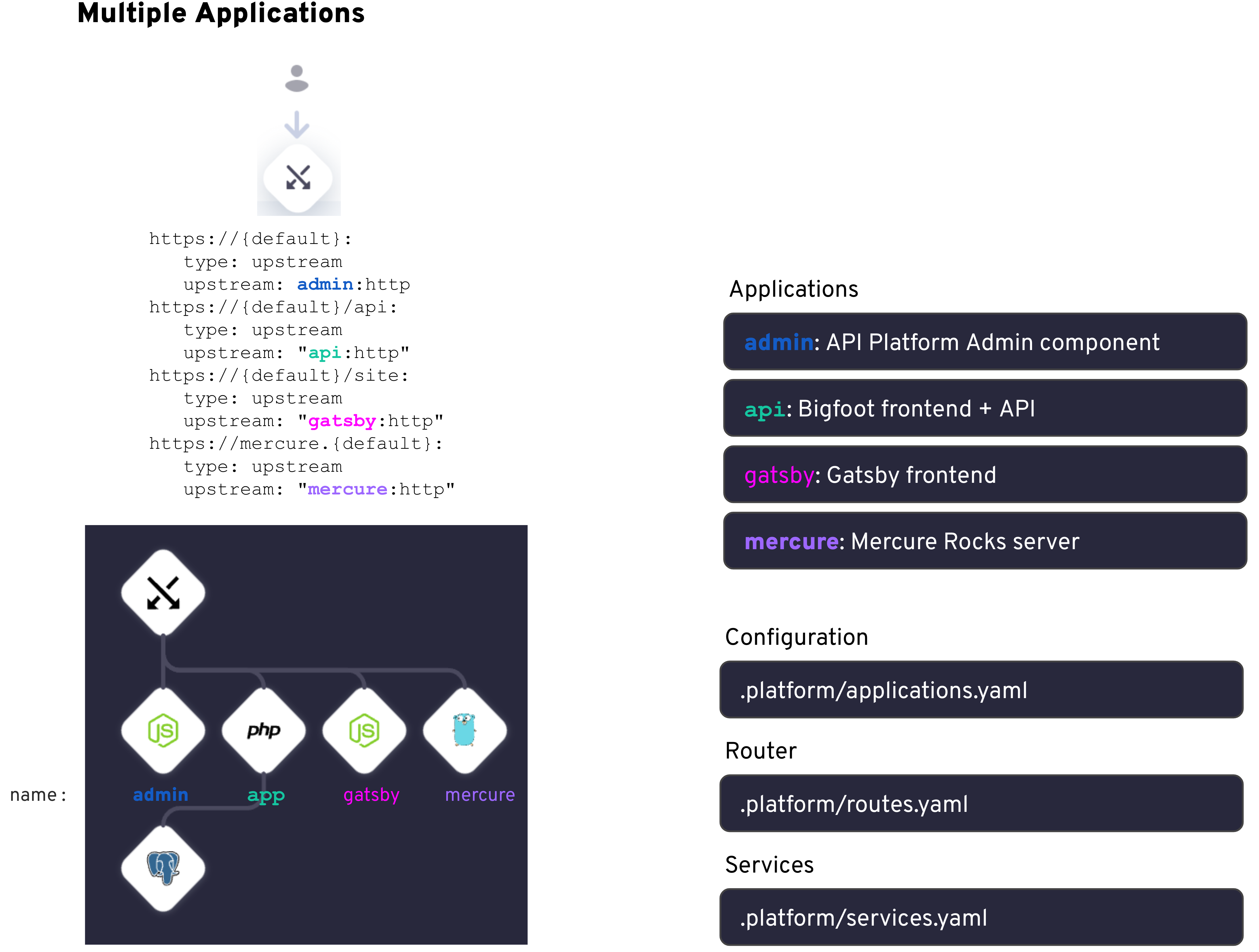
  • A BigFoot app
  • An API Platform v3, Admin component
  • A Gatsby frontend
  • A Mercure Rocks server
To import all the submodules, run the following commands from your multiple application project’s root folder:
touch .gitmodules
git submodule add --name admin https://github.com/platformsh-templates/bigfoot-multiapp-admin.git admin
git submodule add --name api https://github.com/platformsh-templates/bigfoot-multiapp-api.git api
git submodule add --name gatsby https://github.com/platformsh-templates/bigfoot-multiapp-gatsby.git gatsby
git submodule add --name mercure https://github.com/platformsh-templates/bigfoot-multiapp-mercure.git mercure
git add .
git commit -m "Adding submodules for Bigfoot App, API Platform Admin, Gatsby frontend and Mercure Rocks server"
git push
Here is an example of a .gitmodules file:
[submodule "admin"]
  path = admin
  url = https://github.com/platformsh-templates/bigfoot-multiapp-admin.git
[submodule "api"]
  path = api
  url = https://github.com/platformsh-templates/bigfoot-multiapp-api.git
[submodule "gatsby"]
  path = gatsby
  url = https://github.com/platformsh-templates/bigfoot-multiapp-gatsby.git
[submodule "mercure"]
  path = mercure
  url = https://github.com/platformsh-templates/bigfoot-multiapp-mercure.git
When you run git push, you can see the output of the logs:
  Validating submodules
    Updating submodule ttps://github.com/platformsh-templates/bigfoot-multiapp-admin.git
    Updated submodule https://github.com/platformsh-templates/bigfoot-multiapp-admin.git: 549 references updated.
    Updating submodule ttps://github.com/platformsh-templates/bigfoot-multiapp-api.git
    Updated submodule https://github.com/platformsh-templates/bigfoot-multiapp-api.git: 898 references updated.
    Updating submodule https://github.com/platformsh-templates/bigfoot-multiapp-gatsby.git
    Updated submodule https://github.com/platformsh-templates/bigfoot-multiapp-gatsby.git: 257 references updated.
    Updating submodule https://github.com/platformsh-templates/bigfoot-multiapp-mercure.git
    Updated submodule https://github.com/platformsh-templates/bigfoot-multiapp-mercure.git: 124 references updated.
  ...
If your submodule contains an independent app, see how to configure it properly.

Update submodules

When you amend your submodules’ code, make sure your changes are applied by running the following commands before redeploying:
git submodule update --remote [submodule]
Submodule path 'admin': checked out 'a020894cf94de6e79748890c942206bc7af752af'
Submodule path 'api': checked out 'dce6617cc2db159c1a871112909e9ea4121135ec'
Submodule path 'gatsby': checked out '012ab16b05f474278ad0f9916e1cb94fc9df5ba4'
Submodule path 'mercure': checked out '94ccae5055983004aa8ab2c17b1daabd0c0a4927'
To specify which submodule needs to be updated, replace [submodule] with your submodule path.

Error when validating submodules

Using an SSH URL (git@github.com:...) to fetch submodules triggers the following error:
Validating submodules.
  Found unresolvable links, updating submodules.

E: Error validating submodules in tree:
    - admin: Exception: commit 03567c6 not found.

   This might be due to the following errors fetching submodules:
    - git@github.com:platformsh-templates/bigfoot-multiapp-admin.git: HangupException: The remote server unexpectedly closed the connection.
This is due to the fact that the Upsun Git server can’t connect to GitHub via SSH without being granted an SSH key to do so. To solve this issue, use an HTTPS URL (https://github.com/...) instead.

Use private Git repositories

When using Git submodules that are private repositories, URLs with the HTTPS protocol fail with errors such as the following:
GitProtocolError: unexpected http resp 401 for https://bitbucket.org/myusername/mymodule.git/info/refs?service=git-upload-pack
To fix this, follow these steps:
  1. Change your module declarations to use SSH for URLs. Your existing declaration might look like this:
    .gitmodules
    [submodule "support/module"]
        path = support/module
        url = https://bitbucket.org/username/module.git
        branch = submodule/branch
    
    Change this to the following:
    .gitmodules
    [submodule "support/module"]
        path = support/module
        url = git@bitbucket.org:username/module.git
        branch = submodule/branch
    
  2. Add the project’s public key to your remote Git repository. If there are nested submodules in your submodule, then add the public key to those repositories as well. This allows your Upsun project to pull the repository from the remote Git service.
Deploy keys only grant access to a single repository, which can cause issues when attempting to pull several repositories to the same server. If your server needs access to multiple repositories, follow these steps:
  1. Create a machine user with access rights to each of the private repositories.
  2. Attach the deploy key to your machine user.

Removing submodules

These steps aren’t specific to Upsun, but kept as a reference for Git so that submodules are effectively removed before entering the build process.
  1. In your .gitmodules and .git/config files, delete the information related to the submodule you want to remove.
    git submodule deinit -f path_to_submodule
    
  2. Stage changes to .gitmodules:
    git add .gitmodules
    
  3. Remove the submodule from the repository (without trailing slash):
    git rm --cached path_to_submodule
    
  4. Remove the submodule files in .git from the repository (without trailing slash):
    rm -rf .git/modules/path_to_submodule
    
  5. Commit the changes:
    git commit -m "Removed submodule."
    
  6. Remove the submodule code locally, now no longer tracked:
    rm -rf path_to_submodule
    
Last modified on March 11, 2026