

- You can add as many packages to your application container as you need, choosing from over 120,000 packages from the Nixpkgs collection.
- The packages you add are built in isolation, enabling you to install different versions of the same package.
- With Nix, there are no undeclared dependencies in your source code. What works on your local machine is guaranteed to work on any other machine.
.upsun/config.yaml file
(usually located at the root of your Git repository).Note that multi-app projects can be set in various ways. You can also skip directly to this comprehensive example of a composable image configuration in the “Configure apps” topic. This example includes all of the primary application properties listed in the table in the next section.
Primary application properties
In the.upsun/config.yaml file, configure each application as a unique key beneath the top-level applications key.
In a composable image, you can add multiple runtimes to a single application container by defining them in the .applications.<APP_NAME>:.stack key, described later in this topic.
The following table presents all of the properties available to each unique application.
The Set in instance column defines whether the given property can be overridden within a web or workers instance.
To override any part of a property, you must provide the entire property.
- The
typeandstackproperties are unique to the composable image type and are described later in this topic. All other properties are available in both single-runtime and composable images — click a property name to view its details in a separate topic. - The
stackkey replaces thebuild,dependencies, andruntimekeys that are available in the single-runtime image.
| Name | Type | Required | Set in instance? | Description |
|---|---|---|---|---|
type | A type | Yes | No | Defines the version of the Nix channel. Mandatory in each application that uses the composable image. Example: type: "composable:{{version:composable:latest}}". |
stack | runtimes and/or packages arrays | Yes | No | Specifies Upsun-supported runtimes and extra Nixpkgs packages beyond those in the type channel. |
container_profile | A container profile | Yes | Determines which combinations of CPU and RAM an app or service container can use. Default value is HIGH_CPU; see Resources if using multiple runtimes. | |
relationships | A dictionary of relationships | Yes | Connections to other services and apps. | |
mounts | A dictionary of mounts | Yes | Directories that are writable even after the app is built. Allocated disk for mounts is defined with a separate resource configuration call using upsun resources:set. | |
web | A web instance | N/A | How the web application is served. | |
workers | A worker instance | N/A | Alternate copies of the application to run as background processes. | |
timezone | string | No | The timezone for crons to run. Format: a TZ database name. Defaults to UTC, which is the timezone used for all logs no matter the value here. See also app runtime timezones. | |
access | An access dictionary | Yes | Access control for roles accessing app environments. | |
variables | A variables dictionary | Yes | Variables to control the environment. | |
firewall | A firewall dictionary | Yes | Outbound firewall rules for the application. | |
hooks | A hooks dictionary | No | Specifies commands and/or scripts to run in the build, deploy, and post_deploy phases. | |
crons | A cron dictionary | No | Scheduled tasks for the app. | |
source | A source dictionary | No | Details about the app’s source code and available operations. | |
additional_hosts | An additional hosts dictionary | Yes | Mappings of hostnames to IP addresses. | |
operations | A dictionary of runtime operations | No | Runtime operations for the application. |
type
Required for all applications that use the composable image. Defines the version of the Nix channel that application uses.
For example, to specify the Nix channel {{version:composable:latest}} for <VariableBlock name="APP_NAME" />, use the following syntax:
Supported Nix channels
Upsun supports the following Nix channel versions:{{version:composable:latest}}
stack section below.
stack
You must define the stack element by using distinct runtimes and packages keys, as described in the following table.
See the example stack configuration that follows this table.
| Name | Type | Required | Additional keys | Description |
|---|---|---|---|---|
runtimes | array | No | extensions, disabled_extensions, and related subkeys | An array of 1+ language runtimes specified as "<nixruntime@version>" or <nixruntime>.The first declared runtime (or primary runtime) is started automatically. See the complete list of supported runtimes below. |
packages | array | No | package, channel, additional keys to demonstrate passthrough flexibility | Additional Nix tools/libraries, using the channel from type unless overridden locally by specifying the package and its channel. Format: <nixpackage> |
Runtimes extensions or packages?
Be sure you understand where to specify a runtime’s additional components. For example:-
PHP: Manage extensions by using the
stack.runtimes.extensionsandstack.runtimes.disabled_extensionskeys.
- Note: In some scenarios, you might add PHP settings via environment variables or
php.ini.
- Note: In some scenarios, you might add PHP settings via environment variables or
-
Python: Install extra packages via the
stack.packageskey.
stack configuration below.For other runtimes, see the Languages section.
Example: stack configuration
The config.yaml file excerpt below shows the following stack configuration:
- Primary runtime:
php@8.4with additional extensions and one disabled extension - Secondary runtimes:
nodejs@{{version:nodejs' version='latest' />andpython@<MetaVersion language='python:latest}} - Nix packages:
yarnandpython313Packages.yqfrom the channel defined intypepython313Packages.jupyterlab(with config) andwkhtmltopdffrom theunstablechannel
Warning
Althoughnix commands are available during the build phase, they are not supported at runtime because the final image is read-only.When you use the Upsun composable image, you don’t need nix commands.
Anything you declare under the stack key is automatically installed and the binaries are included in your $PATH, making them immediately available to use.For example, to start a secondary runtime,
you can run it directly in your start command without using nix run.Working with multiple runtimes: primary runtime
If you add multiple runtimes to your application container, the first declared runtime becomes the primary runtime. The primary runtime is the one that is automatically started. To start other declared runtimes (or secondary runtimes), you need to start them manually by using web commands. To find out which start command to use, go to the Languages section and visit the documentation page dedicated to your runtime. Containers that define multiple runtimes typically require some resource sizing adjustments. For details, see the Resources section of this topic. See thestack configuration example above, which declares multiple runtimes.
PHP as a primary runtime
If a PHP runtime is the first declared (or primary) runtime in the app:- The PHP-FPM service starts automatically.
-
You can configure the PHP-FPMP service by using
request_terminate_timeoutandsizing_hintskeys in the app’sstack.runtimeskey. Thestackconfiguration example above declares PHP as a primary runtime but does not show these additional keys.
Upsun-supported Nix runtimes
Upsun officially supports the Nix runtimes listed below. To use them in your container, add them to the
Runtimes not listed below are supported only by Nix as Nixpkgs packages, not as Upsun runtimes. In those cases, add them to
For example, if your app requires the FrankenPHP runtime from the
stack.runtimes array.Runtimes not listed below are supported only by Nix as Nixpkgs packages, not as Upsun runtimes. In those cases, add them to
stack.packages. For example, if your app requires the FrankenPHP runtime from the
unstable channel, you would add frankenphp to stack.packages. See the stack configuration example above for a similar addition.For other runtimes (such as Elixir), you can specify a major or a major.minor version. Security and other patches are applied automatically.
| Language | Nix package | Supported version(s) |
|---|---|---|
| Clojure | clojure | 1 |
| Elixir | elixir | 1.19 1.18 1.17 |
| Go | golang | 1.25 1.24 |
| Java | java | 25 |
| Javascript/Bun | bun | 1 |
| JavaScript/Node.js | nodejs | 24 22 20 |
| Perl | perl | 5 |
| PHP | php | 8.4 8.3 8.2 |
| Python | python | 3.13 3.12 3.11 |
| Ruby | ruby | 3.4 3.3 |
PHP extensions and Python packages
To discover which PHP extensions and Python packages are available for these runtimes:- Go to the NixOS search.
- Enter a runtime and click Search.
- In the Package sets side bar, select the right set of extensions/packages for your runtime version.
You can choose the desired extensions/packages from the filtered results.
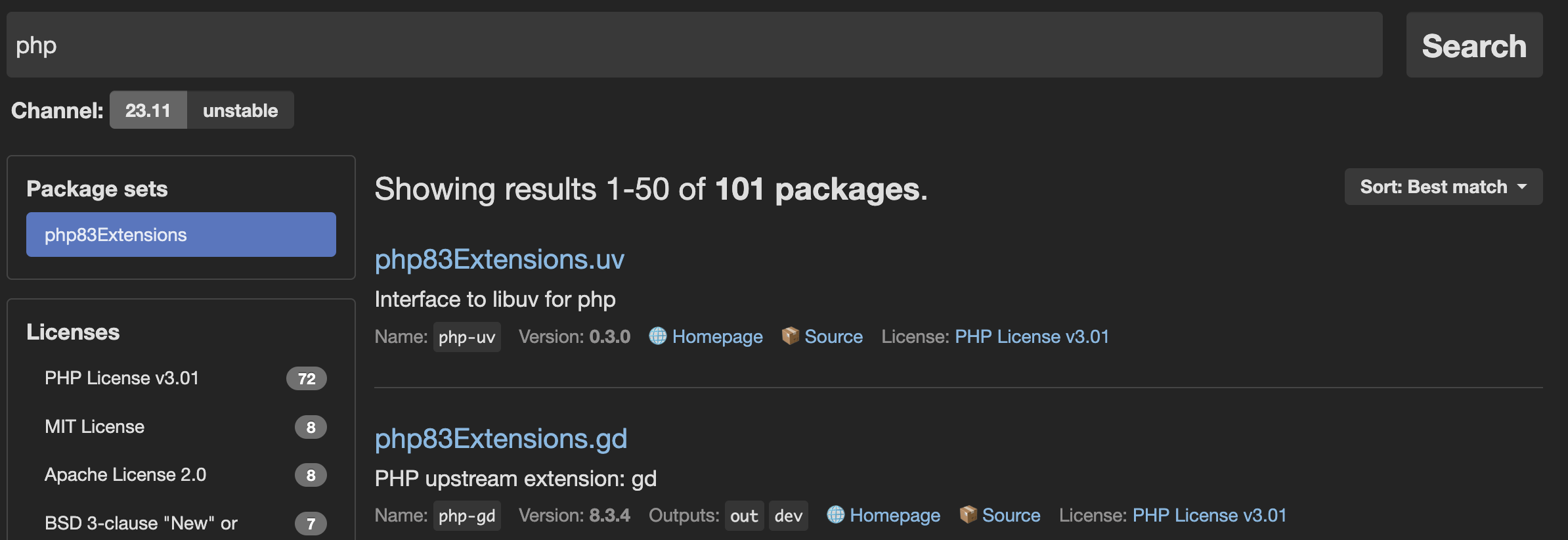
Note: PHP extension names
To help you find PHP extension names, some maintainers provide aPHP upstream extension value in the NixOS search engine.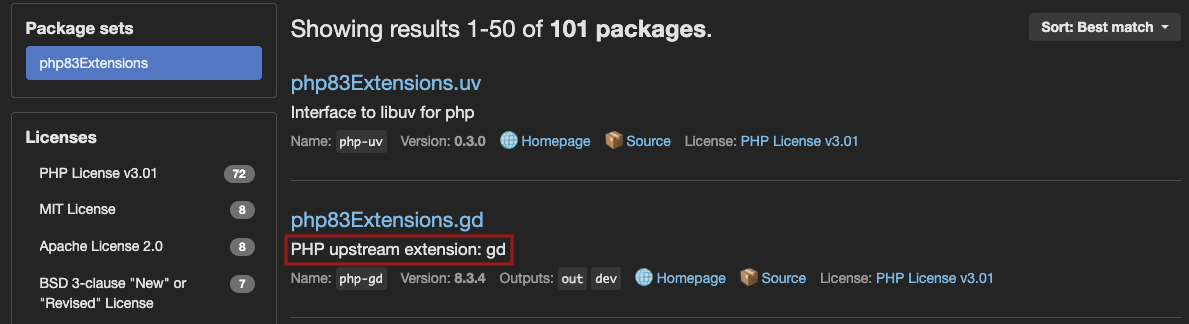
<EXTENSION-NAME> extension name from the appropriate <PHP><VERSION>Extensions.<EXTENSION-NAME> search result and add it to stack.runtimes.extensions as shown in the stack configuration example above.- Add extensions to
stack.runtimes.extensionsand packages tostack.packagesas described in thestacksection above.
Resources (CPU, memory, disk space)
By default, Upsun assigns a container profile and container size to each application and service on the first deployment of a project.The container profile defines and enforces a specific CPU-to-memory ratio. The default container profile for an app or service in a composable image is
HIGH_CPU.
Use the Upsun CLI or Console to manually adjust the allocated container size (CPU and memory resources)—that is, to perform a vertical‑scaling action. When you redeploy, the container runs with the CPU‑to‑memory ratio defined by its profile, so it enforces the size you specified.
If you define multiple runtimes in an application’s .applications.<app_name>.stack.runtimes key, you need to do one of the following:
-
Change the
.applications.<app_name>.container_profileto a profile that uses a larger container size.
-
Change the resource initialization policy (the default CPU and RAM ratio) by running this command:
- For detailed steps for changing the container size, see the Vertical scaling section of the “Resource configuration topic.
- For details about container sizes for each resource allocation strategy (shared CPU, guaranteed CPU, and initial allocation), see the Advanced: Container profiles section of the “Resource configuration” topic.
- To learn more about general resource management in Upsun, see the topics in the Manage resources section.
Downsize a disk
You can reduce the target disk size of an app. Keep in mind:- Backups created before the downsize are incompatible and cannot be used; you must create new backups.
- The downsize will fail if the disk contains more data than the target size.
Combine single-runtime and composable images
In a multiple application context, you can use a mix of single-runtime images and composable images. The following sample configuration includes two applications:frontend– uses a single-runtime imagebackend– uses a composable image
In this app, PHP is the primary runtime and is started automatically (PHP-FPM also starts automatically when PHP is the primary runtime). For details, see the PHP as a primary runtime section in this topic.