

 Dispatch
 Cloud
CloudSince then, we’ve been using n8n to automate our internal workflows — and one pain point in particular has been solved: promoting our Dev Center technical blogposts! In the Advocacy team, our mission is to publish high-quality, relevant technical blogposts across a variety of topics — ideally with strong engagement.
But until recently, promotion on social media was a manual process, handled by our wonderful and brilliant teammate Community Manager. 🧠💪 And as with any manual process, miscommunication sometimes occurred:
- Sometimes the Advocacy team forgot to ping our Community Manager with a summary and link.
- Sometimes our Community Manager was too busy and missed the momentum for promotion.
This is now history! 🚀
We’ve built an n8n workflow that automatically sends a Slack message to our marketing team whenever a new blogpost is published.It extracts key metadata (title, URL, image), uses OpenAI to generate a tweet, and notifies our
#marketing Slack channel — complete with a pre-written tweet.
💡 If you’re reading this article because of a tweet — then it worked!
Our old workflow (RIP)
Before this automation, our flow looked like this:- Write the article on a new Git branch.
- Open a Pull Request on the Dev Center repository.
- ask teammates to review the online version of the blogpost (or the series) via the Upsun preview environment, which is automatically linked in the Pull Request as a comment.
- Once merged, manually ping the marketing team with the article and a short summary.
- The marketing team would write a tweet and schedule it for social media.
Our new workflow 🎉
Here’s how it works now:- Write the article and open a PR, as usual.
- Once merged, n8n detects the new blogpost(s).
- n8n extracts the title(s), author(s), and image(s).
- It uses OpenAI to generate a tweet.
- It automatically pings the
#marketingSlack channel with everything the team needs.
Why this automation matters
-
⏱️ Time saved for both teams
Marketing no longer needs to read every blogpost — they receive a tweet-ready summary instantly. -
⚡ Increased reactivity
Blogposts are promoted as soon as they’re live, improving reach and engagement. -
🤝 Better collaboration
Automation ensures that nothing falls through the cracks, and that both teams stay aligned. -
📢 Consistent messaging
OpenAI-generated summaries keep tone and clarity consistent across posts. -
📈 Scalable promotion
As our content production scales, we keep a strong social presence without increasing manual effort.
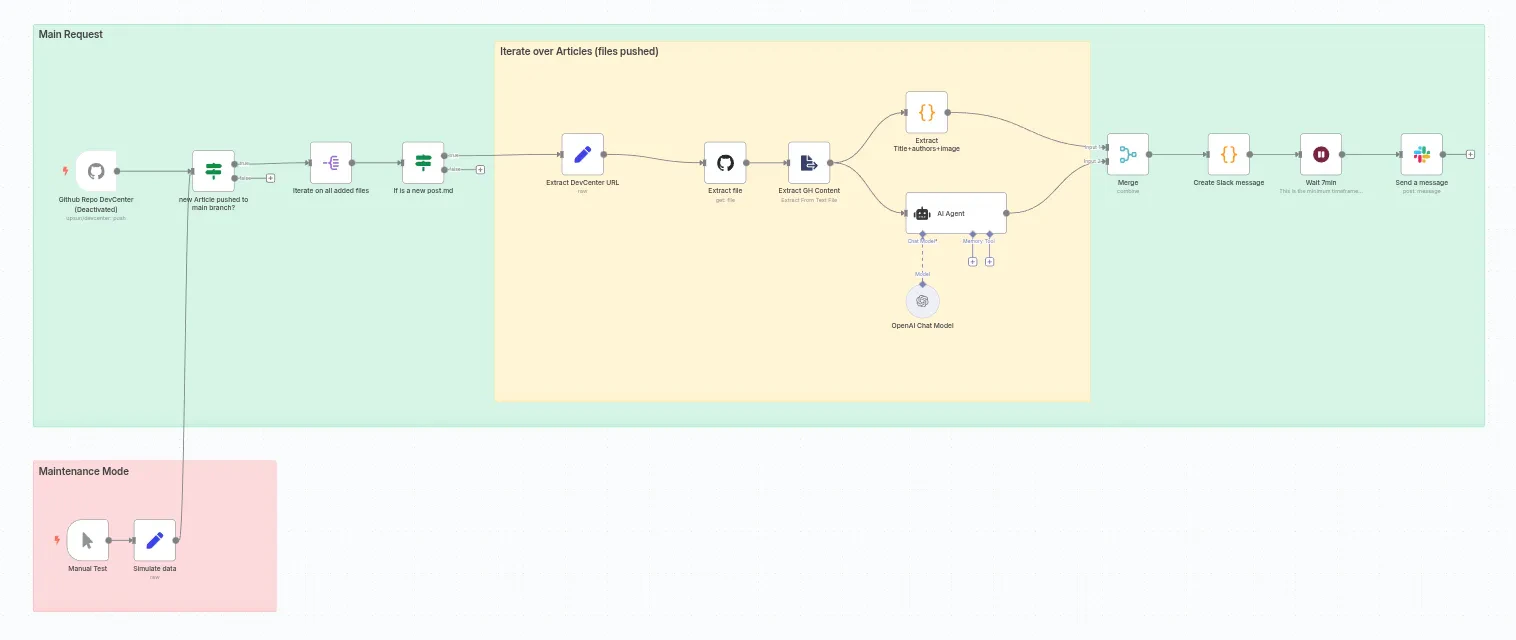
Behind the scenes: How it works
-
GitHub Webhook Trigger
The workflow listens for push events on the Dev Center repo. -
Metadata Extraction
It extracts new.mdfiles, ignores edits to old posts, and parses frontmatter (title, authors, image). -
Tweet Generation
OpenAI creates a short, clear tweet summarizing the article. -
Slack Notification
It posts to#marketingwith:- Article title
- GitHub authors (linked)
- Article URL
- Tweet suggestion
- Thumbnail image
Final Result: What It Looks Like
Here’s an example of the Slack message sent by the workflow: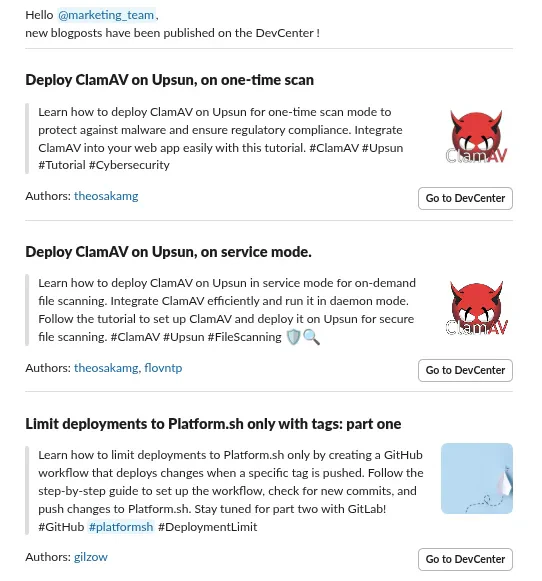
Want to build it yourself?
You can grab the exported n8n workflow here.Once imported into your n8n instance, configure the following:
- 🔑 Credentials: Add OpenAI, GitHub, and Slack credentials from your n8n account.
- 🔗 GitHub Repo: Update the repo URL in the
Github Repo DevCentertrigger block. - 👤 Author Extraction Logic: On our DevCenter, authors are listed with GitHub usernames. Update this logic if yours differs in the
Extract Title+authors+imageblock.