Documentation Index

Fetch the complete documentation index at: https://developer.upsun.com/llms.txt

Use this file to discover all available pages before exploring further.

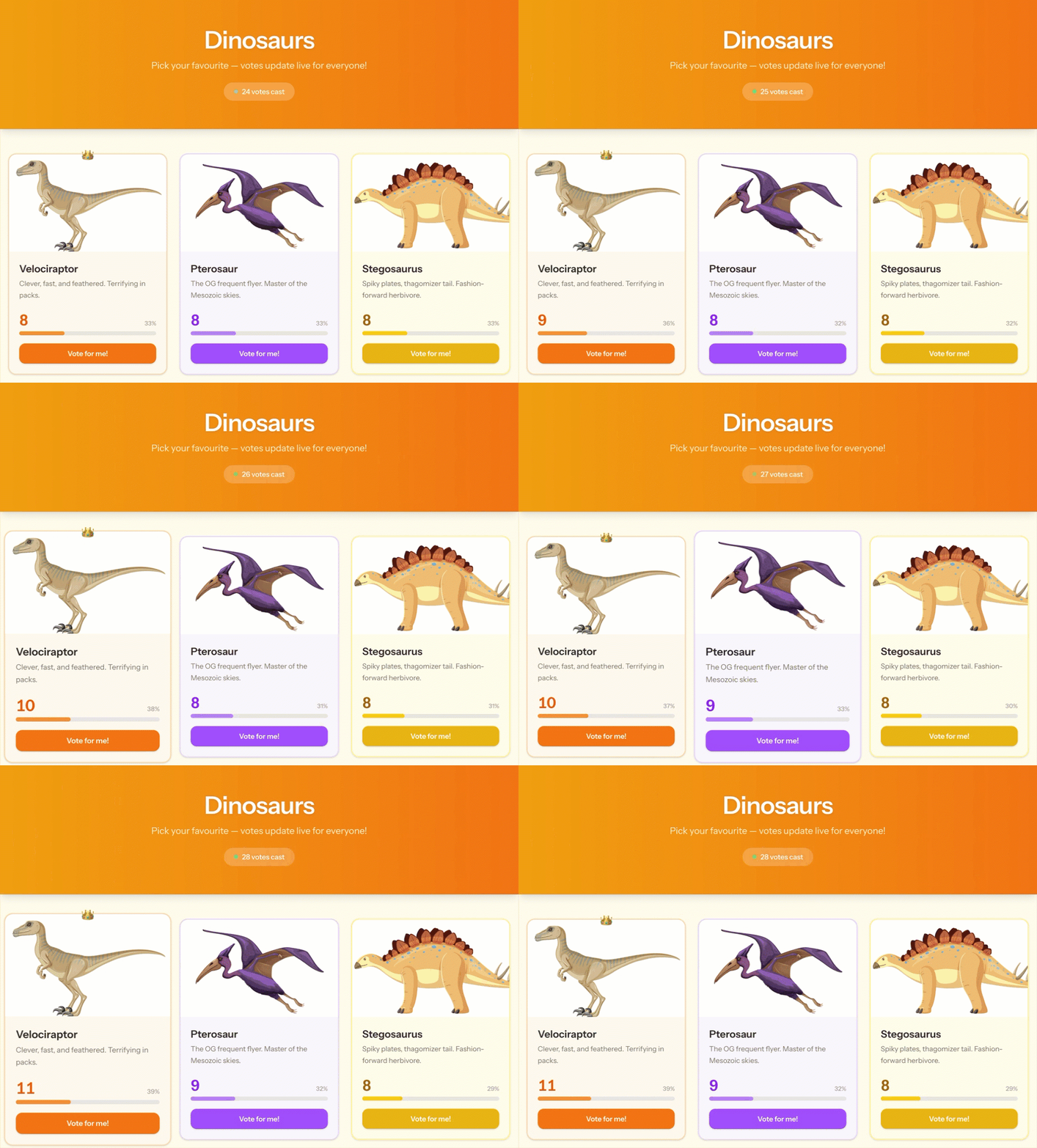
Real-time updates in Laravel apps used to mean reaching for a third-party SaaS like Pusher or Ably that charges based on total concurrent connections. Laravel Reverb flips that model: it’s a self-hosted WebSocket server you run alongside your app, with no per-connection bill. This tutorial walks you through building a small voting app where everyone watching the page sees votes update live. You’ll start with a local DDEV environment, deploy to Upsun, and then scale the Reverb layer horizontally so a single project can handle far more concurrent WebSocket connections than one instance allows. Dinosaurs voting app with live vote counts updating across browsers

What you’re building

A one-page Laravel app that lists 13 dinosaurs. Visitors vote for their favourite, and every connected browser sees the totals tick up in real time. Reverb handles the WebSocket fan-out, Inertia and Vue drive the UI, and MariaDB stores the counts. The deployed setup uses three containers:
  • A dinosaurs PHP app serving HTTP traffic
  • A reverb PHP app running the WebSocket server
  • A mariadb service for persistence
All three live in the same Upsun project and are described in a single .upsun/config.yaml. Adding a service later (you’ll add Redis at the end) is a few extra lines of YAML and a git push, no provisioning steps.

Prerequisites

Before you start, install:

Local development with DDEV

Scaffold the project

Create the project directory and configure DDEV for Laravel:
Terminal
mkdir -p dinosaurs && cd dinosaurs
ddev config --project-type=laravel --docroot=public
Add the Laravel installer to the DDEV container so you can scaffold the app from inside it:
Terminal
cat <<'DOCKERFILEEND' >.ddev/web-build/Dockerfile.laravel
ARG COMPOSER_HOME=/usr/local/composer
RUN composer global require laravel/installer
RUN ln -s $COMPOSER_HOME/vendor/bin/laravel /usr/local/bin/laravel
DOCKERFILEEND

ddev start

Create the Laravel project

Run the Laravel installer inside the DDEV container, targeting a temporary subdirectory:
Terminal
ddev exec laravel new temp --database=sqlite
Answer the prompts as follows:
PromptAnswer
Update Laravel installer?No
Which starter kit?Vue
Authentication provider?No authentication scaffolding
Testing framework?Pest
Install Laravel Boost?No
Run npm install and npm run build?Yes
Move the generated files to the project root and clean up:
Terminal
ddev exec 'rsync -rltgopD temp/ ./ && rm -rf temp'
rm -f .ddev/web-build/Dockerfile.laravel .env
Restart DDEV and finish the Laravel setup:
Terminal
ddev restart
ddev composer run-script post-root-package-install
ddev composer run-script post-create-project-cmd
ddev launch
You should now see the default Laravel welcome page in your browser.

Initialize Git

Terminal
git init

Project structure

You’ll create or edit the following files:
FilePurpose
.environment
Maps Upsun relationships to Laravel env vars
.upsun
config.yaml
Upsun infrastructure configuration
app
Events
DinosaurVoted.php
Http/Controllers
DinosaurController.php
Models
Dinosaur.php
Model, controller, and broadcast event
database/migrations
2026_04_16_190223_create_dinosaurs_table.php
Schema and seed data in one migration
resources/js/pages
Welcome.vue
The voting UI
routes
web.php
The two HTTP routes

Enable broadcasting

Run the Laravel broadcaster installer. It installs the Reverb package, generates credentials in .env, and installs the frontend broadcasting package:
Terminal
ddev artisan install:broadcasting --reverb
PromptAnswer
Would you like to install Laravel Reverb?Yes
Enable event broadcasting?Yes
Install and build Node dependencies?Yes
Open the generated .env and update these two values so the local frontend can reach Reverb through DDEV’s HTTPS proxy:
.env
REVERB_HOST="dinosaurs.ddev.site"
REVERB_SCHEME=https
Append the following to .ddev/config.yaml so DDEV exposes the Reverb port and runs the Reverb daemon:
.ddev/config.yaml
web_extra_exposed_ports:
  - name: reverb
    container_port: 8080
    http_port: 8081
    https_port: 8080

web_extra_daemons:
  - name: reverb
    command: bash -c 'php artisan reverb:start'
    directory: /var/www/html
Restart DDEV to apply the daemon config:
Terminal
ddev restart

Application code

Routes

Replace the contents of routes/web.php:
routes/web.php
<?php

use App\Http\Controllers\DinosaurController;
use Illuminate\Support\Facades\Route;

Route::get('/', [DinosaurController::class, 'index'])->name('home');
Route::post('/dinosaurs/{dinosaur}/vote', [DinosaurController::class, 'vote'])->name('dinosaurs.vote');

Model

Create app/Models/Dinosaur.php:
app/Models/Dinosaur.php
<?php

namespace App\Models;

use Illuminate\Database\Eloquent\Model;

class Dinosaur extends Model
{
    protected $fillable = [
        'name', 'slug', 'description',
        'color', 'image_url', 'votes',
    ];

    protected function casts(): array
    {
        return ['votes' => 'integer'];
    }
}

Controller

Create app/Http/Controllers/DinosaurController.php. The vote action increments the counter and dispatches a DinosaurVoted event that Reverb broadcasts to every connected client:
app/Http/Controllers/DinosaurController.php
<?php

namespace App\Http\Controllers;

use App\Events\DinosaurVoted;
use App\Models\Dinosaur;
use Illuminate\Http\RedirectResponse;
use Inertia\Inertia;
use Inertia\Response;

class DinosaurController extends Controller
{
    public function index(): Response
    {
        return Inertia::render('Welcome', [
            'dinosaurs' => Dinosaur::orderBy('id')->get(),
        ]);
    }

    public function vote(Dinosaur $dinosaur): RedirectResponse
    {
        $dinosaur->increment('votes');
        DinosaurVoted::dispatch($dinosaur->fresh());
        return back();
    }
}

Broadcast event

Create app/Events/DinosaurVoted.php. It implements ShouldBroadcastNow so the event is sent on the public dinosaurs channel as soon as a vote lands:
app/Events/DinosaurVoted.php
<?php

namespace App\Events;

use App\Models\Dinosaur;
use Illuminate\Broadcasting\Channel;
use Illuminate\Broadcasting\InteractsWithSockets;
use Illuminate\Contracts\Broadcasting\ShouldBroadcastNow;
use Illuminate\Foundation\Events\Dispatchable;
use Illuminate\Queue\SerializesModels;

class DinosaurVoted implements ShouldBroadcastNow
{
    use Dispatchable, InteractsWithSockets, SerializesModels;

    public function __construct(public Dinosaur $dinosaur) {}

    public function broadcastOn(): array
    {
        return [new Channel('dinosaurs')];
    }

    public function broadcastWith(): array
    {
        return [
            'id'    => $this->dinosaur->id,
            'votes' => $this->dinosaur->votes,
        ];
    }
}

Migration

Create database/migrations/2026_04_16_190223_create_dinosaurs_table.php. The migration creates the table and seeds 13 dinosaurs in one step, so you don’t need a separate seeder:
database/migrations/2026_04_16_190223_create_dinosaurs_table.php
<?php

use Illuminate\Database\Migrations\Migration;
use Illuminate\Database\Schema\Blueprint;
use Illuminate\Support\Facades\DB;
use Illuminate\Support\Facades\Schema;

return new class extends Migration
{
    public function up(): void
    {
        Schema::create('dinosaurs', function (Blueprint $table) {
            $table->id();
            $table->string('name');
            $table->string('slug')->unique();
            $table->string('description');
            $table->string('color');
            $table->string('image_url')->nullable();
            $table->unsignedBigInteger('votes')->default(0);
            $table->timestamps();
        });

        DB::table('dinosaurs')->insert([
            ['name'=>'Velociraptor',    'slug'=>'velociraptor',    'color'=>'orange', 'description'=>'Clever, fast, and feathered. Terrifying in packs.',         'image_url'=>'https://i.ibb.co/MxPrRFkX/velociraptor.png',    'votes'=>0, 'created_at'=>now(), 'updated_at'=>now()],
            ['name'=>'Pterosaur',       'slug'=>'pterosaur',       'color'=>'purple', 'description'=>'The OG frequent flyer. Master of the Mesozoic skies.',      'image_url'=>'https://i.ibb.co/zVLcjXfm/pterosaur.png',       'votes'=>0, 'created_at'=>now(), 'updated_at'=>now()],
            ['name'=>'Stegosaurus',     'slug'=>'stegosaurus',     'color'=>'yellow', 'description'=>'Spiky plates, thagomizer tail. Fashion-forward herbivore.', 'image_url'=>'https://i.ibb.co/dwSRJg7B/stegosaurus.png',     'votes'=>0, 'created_at'=>now(), 'updated_at'=>now()],
            ['name'=>'Spinosaurus',     'slug'=>'spinosaurus',     'color'=>'orange', 'description'=>'Bigger than T-Rex and happy to remind everyone about it.', 'image_url'=>'https://i.ibb.co/k2xTHmFj/spinosaurus.png',     'votes'=>0, 'created_at'=>now(), 'updated_at'=>now()],
            ['name'=>'Brachiosaurus',   'slug'=>'brachiosaurus',   'color'=>'green',  'description'=>'The gentle giant who could see for miles.',                'image_url'=>'https://i.ibb.co/PZdGpMgn/brachiosaurus.png',   'votes'=>0, 'created_at'=>now(), 'updated_at'=>now()],
            ['name'=>'Allosaurus',      'slug'=>'allosaurus',      'color'=>'teal',   'description'=>"The Jurassic apex predator. T-Rex's scarier older cousin.", 'image_url'=>'https://i.ibb.co/N6b2tQM0/allosaurus.png',      'votes'=>0, 'created_at'=>now(), 'updated_at'=>now()],
            ['name'=>'Plesiosaurus',    'slug'=>'plesiosaurus',    'color'=>'blue',   'description'=>'The sea monster your nightmares warned you about.',        'image_url'=>'https://i.ibb.co/HpnP0B8m/plesiosaurus.png',    'votes'=>0, 'created_at'=>now(), 'updated_at'=>now()],
            ['name'=>'Dilophosaurus',   'slug'=>'dilophosaurus',   'color'=>'green',  'description'=>'Small but deadly, with a fancy frill to boot.',            'image_url'=>'https://i.ibb.co/8LNt4HH1/dilophosaurus.png',   'votes'=>0, 'created_at'=>now(), 'updated_at'=>now()],
            ['name'=>'Archaeopteryx',   'slug'=>'archaeopteryx',   'color'=>'teal',   'description'=>'The missing link between dinosaurs and birds.',            'image_url'=>'https://i.ibb.co/qYZ951rX/archaeopteryx.png',   'votes'=>0, 'created_at'=>now(), 'updated_at'=>now()],
            ['name'=>'Parasaurolophus', 'slug'=>'parasaurolophus', 'color'=>'pink',   'description'=>'Had a head crest that honked like a foghorn.',             'image_url'=>'https://i.ibb.co/gLsdt56K/parasaurolophus.png', 'votes'=>0, 'created_at'=>now(), 'updated_at'=>now()],
            ['name'=>'Triceratops',     'slug'=>'triceratops',     'color'=>'red',    'description'=>'Three horns and a frill. Always ready for a fight.',       'image_url'=>'https://i.ibb.co/TMLbzGVQ/triceratops.png',     'votes'=>0, 'created_at'=>now(), 'updated_at'=>now()],
            ['name'=>'T-Rex',           'slug'=>'t-rex',           'color'=>'red',    'description'=>'King of the Cretaceous. Tiny arms, massive attitude.',     'image_url'=>'https://i.ibb.co/CpsGbpVS/t-rex.png',           'votes'=>0, 'created_at'=>now(), 'updated_at'=>now()],
            ['name'=>'Apatosaurus',     'slug'=>'apatosaurus',     'color'=>'green',  'description'=>'Long neck, long body, legendary appetite.',                'image_url'=>'https://i.ibb.co/BV8cFW7C/apatosaurus.png',     'votes'=>0, 'created_at'=>now(), 'updated_at'=>now()],
        ]);
    }

    public function down(): void
    {
        Schema::dropIfExists('dinosaurs');
    }
};

Frontend

Replace resources/js/pages/Welcome.vue with the voting UI. The page uses useEchoPublic to subscribe to the dinosaurs channel and update vote counts as DinosaurVoted events arrive:
resources/js/pages/Welcome.vue
<script setup lang="ts">
import { Head, useForm } from '@inertiajs/vue3';
import { useEchoPublic } from '@laravel/echo-vue';
import { computed, ref } from 'vue';
import { vote as voteRoute } from '@/actions/App/Http/Controllers/DinosaurController';

interface Dinosaur {
    id: number;
    name: string;
    slug: string;
    description: string;
    image_url: string;
    color: string;
    votes: number;
}

const props = defineProps<{
    dinosaurs: Dinosaur[];
}>();

const dinosaurs = ref(props.dinosaurs.map((d) => ({ ...d })));
const votedFor = ref<number | null>(null);
const flashId = ref<number | null>(null);

const totalVotes = computed(() => dinosaurs.value.reduce((sum, d) => sum + d.votes, 0));

const leaderId = computed(() => {
    if (totalVotes.value === 0) return null;
    return dinosaurs.value.reduce((leader, d) => (d.votes > leader.votes ? d : leader)).id;
});

useEchoPublic('dinosaurs', 'DinosaurVoted', (event: { id: number; votes: number }) => {
    const dino = dinosaurs.value.find((d) => d.id === event.id);
    if (dino) {
        dino.votes = event.votes;
        flashId.value = event.id;
        setTimeout(() => {
            flashId.value = null;
        }, 600);
    }
});

const form = useForm({});

function vote(dinosaur: Dinosaur) {
    if (form.processing) return;
    votedFor.value = dinosaur.id;
    form.post(voteRoute(dinosaur).url, {
        preserveScroll: true,
        preserveState: true,
    });
}

function votePercentage(dino: Dinosaur) {
    if (totalVotes.value === 0) return 0;
    return Math.round((dino.votes / totalVotes.value) * 100);
}

const colorMap: Record<string, { card: string; text: string; bar: string; button: string; voted: string }> = {
    red:    { card: 'bg-red-50 border-red-200 dark:bg-red-950/30 dark:border-red-800',          text: 'text-red-600 dark:text-red-400',       bar: 'bg-red-400',    button: 'bg-red-500 hover:bg-red-600 active:scale-95',       voted: 'bg-red-700' },
    green:  { card: 'bg-green-50 border-green-200 dark:bg-green-950/30 dark:border-green-800',  text: 'text-green-600 dark:text-green-400',   bar: 'bg-green-400',  button: 'bg-green-500 hover:bg-green-600 active:scale-95',   voted: 'bg-green-700' },
    teal:   { card: 'bg-teal-50 border-teal-200 dark:bg-teal-950/30 dark:border-teal-800',      text: 'text-teal-600 dark:text-teal-400',     bar: 'bg-teal-400',   button: 'bg-teal-500 hover:bg-teal-600 active:scale-95',     voted: 'bg-teal-700' },
    orange: { card: 'bg-orange-50 border-orange-200 dark:bg-orange-950/30 dark:border-orange-800', text: 'text-orange-600 dark:text-orange-400', bar: 'bg-orange-400', button: 'bg-orange-500 hover:bg-orange-600 active:scale-95', voted: 'bg-orange-700' },
    yellow: { card: 'bg-yellow-50 border-yellow-200 dark:bg-yellow-950/30 dark:border-yellow-800', text: 'text-yellow-700 dark:text-yellow-400', bar: 'bg-yellow-400', button: 'bg-yellow-500 hover:bg-yellow-600 active:scale-95', voted: 'bg-yellow-700' },
    purple: { card: 'bg-purple-50 border-purple-200 dark:bg-purple-950/30 dark:border-purple-800', text: 'text-purple-600 dark:text-purple-400', bar: 'bg-purple-400', button: 'bg-purple-500 hover:bg-purple-600 active:scale-95', voted: 'bg-purple-700' },
    blue:   { card: 'bg-blue-50 border-blue-200 dark:bg-blue-950/30 dark:border-blue-800',      text: 'text-blue-600 dark:text-blue-400',     bar: 'bg-blue-400',   button: 'bg-blue-500 hover:bg-blue-600 active:scale-95',     voted: 'bg-blue-700' },
    pink:   { card: 'bg-pink-50 border-pink-200 dark:bg-pink-950/30 dark:border-pink-800',      text: 'text-pink-600 dark:text-pink-400',     bar: 'bg-pink-400',   button: 'bg-pink-500 hover:bg-pink-600 active:scale-95',     voted: 'bg-pink-700' },
};

function colorClasses(color: string) {
    return colorMap[color] ?? colorMap.green;
}
</script>

<template>
    <Head title="Dinosaurs, vote for your favourite!" />

    <div class="min-h-screen bg-amber-50 dark:bg-stone-950">
        <header class="bg-gradient-to-r from-amber-500 to-orange-500 py-14 text-center shadow-lg">
            <h1 class="text-5xl font-extrabold tracking-tight text-white drop-shadow">Dinosaurs</h1>
            <p class="mt-3 text-lg text-amber-100">Pick your favourite, votes update live for everyone!</p>
            <div class="mt-5 inline-flex items-center gap-2 rounded-full bg-white/20 px-5 py-2 text-sm font-medium text-white backdrop-blur">
                <span class="h-2 w-2 animate-pulse rounded-full bg-green-400"></span>
                {{ totalVotes }} {{ totalVotes === 1 ? 'vote' : 'votes' }} cast
            </div>
        </header>

        <main class="mx-auto max-w-6xl px-4 py-12">
            <div class="grid grid-cols-1 gap-6 sm:grid-cols-2 lg:grid-cols-3 xl:grid-cols-4">
                <div
                    v-for="dino in dinosaurs"
                    :key="dino.id"
                    :class="[
                        'relative flex flex-col rounded-2xl border-2 shadow-sm transition-all duration-200 hover:-translate-y-1 hover:shadow-md',
                        colorClasses(dino.color).card,
                        flashId === dino.id ? 'scale-105' : '',
                    ]"
                >
                    <div
                        v-if="leaderId === dino.id && totalVotes > 0"
                        class="absolute -top-4 left-1/2 -translate-x-1/2 text-2xl"
                        title="Current leader!"
                    >
                        👑
                    </div>

                    <div class="flex flex-1 flex-col p-5">
                        <h2 class="text-xl font-bold text-stone-800 dark:text-stone-100">{{ dino.name }}</h2>
                        <p class="mt-1 flex-1 text-sm leading-relaxed text-stone-500 dark:text-stone-400">{{ dino.description }}</p>

                        <div class="mt-5">
                            <div class="mb-1 flex items-baseline justify-between">
                                <span :class="['text-3xl font-extrabold tabular-nums transition-all duration-300', colorClasses(dino.color).text]">
                                    {{ dino.votes }}
                                </span>
                                <span class="text-xs font-medium text-stone-400">{{ votePercentage(dino) }}%</span>
                            </div>

                            <div class="h-2 w-full overflow-hidden rounded-full bg-stone-200 dark:bg-stone-700">
                                <div
                                    :class="['h-2 rounded-full transition-all duration-500', colorClasses(dino.color).bar]"
                                    :style="{ width: votePercentage(dino) + '%' }"
                                ></div>
                            </div>

                            <button
                                :class="[
                                    'mt-4 w-full cursor-pointer rounded-xl py-2.5 text-sm font-semibold text-white shadow transition-all duration-150',
                                    votedFor === dino.id ? colorClasses(dino.color).voted : colorClasses(dino.color).button,
                                    form.processing ? 'opacity-60' : '',
                                ]"
                                :disabled="form.processing"
                                @click="vote(dino)"
                            >
                                {{ votedFor === dino.id ? '✓ You voted!' : 'Vote for me!' }}
                            </button>
                        </div>
                    </div>
                </div>
            </div>
        </main>
    </div>
</template>

Run it locally

Apply the migration and build the frontend assets:
Terminal
ddev artisan migrate
ddev npm run build
Open the site with ddev launch and vote in two browser windows side by side. The counts update in real time, without a page refresh.

Upsun configuration

With the app working locally, you can now describe the production setup. Two files do the work: .environment maps Upsun-managed credentials to Laravel’s expected env vars, and .upsun/config.yaml defines the containers, services, and routes.

The .environment file

Upsun reads .environment at runtime to set environment variables for every container. It’s the right place to derive Laravel’s config from service relationships, which Upsun injects into the runtime as $MARIADB_HOST, $MARIADB_USERNAME, and so on. You never write credentials into your repo, and the same .environment works unchanged on every branch and preview environment. Two things are worth calling out:
  • APP_KEY is derived from PLATFORM_PROJECT_ENTROPY, a stable per-project secret that Upsun generates for you.
  • The public Reverb host is extracted from PLATFORM_ROUTES at runtime with jq, so the frontend always points at the right URL across branches and preview environments.
Create .environment at the project root. Replace <YOUR_REVERB_APP_ID> and <YOUR_REVERB_APP_KEY> with the values the broadcaster installer generated in your local .env:
.environment
# Application
export APP_NAME="Dinosaurs"
export APP_KEY="base64:$(echo -n "${PLATFORM_PROJECT_ENTROPY}" | openssl dgst -sha256 -binary | base64)"

# Database
export DB_HOST="$MARIADB_HOST"
export DB_PORT="$MARIADB_PORT"
export DB_PATH="$MARIADB_PATH"
export DB_DATABASE="$DB_PATH"
export DB_USERNAME="$MARIADB_USERNAME"
export DB_PASSWORD="$MARIADB_PASSWORD"
export DB_SCHEME="$MARIADB_SCHEME"
export DB_CONNECTION="$DB_SCHEME"
export DATABASE_URL="${DB_SCHEME}://${DB_USERNAME}:${DB_PASSWORD}@${DB_HOST}:${DB_PORT}/${DB_PATH}"

# Reverb (server-side)
export BROADCAST_CONNECTION="reverb"
export REVERB_APP_ID="<YOUR_REVERB_APP_ID>"
export REVERB_APP_KEY="<YOUR_REVERB_APP_KEY>"
export REVERB_HOST="reverb.internal"
export REVERB_PORT="80"
export REVERB_SCHEME="http"

# Reverb (client-side, exposed to Vite)
export VITE_APP_NAME="$APP_NAME"
export VITE_REVERB_APP_KEY="$REVERB_APP_KEY"
export VITE_REVERB_HOST="$(echo $PLATFORM_ROUTES | base64 -d | jq -r 'to_entries[] | select(.value.upstream == "reverb") | .key' | sed 's|https://||;s|/$||')"
export VITE_REVERB_PORT="443"
export VITE_REVERB_SCHEME="https"

The .upsun/config.yaml file

Two applications share the same source tree: dinosaurs serves HTTP, and reverb runs the WebSocket server. Both connect to a shared MariaDB service. Running two apps from one repository is a built-in pattern on Upsun, so there’s no separate Reverb project to deploy, manage, or pay for on the side. A few details worth flagging:
  • Cache directories (bootstrap/cache, .config) use instance mounts, so each container gets its own writable copy. That matters once you scale.
  • The optimize:clear step lives in web.commands.pre_start, not the deploy hook. The deploy hook only runs on one instance, but pre_start runs on every container at boot, which is what you want when scaling horizontally.
  • The ws.{default} route for Reverb disables caching and request buffering, both of which would break long-lived WebSocket connections.
Create .upsun/config.yaml:
.upsun/config.yaml
applications:
  dinosaurs:
    source:
      root: "/"
    type: "php:8.4"

    relationships:
      mariadb:
      reverb:
        service: "reverb"
        endpoint: "http"

    mounts:
      "/.config":
        source: "instance"
        source_path: "config"
      "bootstrap/cache":
        source: "instance"
        source_path: "cache"
      "storage":
        source: "storage"
        source_path: "storage"
      "node_modules":
        source: "storage"
        source_path: "node_modules"
      "public/build":
        source: "storage"
        source_path: "build"
      "resources/js/wayfinder":
        source: "storage"
        source_path: "wayfinder"
      "resources/js/actions":
        source: "storage"
        source_path: "actions"
      "resources/js/routes":
        source: "storage"
        source_path: "routes"

    web:
      commands:
        pre_start: |
          php artisan optimize:clear
      locations:
        "/":
          passthru: "/index.php"
          root: "public"

    variables:
      env:
        N_PREFIX: "/app/.global"

    build:
      flavor: none

    dependencies:
      nodejs:
        n: "*"
        npx: "*"
      php:
        composer/composer: "^2"

    hooks:
      build: |
        set -eux
        composer --no-ansi --no-interaction install --no-progress --prefer-dist --optimize-autoloader --no-dev
        n auto || n lts
        hash -r
      deploy: |
        set -eux
        mkdir -p storage/framework/sessions
        mkdir -p storage/framework/cache
        mkdir -p storage/framework/views
        php artisan migrate --force
        npm ci
        npm run build

  reverb:
    source:
      root: "/"
    type: "php:8.4"
    runtime:
      extensions:
        - uv

    relationships:
      mariadb:

    mounts:
      "/.config":
        source: "instance"
        source_path: "config"
      "bootstrap/cache":
        source: "instance"
        source_path: "cache"
      "storage":
        source: "storage"
        source_path: "storage"

    web:
      commands:
        pre_start: php artisan optimize:clear
        start: php artisan reverb:start --port=$PORT --host=0.0.0.0
      upstream:
        socket_family: tcp
        protocol: http
      locations:
        '/':
          passthru: true
          request_buffering:
            enabled: false

    build:
      flavor: none

    dependencies:
      php:
        composer/composer: "^2"

    hooks:
      build: |
        set -eux
        composer --no-ansi --no-interaction install --no-progress --prefer-dist --optimize-autoloader --no-dev
      deploy: |
        set -eux
        mkdir -p storage/framework/sessions
        mkdir -p storage/framework/cache
        mkdir -p storage/framework/views

services:
  mariadb:
    type: mariadb:11.8

routes:
  "https://{default}/":
    type: upstream
    upstream: "dinosaurs:http"
  "https://www.{default}":
    type: redirect
    to: "https://{default}/"
  "https://ws.{default}/":
    type: upstream
    upstream: "reverb:http"
    cache:
      enabled: false

Deploy to Upsun

Create the project

Terminal
upsun create
Answer the prompts:
PromptAnswer
Project titleDinosaurs
RegionPick the lowest-carbon region near you
Default branchmain
Switch the remote project for this repository to the new project?Y
Are you sure you want to continue?Y

Add the Reverb secret

The Reverb app secret is sensitive, so it doesn’t belong in .environment. Store it as a project-level variable with the --sensitive flag, which hides it from logs and the UI:
Terminal
upsun variable:create \
  --level project \
  --name env:REVERB_APP_SECRET \
  --value "<YOUR_REVERB_APP_SECRET>" \
  --sensitive true
Replace <YOUR_REVERB_APP_SECRET> with the REVERB_APP_SECRET value from your local .env. Never commit it to the repository.

Push

Terminal
git add . && git commit -m 'Initial Upsun deployment' && upsun push
Upsun reads .upsun/config.yaml, builds both PHP apps, provisions MariaDB, wires the relationships, and issues a Let’s Encrypt certificate for the routes. There’s nothing to click in a console. Once the deploy finishes, open the site:
Terminal
upsun url --primary
Open the URL in two browsers and try voting. Votes propagate live across both windows, served by a single Reverb instance.

Scale Reverb horizontally

A single Reverb container has a ceiling on how many WebSocket connections it can hold open. To go beyond that ceiling, you need multiple Reverb instances coordinating through a shared backend, because each WebSocket connection is pinned to one container. When a vote arrives at one instance, every other instance has to be told so it can forward the update to the clients connected to it. Reverb solves this with Redis pub/sub. On Upsun, adding Redis to the stack is three lines of YAML: a service declaration and a relationship on each app. There’s no Redis instance to provision separately, no firewall rules to open, and the credentials show up in your runtime env automatically.

Add Redis to .upsun/config.yaml

Add redis: to the relationships block of the dinosaurs app:
.upsun/config.yaml
    relationships:
      mariadb:
      redis:
      reverb:
        service: "reverb"
        endpoint: "http"
Add it to the reverb app too:
.upsun/config.yaml
    relationships:
      mariadb:
      redis:
Then declare the service:
.upsun/config.yaml
services:
  mariadb:
    type: mariadb:11.8
  redis:
    type: redis:8.0

Wire Redis credentials into .environment

Append to the bottom of .environment:
.environment
# Cache / Redis
export CACHE_HOST="$REDIS_HOST"
export CACHE_PORT="$REDIS_PORT"
export CACHE_SCHEME="$REDIS_SCHEME"
export CACHE_URL="${CACHE_SCHEME}://${CACHE_HOST}:${CACHE_PORT}"
export REDIS_URL="$CACHE_URL"

# Reverb scaling
export REVERB_SCALING_ENABLED="true"
REVERB_SCALING_ENABLED=true tells Reverb to use Redis pub/sub to fan events out across instances.

Deploy and scale

Commit and push:
Terminal
git add . && git commit -m 'Enable Redis-backed Reverb scaling' && upsun push
Scale the Reverb app to two instances. Upsun load-balances the WebSocket connections for you, so there’s no extra proxy or sticky-session configuration to manage:
Terminal
upsun resources:set --count reverb:2
That’s it. The site is live, votes update in real time, and the WebSocket layer can grow horizontally as traffic does.

Where to go from here

Last modified on May 21, 2026