

 Dispatch
 Cloud
CloudWhen long-running tasks break your user experience
A user uploads an image to your app, clicks “Generate AI description,” and waits. And waits. Your API is busy processing the image through an external model, taking 15 seconds to respond. During those 15 seconds, your user sees a loading spinner, your server thread is blocked, and your application can’t handle other requests efficiently. This scenario plays out across countless use-cases with different variations:- PDF generation: Converting complex reports or documents
- Email campaigns: Sending thousands of personalized emails
- Image processing: Resizing, filtering, or AI analysis of uploaded media
- Data analysis: Processing large datasets or generating reports
- Web scraping: Extracting content from external websites
- File conversion: Transforming between different formats
- Poor user experience: Long loading times frustrate users and increase bounce rates
- Resource waste: Server threads remain blocked, reducing overall throughput
- Timeout failures: Web servers and load balancers often timeout long-running requests
- Scaling bottlenecks: Limited concurrent request capacity under heavy loads
Why Celery delivers production-ready async processing
When you need reliable background task processing in Python, you have several options. You could use built-inasyncio for simple cases, try newer solutions like arq or RQ, or reach for the battle-tested Celery. Here’s why Celery stands out for production applications:
Proven reliability at scale: Celery has powered background tasks for companies like Instagram, Mozilla, and countless startups for over a decade. It handles billions of tasks monthly across production environments, with robust error handling and recovery mechanisms built-in.
Comprehensive monitoring: Unlike simpler alternatives, Celery provides detailed introspection into your task queues. You can monitor active tasks, inspect worker status, track success rates, and identify bottlenecks, all crucial for production operations.
Flexible routing and prioritization: Celery supports multiple queues, task routing based on content, and priority levels. Need urgent email notifications to process faster than bulk data exports? Celery handles this elegantly through its routing system.
Horizontal scaling: Adding more workers is as simple as starting new processes. Celery automatically distributes tasks across available workers, making it straightforward to scale your processing capacity as demand grows.
Production-grade features: Built-in support for task retries with exponential backoff, result persistence, task timeouts, progress tracking, and integration with monitoring tools like Prometheus make Celery suitable for mission-critical applications.
The combination of FastAPI and Celery creates a powerful async processing architecture. FastAPI handles your web requests with excellent performance and automatic API documentation, while Celery manages background tasks with enterprise-grade reliability. This pairing has become the Python standard for building scalable web applications that need background processing.
Architecting a multi-service async processing pipeline
Building a production-ready async processing system requires more than just FastAPI and Celery. You need a thoughtfully designed architecture that handles the complexities of distributed task processing. Here’s how the components work together:System architecture overview
Our pipeline consists of five key components, each with a specific responsibility: FastAPI application serves as your main web API, handling HTTP requests and responses. It validates incoming requests, queues tasks with Celery, and provides endpoints to check task status and retrieve results. Redis functions as the message broker, managing the task queue between FastAPI and Celery workers. It stores task metadata, handles message delivery, and provides fast result caching. Celery workers execute the actual background tasks. They pull tasks from Redis, process them (web scraping, AI analysis, etc.), and store results. Workers can run on separate machines for horizontal scaling. Shared storage ensures result persistence across containers. Since workers and the API run in different containers on Upsun, they need a common location to store and retrieve task results. This could also a database or an external repository. Flower dashboard provides real-time monitoring of your task queue system. You can view active tasks, worker status, task history, and performance metrics through its web interface.Follow along with the complete example: All the code snippets in this tutorial are available in the tutorial-fastapi-celery repository on GitHub. You can clone it, deploy it to Upsun, and explore the full implementation details.
FastAPI as the API gateway
The FastAPI application acts as the entry point for all task processing requests. Here’s the core async workflow pattern:Celery workers for background processing
Celery workers handle the heavy lifting of task execution. They’re designed to be stateless and scalable:Deploying multi-app architecture on Upsun
Upsun’s multi-app deployment model is perfect for async processing pipelines. Instead of cramming everything into a single container, you can deploy each service independently with appropriate resource allocation and scaling settings. Here’s how to configure the entire pipeline:Understanding Upsun’s multi-app approach
Traditional Cloud Application Platforms often force you to deploy monolithic applications. Upsun takes a different approach, allowing you to define multiple applications within a single project, each with its own:- Resource allocation: Different CPU and memory limits per service
- Scaling behavior: Independent scaling based on usage patterns
- Dependencies: Service-specific package requirements
- Runtime configuration: Environment variables and startup commands tailored to each role
Deep dive into .upsun/config.yaml configuration
Keep in mind that the final
.upsun/config.yaml is a combination of all the snippets below.Shared services and routing
The configuration also includes Redis for message brokering and routing rules that expose your API and monitoring dashboard externally. The complete setup handles internal networking, service discovery, and external access automatically.Critical implementation patterns for production reliability
Building async processing pipelines that work reliably in production requires attention to several key patterns. These patterns prevent common failure modes and ensure your system can handle real-world challenges gracefully.Structured error handling across services
Error handling in distributed systems is complex because failures can occur in multiple places: the API, message broker, workers, or external services. The implementation uses a shared error handling system:Task progress tracking and timeout management
Long-running tasks need progress tracking and timeout management. The implementation provides:Cross-container result persistence strategies
In a multi-app architecture, task results must be accessible from both worker containers and API containers. The implementation uses a shared storage system:Configuration management and environment isolation
Managing configuration across multiple services requires careful attention to security and maintainability. The implementation uses Pydantic settings for type-safe configuration:Testing your deployed application
Once your async processing pipeline is deployed on Upsun, you can test all the endpoints using curl commands. Here are practical examples using a production deployment:Creating background jobs
Test the web scraping and summarization endpoint with a real URL:Checking job status
Monitor your task progress using the task ID from the previous response:{task_id} with the actual task ID returned from the job creation request. The response shows the current task state:
Retrieving completed results
Once the status shows “completed”, fetch the detailed results:Testing different processing types
You can also test with different processing parameters:Monitoring with Flower dashboard
Access the Flower monitoring interface to visualize your task queue in real-time: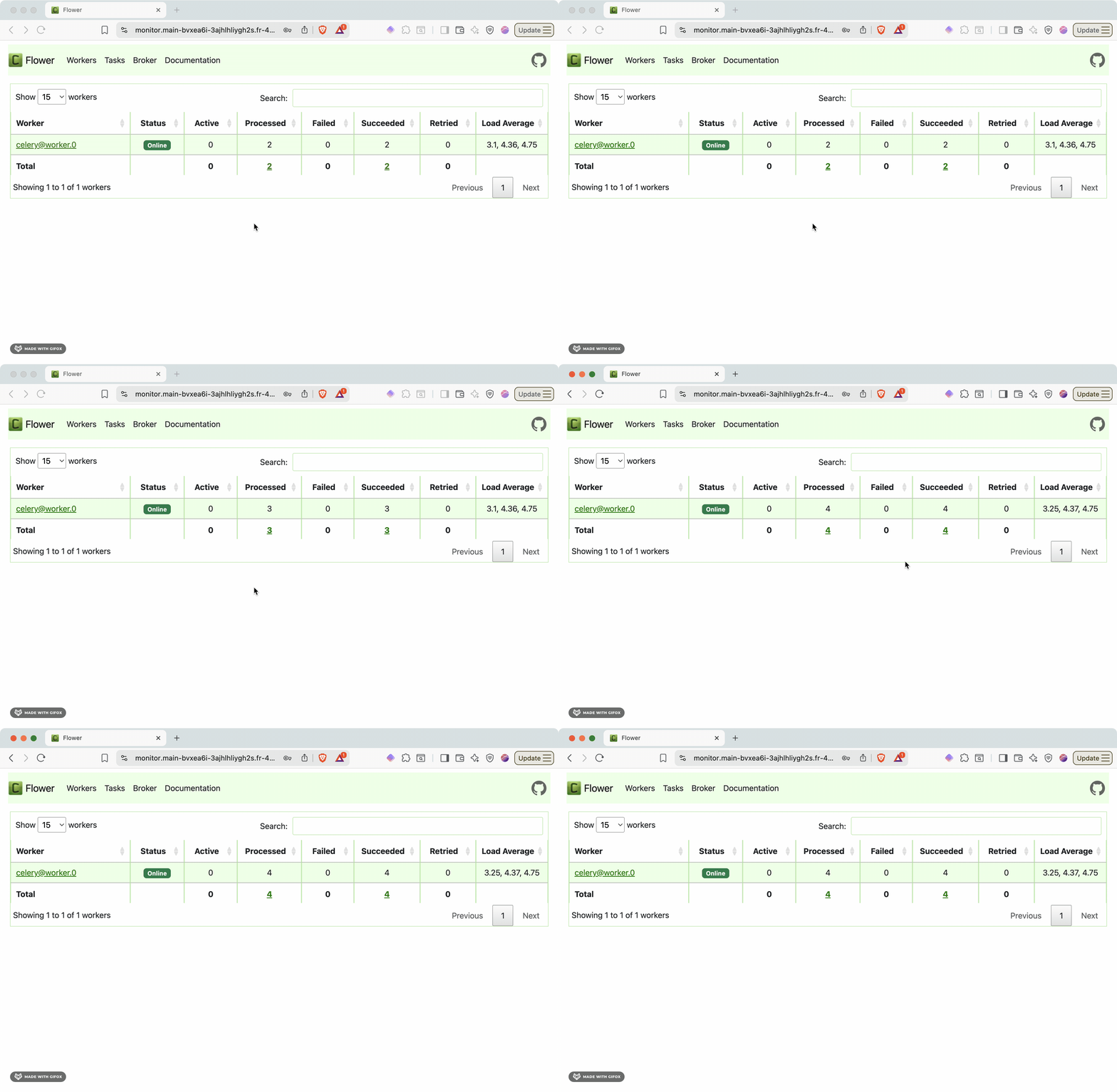
- Active tasks: Currently running background jobs
- Worker status: Health and performance of Celery workers
- Task history: Completed, failed, and retried tasks
- Queue depth: Number of pending tasks waiting for processing
- Performance metrics: Task throughput, execution times, and success rates