Efficient multi-website management using Source Operations on Platform.sh. Automate updates, builds, and deployments for a large number of websites with ease.
As hinted in the previous post, one of the potential use cases for
Source Operations is managing and updating a fleet of
sites—a common situation, especially for organizations that have large numbers of sites running identical or nearly
identical code, but in their own projects. Traditional approaches to fleet management involve pushing updates to an
array of sites. What Source Operations enables is the ability to have sites “pull” updates — en masse,
individually, or as a subset — and own the process of managing the site from the receiving end rather than the
sending end.With a pull-based approach, of course, it’s still useful to have a way to automate updating a large set of sites at once,
building a preview environment, and subsequently merging them. (Just because you can deploy updates directly to
production without review doesn’t mean you should.) Because we provide a robust set of primitives, there are a number
of ways you could build on top of them to create a customized, personalized workflow for
managing multiple sites.In this post, we’ll look at three ways to build a fleet management workflow on Platform.sh.In each case, we’ll assume that every project has the following source operation defined:
When triggered, it will merge in any changes from an upstream
Git repository defined in an environment
variable and redeploy that code on that branch. Note that this is just an example script that lacks good error handling,
but is easier to explain for now. There are also, of course, ample other ways to handle a site updating itself, such as
pulling new packages from a private language repository on demand.
Because a source operation can be triggered from the CLI tool, it can also be triggered from cron.First, install the CLI and add an API key configured to
make it available from the application container. Then, add the following cron job in the .platform.app.yaml of the
upstream repository (which will, therefore, be included in all of its clones):
crons:
    update:
        spec: '0 0 * * *'
        cmd: |
            if [ "$PLATFORM_BRANCH" = upstream-update ]; then
                platform environment:sync code data --no-wait --yes
                platform source-operation:run upstream-update --no-wait --yes
        	fi
Now, at about midnight UTC, a cron job will run on each branch, but will be a no-op on most. However, on the branch
named upstream-update it will first sync both code and data from the parent branch (presumably master) to get the
latest updates, then run a code update on itself.As a result, the upstream-update environment will always have the latest production code and data (as of midnight)
plus the latest upstream dependency updates. You now have an environment that self-updates and previews the resulting
changes. Whoever manages each individual site can then do a visual review of that branch and, when happy with it, just
click “Merge” from the Management Console in their browser.Keep your site up to date with just a few mouse clicks.
Triggering Source Operations updates on demand with scripting
If you’d rather only trigger updates when you actively decide to, rather than nightly, the Platform.sh CLI is highly
scriptable. At the most basic end, one could whip up a small bash script like so:
That code would certainly work to trigger a source operation update across a number of sites, but it’s a bit clunky.Fortunately, the CLI has a helpful multi command that can internalize that task for you. Instead of the above, you can
do:
platform multi --projects=abc123,def456 --continue 'environment:sync code data -e upstream-update --no-wait --yes'platform multi --projects=abc123,def456 --continue 'source-operation:run upstream-update -e upstream-update --no-wait --yes'
And with just those two lines, the CLI will trigger a Sync of both projects’ upstream-update branches, then queue up
the source operation behind them. For more projects, just list more project IDs in the list.As with the cron approach, site owners can then click Merge in the UI at their leisure. Alternatively, the CLI can
trigger the merge, too:
platform multi --projects=abc123,def456 --continue 'merge -e upstream-update --no-wait --yes'
And every project will merge upstream-update to master, which triggers a new build-and-deploy for production.The list of project IDs can be comma or whitespace delimited, which means you could also read them from a file, like so:
platform multi --projects="$(< projects.txt)" --continue 'merge -e upstream-update --no-wait --yes'
Because the CLI is scriptable, you could also wrap more complex behavior into a bash script, Python script, PHP script,
or whatever else to build the commands dynamically. Such a script is left as an exercise for the reader.
Creating a GUI to manage your website fleet with Source Operations
Both of the above methods will scale to a few dozen sites in a fleet. When you’re talking about hundreds or even
thousands of sites, though, you may want a more robust solution. Past a certain scale, you want a nice GUI that lets you
mass-manage sites.Everything the Platform.sh CLI or Management Console do is just a combination of Git commands and API calls. Those
APIs are documented, and of course Git is, well, Git. That means one could build a custom
application to issue calls against that API however and whenever desired. Like, say, from your own web application
(which can itself be hosted on Platform.sh).We have built a proof of concept of such an application. The application itself is very rudimentary and still lacks
important features like user management (BYO authentication), but it’s enough to demonstrate the basic operations you
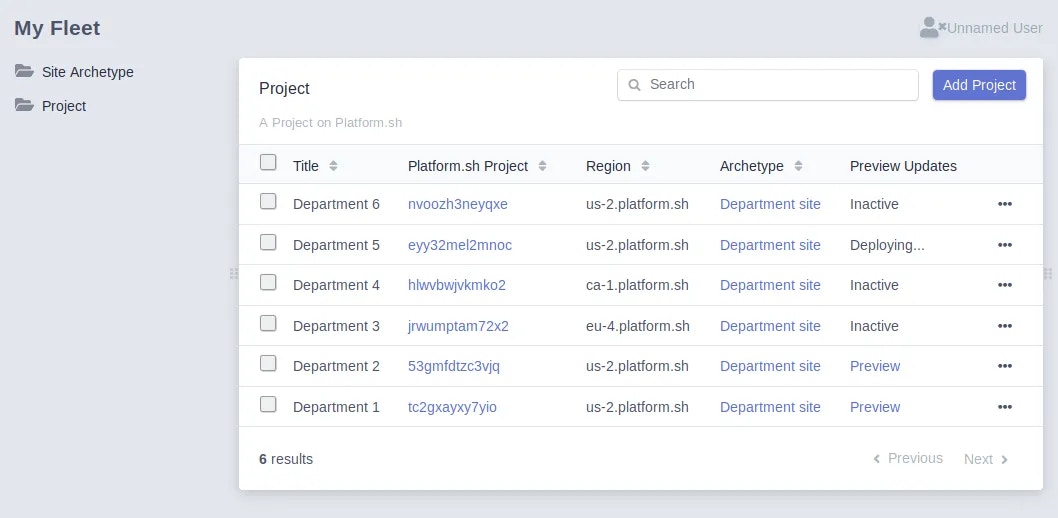
can do. It’s built with Symfony and the EasyAdminBundle, which provides the CRUD UI.The dashboard lists multiple projects owned by the same Platform.sh user. It’s largely an automated list of Doctrine
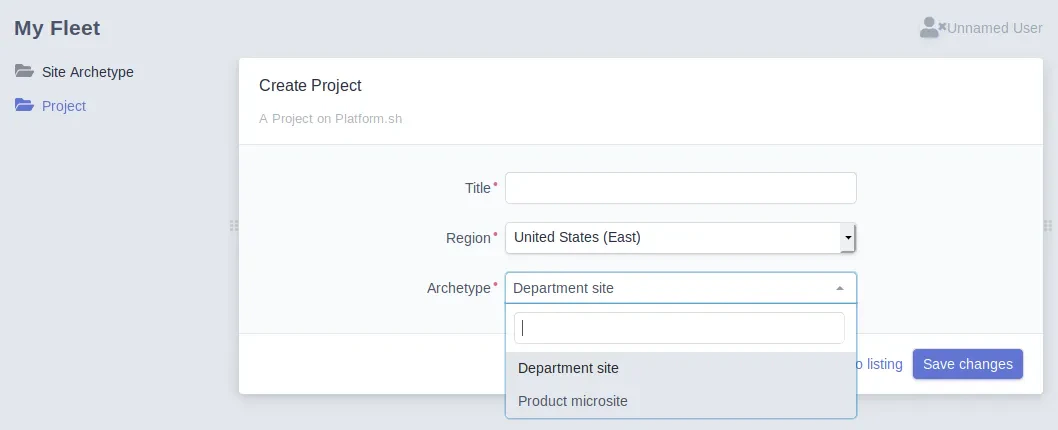
objects. (Doctrine is the standard ORM for Symfony.) Projects can be added through this application as well:Projects are created from an “Archetype,” which is just a simple record of an upstream Git repository and some
configuration data, like the name of the environment to use for updates. It can also be placed in any Platform.sh
region. More settings could easily be added.On Save, the application issues an API call to Platform.sh to create a new project with the specified criteria. The
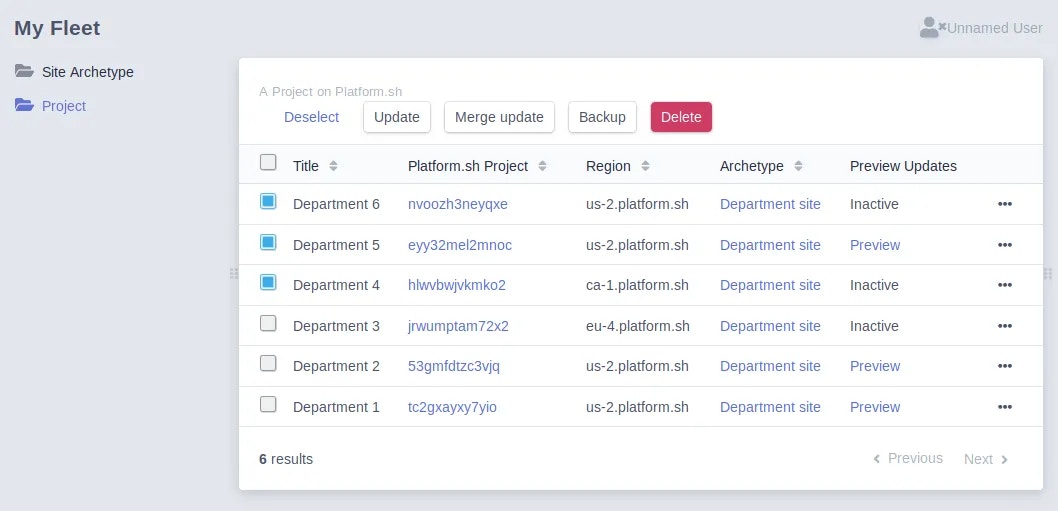
project is then initialized with a clone of the Archetype Git repository.Once a project is created and tracked by the application, it can issue API calls against one or more projects in a
batched set.
“Backup” is just an API call to trigger a backup on the master environment.
“Update” triggers a sync on the update branch and then runs the source operation.
“Merge update” triggers a simple merge of the update branch to master.
“Delete” deletes the projects from the dashboard, and from Platform.sh.
This demo application is not production usable in its current state, of course, but demonstrates the sort of custom
mass-management dashboard one could build. In fact, some of our customers have already built White Label SaaS tools to
do such management themselves, including managing billing and accounts for their own customers. They didn’t even tell us
they were doing it! (That’s a good sign that our APIs are where we want them.)Naturally, there are ample other ways to wrap a user interface around the Platform.sh API, depending on your specific
use case.
Platform.sh is designed to give you flexibility for your fleet workflow
Regardless of how many sites you have and how you want to manage them, there are options available. Our goal is to let
you build the perfect SaaS, fleet deployment, or other management toolchain for your organization. Between the
Platform.sh REST API and our new Source Operations feature, the
components are there to let you build what you want, how you want, as you want.
Last modified on April 27, 2026
Was this page helpful?
Assistant
Responses are generated using AI and may contain mistakes.


 Dispatch
 Cloud
Cloud