

What is the Model Context Protocol (MCP)
Our team just published an article on using MCP to connect your LLM to an Upsun database where we also introduce the protocol. Go take a look at the article or browse the official MCP documentation.What is Context7?
Context7 is a powerful documentation tool that delivers up-to-date, version-specific documentation and code examples directly to AI-powered coding assistants. Instead of relying on potentially outdated information in an AI model’s training data, Context7 fetches current documentation from the source and injects it into the model’s context.How to Access Upsun Documentation via Context7
Accessing Upsun documentation through Context7 is straightforward once you’ve set up the Context7 MCP server with your preferred AI coding assistant. Here’s how to get started:1. Install the Context7 MCP Server
Context7 MCP can be installed with various AI-powered coding tools that support the Model Context Protocol, including:- Cursor
- VS Code (with MCP Extension)
- Claude Desktop
- Claude Code
- Windsurf
- Zed
- Navigate to Settings → Cursor Settings → MCP → Add new global MCP server
- Add the following configuration to your
~/.cursor/mcp.jsonfile:
- Install the MCP extension
- Add the following to your VS Code MCP configuration file:
claude_desktop_config.json file:
.claude.json file in your home directory, allowing Claude Code to access it during
any Claude Code session.
For other platforms or alternative runtime options like bunx or deno, check the Context7 GitHub repository for detailed installation instructions.
2. Query Upsun Documentation
Once you’ve set up Context7 MCP, you can access Upsun documentation by simply addinguse context7 to your prompts. For example:
- “How do I deploy a Next.js application on Upsun? use context7”
- “Explain Upsun’s preview environments and how they work. use context7”
- “Show me how to configure a PostgreSQL database service on Upsun. use context7”
As Upsun and Platform.sh are sharing the same public documentation repository for now, you may need to specify in your prompt to look for the Platform.sh library in Context7.
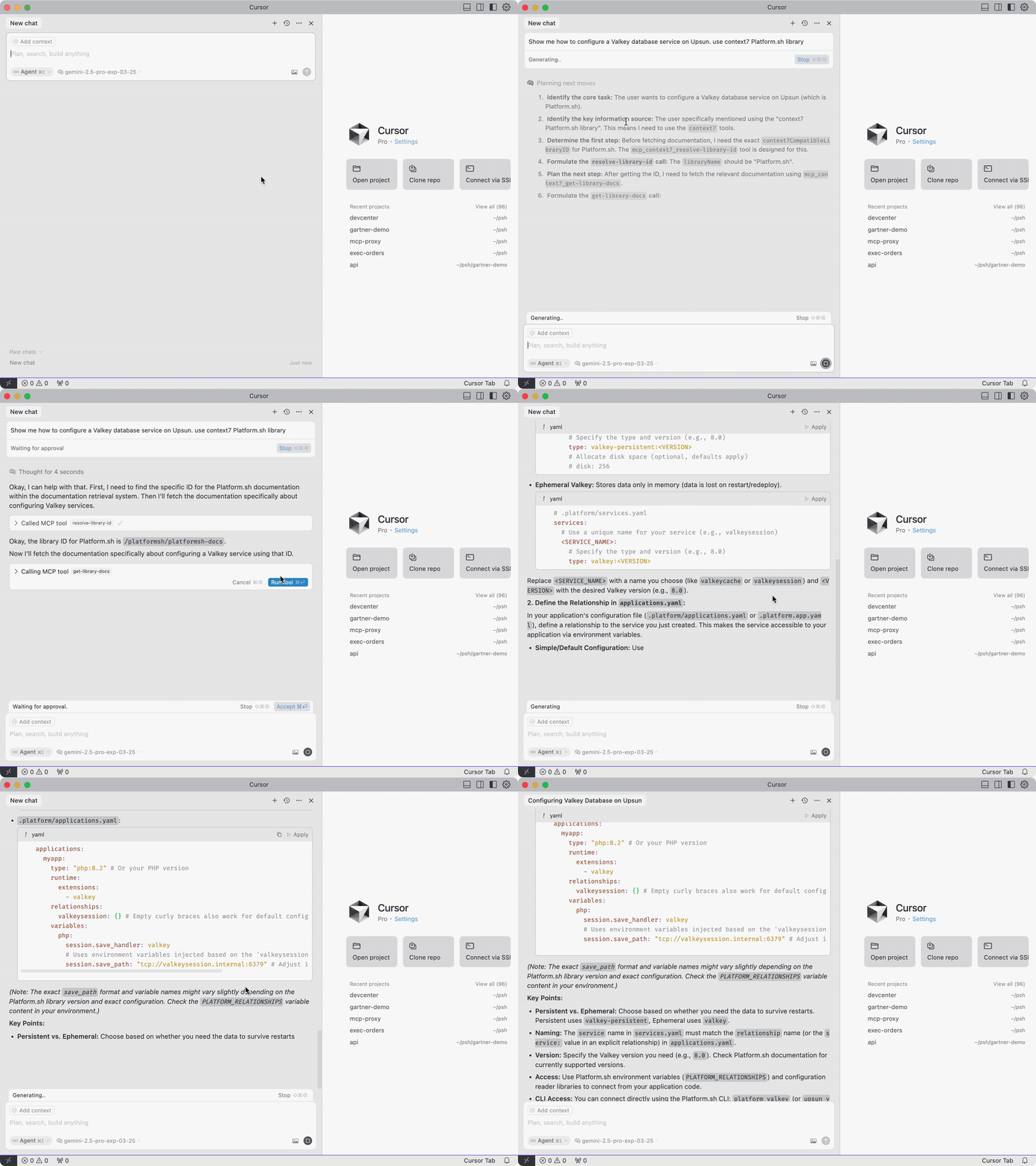
Example Use Cases
Here are some practical examples of how you can leverage this integration:-
Troubleshooting Deployment Issues:
Ask your AI assistant about specific error messages or deployment problems, and it will have access to current troubleshooting guidance from Upsun’s documentation. -
Setting Up Services:
Get step-by-step guidance on configuring databases, caching layers, or other services with your Upsun project, all without leaving your coding environment. -
Learning Platform Features:
New to Upsun? Ask your AI assistant to explain key concepts like Git-driven infrastructure, preview environments, or multi-app architecture with accurate, current information. -
Configuration File Assistance:
Get help creating or modifying your.upsun/config.yamlfiles with the most up-to-date syntax and options.
Benefits for Developers
This integration brings several key advantages to developers working with Upsun:- Reduced Context Switching: Access documentation without switching between your editor and browser
- Always Current Information: Get the latest documentation rather than potentially outdated information from AI training data
- Streamlined Learning Curve: New Upsun users can get up to speed more quickly with contextual documentation accessible through familiar AI tools
- Increased Productivity: Spend less time searching for information and more time building