How we scaled live connections for 1200 developers at SymfonyCon
A Symfony core contributor’s journey from FrankenPHP 502 errors to a stable multi-app architecture that handled hundreds of live connections at SymfonyCon 2025.
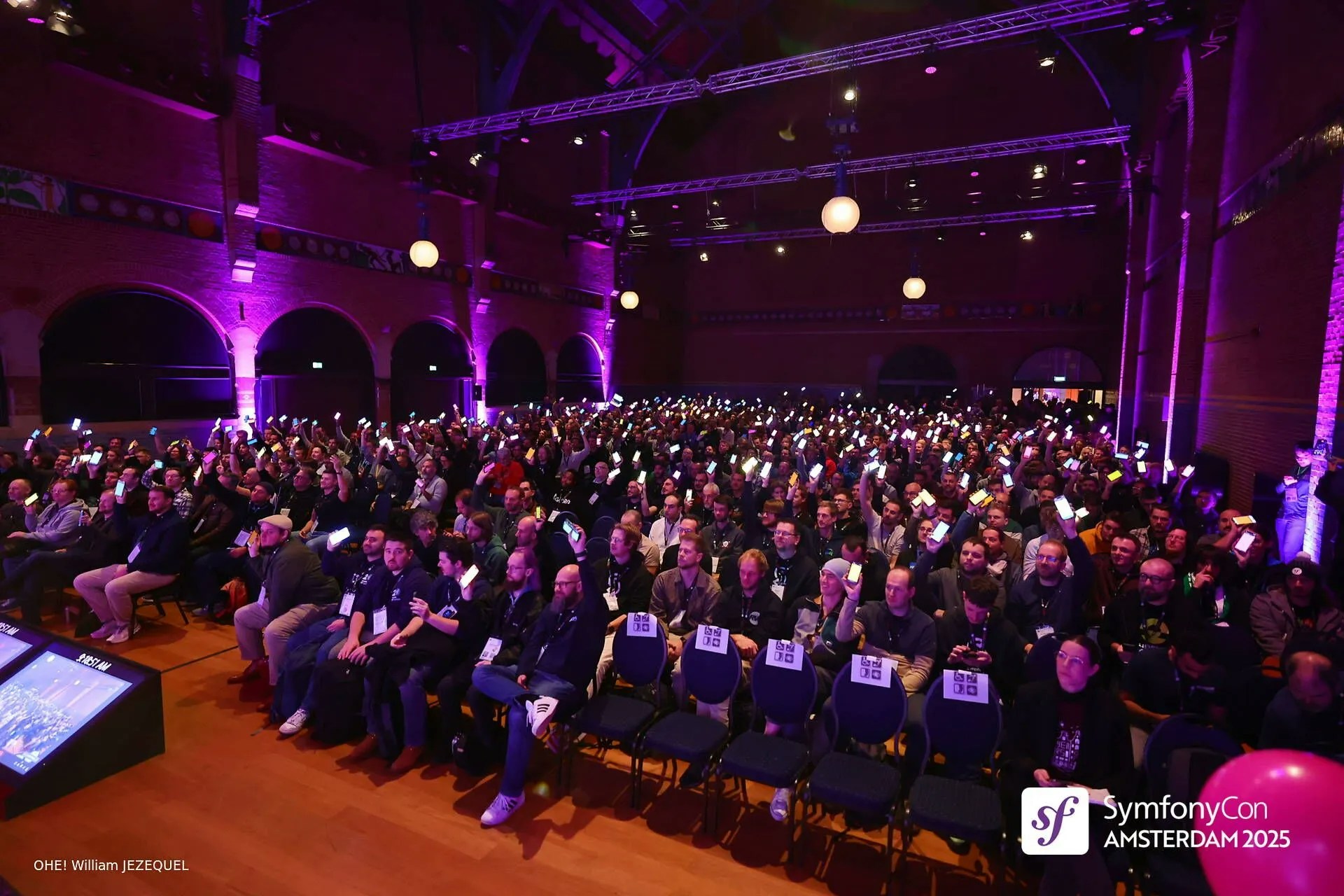
For Symfony’s 20th anniversary at SymfonyCon 2025, we wanted to create a moment of celebration where the entire audience could participate. Picture this: 1200 developers in a conference hall, each holding their phone displaying a colored rectangle that I could control from the stage. Click a button, and everyone’s screen turns blue. Click another, and only the phones belonging to contributors light up. Select “20+ years in the community,” and Fabien Potencier’s phone stays lit while the rest go dark.It was a simple concept with a complex requirement: hundreds of persistent connections, all updating in real-time. And that’s where traditional PHP-FPM becomes a problem.
Why PHP-FPM doesn’t scale for persistent connections
If you’ve worked with PHP, you know the typical model. Each incoming request gets assigned to a worker process. That worker handles the request, returns a response, and becomes available for the next request. It’s efficient for traditional web traffic, where requests complete in milliseconds.But persistent connections don’t work that way. When a phone connects and waits for updates, it holds a worker hostage. One connection equals one worker, continuously occupied. With PHP-FPM workers being a limited resource, you’d need hundreds of workers just to keep the connections alive, which quickly becomes impractical from a memory perspective.This is exactly where FrankenPHP and Mercure shine. FrankenPHP is built on top of the Caddy web server and includes a Mercure hub for handling Server-Sent Events (SSE). Instead of blocking a worker per connection, it uses async I/O to manage thousands of connections efficiently. For our use case, it seemed perfect.To be clear: both approaches have their place. PHP-FPM is battle-tested and rock-solid for traditional request-response patterns. FrankenPHP and Mercure excel at connection-heavy workloads. Neither is inherently better than the other.
When I began setting up FrankenPHP on SymfonyCloud, I found Florent’s blog post on running FrankenPHP on Upsun. It was helpful to get started, but I quickly realized I needed more detail about how FrankenPHP actually works under the hood, particularly when it came to integrating Mercure.Take the frankenphp php-server command, for instance. It’s a convenient shortcut that works great for basic setups, but as soon as you need more advanced configuration like integrating Mercure, you hit a wall. I had to learn that what you really want is frankenphp run --config prod.Caddyfile, which gives you full control over the Caddy configuration.Here’s what that configuration looked like:
A few things worth highlighting here. First, the skip_install_trust directive prevents Caddy from trying to install its CA certificate, which wouldn’t work in a containerized environment. The enable_full_duplex setting in the servers block is important for Server-Sent Events to work properly.Second, you need to listen on HTTP, not HTTPS. Upsun’s routing layer handles TLS termination, so your application receives HTTP traffic internally. You configure this by using http://:{$PORT} where $PORT is the environment variable Upsun provides.Third, the transport_url local setting. By default, Mercure tries to persist messages to disk before broadcasting them. For our use case, we didn’t need persistence; phones would connect and get the current state. Using the local transport kept everything in memory and avoided filesystem write issues on a read-only filesystem.Fourth, you need to set up the Symfony trusted proxies and headers. When you’re running HTTP-to-HTTP behind a proxy, Symfony needs to know it can trust the proxy’s forwarded headers:
Fifth, configure where Caddy stores its data. By default, Caddy uses XDG directories under ~/.local, but in Upsun’s environment, it’s cleaner to point everything to your writable mount:
This approach keeps all your Caddy files organized in your application’s var/cache directory rather than creating a separate mount for ~/.local.These configuration details aren’t immediately obvious from the documentation, and discovering them takes time.
I deployed the application with FrankenPHP handling everything: the Mercure hub for persistent connections and the main Symfony application for the control interface. I tested it. It worked beautifully. I felt good about it.Then, the day before the conference, we started seeing 502 errors on parts of the application. Not on the Mercure connections themselves, but on the regular application routes. Something wasn’t stable.I’ll be honest: I didn’t have time to debug it. The conference was the next day. I had two choices: spend hours trying to figure out what was causing the 502s in FrankenPHP, potentially going down rabbit holes and chasing one issue after another, or find another solution quickly.FrankenPHP is still relatively young in terms of production deployments. While it’s built and maintained by Kévin Dunglas, a core Symfony community member, and has been adopted by the PHP Foundation, moving an existing application entirely onto FrankenPHP overnight isn’t trivial. There are edge cases, particularly when you’re not using the worker mode (which would have added even more complexity to debug).I needed stability, and I needed it fast. That’s when I realized SymfonyCloud’s multi-app architecture (powered by Upsun) was exactly what I needed.
The insight was simple: I didn’t need FrankenPHP for the entire application. I only needed it for Mercure. The rest of the application, all the standard Symfony routes, could stay on good old PHP-FPM.The beauty of Upsun’s multi-app architecture is that I could implement this pivot in a few hours. With the conference looming, I didn’t have time for complex migrations or infrastructure rewrites. I restructured the configuration, deployed, and had a stable solution running before the event.Here’s how it works. You define multiple applications in your Upsun configuration. One application runs Mercure using FrankenPHP. The other runs your main Symfony application using PHP-FPM. You create a route that directs traffic to the Mercure application only for the SSE endpoint, and everything else goes to the main application.In .upsun/config.yaml:
applications:
  app:
    # Main application using PHP-FPM
    type: "php:8.4"
    relationships:
      mercure: "mercure:http"
    # ... standard PHP-FPM configuration

  mercure:
    # Dedicated Mercure application
    type: "php:8.4"
    # ... FrankenPHP configuration
    web:
      locations:
        "/":
          # ... rest of configuration, and the important bit:
          request_buffering:
            enabled: false
The main application doesn’t handle persistent connections at all. When I press a button in the control interface, a PHP-FPM worker processes the request and makes an HTTP POST to the Mercure hub with the publisher JWT token. Mercure then broadcasts that message to all connected phones.The phones, meanwhile, connect directly to the /.well-known/mercure route, which is handled by the dedicated Mercure application. That application runs FrankenPHP and can handle hundreds or thousands of concurrent connections without breaking a sweat.Two critical settings here: cache: enabled: false and request_buffering: enabled: false. Without disabling the cache, the router would buffer the entire SSE stream and SSE simply won’t work at all. Without disabling request buffering on the application side, the same issue would happen again.
This solution worked perfectly for the conference. The phones lit up on command, the audience loved it, and we had zero stability issues. But it did come with one downside: cost.On Upsun’s traditional plans, adding a second application means moving to a higher pricing tier. You’re essentially doubling your plan cost to add one small app. It’s not ideal for a use case like this, where the Mercure app needs very few resources.This is exactly the problem Upsun’s newer Flex pricing model addresses. Instead of jumping to a higher tier, you pay incrementally for the additional app. It’s a much better fit for this kind of architecture. That’s why we’re moving to Upsun Flex: being able to add an app like this without doubling our costs makes way more sense.As for FrankenPHP itself, I still believe in its promise. The idea of a single binary that can handle both traditional PHP requests and persistent connections efficiently is compelling. FrankenPHP also offers a worker mode where the same PHP process handles multiple requests, eliminating the bootstrapping overhead of the Symfony kernel on each request. That’s a significant performance gain.But moving an existing application to FrankenPHP isn’t a drop-in replacement for PHP-FPM yet. There are edge cases. There’s less production battle-testing compared to PHP-FPM’s decades of deployment. I would have loved to keep everything in a single application, but the 502 errors reminded me that stability trumps elegance when you’re going live in front of 1200 people.
If you’re building something similar, here’s what I’d recommend:
Separate concerns architecturally. Use PHP-FPM for your application logic and FrankenPHP/Mercure specifically for persistent connections. You get the stability of FPM with the scaling benefits of async I/O.
Don’t rely on shortcuts. Commands like frankenphp php-server are fine for development, but when you need control, use frankenphp run with a proper Caddyfile configuration.
Disable request buffering for SSE routes. Both at the route level (cache disabled) and at the application level (request buffering disabled), or SSE won’t work at all.
Test under realistic conditions. What works in development doesn’t always work at scale. If I’d caught the 502 errors earlier, I might have debugged them in time. Instead, I pivoted architecturally at the last minute, which turned out fine but was more stressful than I’d like.
Choose a platform that lets you iterate quickly. When I hit the 502 errors the day before the conference, I needed to pivot architecturally in hours, not days. Upsun’s multi-app support let me restructure the entire deployment, test it, and go live with confidence before the event.
The multi-app architecture let me keep my sanity and deliver a working, stable demo for SymfonyCon. Sometimes the best solution isn’t the most elegant one. Sometimes it’s the one that works when you need it most.
Last modified on April 27, 2026
Was this page helpful?
Assistant
Responses are generated using AI and may contain mistakes.


 Dispatch
 Cloud
Cloud