

 Dispatch
 Cloud
CloudPlatform.sh is committed to “Green Hosting” and better environmental sustainability.
Overview
To keep things simple to start with, We will set up two small cron jobs that will put your development environments to sleep at the end of the day, and wake them up again before you start work. The ability to turn things on and off requires access to an API key that can be used to invoke theupsun CLI utility.
Assumptions:
- You already have a project hosted on Upsun.
- with at least one development environment
- and resources to add one more
- You have the Upsun CLI installed.
Steps
Create a feature branch environment
We will be adding and testing this new work in a feature branch. Open a CLI in the project root and:Upsun also provides the equivalent of these git commands - that can useful.
Create an API token
You can do this either via the console, or with the CLI as outlined below:Generating a new token cannot be done using a CLI token.
Need to force browser login to make this work.
Embed the token into the feature branch environment
Do this the easy way by setting an environment variable in the console. … or the hard wayInstall upsun CLI
Now add a build hook to your app configuration to install the CLI as part of the build process.
Verify
If you push the code with the build hook now, you should see the messageUpsun CLI has been installed successfully. in your build log.
You can also upsun ssh into the environment and ensure that running upsun commands there works as expected and the token is valid.
Write the script
This could be done in any language you are comfortable with, but seeing as we are mostly just running commands on the CLI, I will stay inbash.
The default shell in
upsun environments is actually dash, but that won’t make a difference here.scripts/ directory inside your app folder. So in my case with my application in a folder called app/, this will be app/scripts/ in the repository, but just scripts/ from the runtime environment application root.
It’s very easy to ask the API for the list of environments.
I want only active, development environments - don’t want to touch the production environment!
--no-wait and loop through all the environments. This will result in the activities being queued by the orchestration system, while this command returns immediately.
If you have a number of environments, it may take a few minutes for them to all process sequentially.
Check out the activity log to watch the queue in action.
We can set this script to be executable now, and git add, commit, push, and test it.
Optional - publish this as a runtime operation
This will make it easy to turn everything on or off with one button!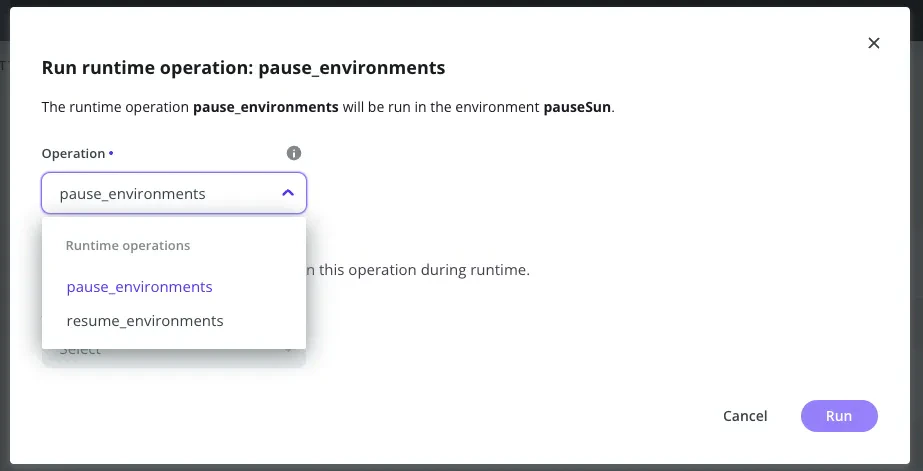
Set a schedule
This is as simple as adding a line in thecrons section of your .upsun/config.yaml
Take care for time zones!!
cron will run on the system timezone. Adjust as needed.git add, commit, and push this to your environment, all should be ready to run.
You can test the operation immediately by invoking it from the console via “Run runtime operation”
Repeat this for turning back on in the morning
Almost the same additions can be made to reverse the process. We useupsun environment:resume (not environment:activate) so as to not accidentally turn on new environments.
upsun/config.yaml, add the cron job and runtime operation to turn things on:
Conclusions
You now have a short, simple way to schedule downtime for your development environments when you are not using them. This simple example doesn’t contain much business logic, though I do try to leave things off over the weekend also. For real use you may want to maybe adjust the schedule to be more selective about which environments really have to be turned on every day. In this example, I developed and tested in a dedicated branch environment. For real use, I could now merge this addition into theproduction branch, and have the schedule running from there.
This is because the production is expected to be always-on, and we can’t put the scheduler into an environment that might itself become paused.
You could even put this script (and the corresponding upsun CLI and token) in a separate hosting environment altogether. This tutorial is an example of the building blocks that you can adjust to your own workflows.