

 Dispatch
 Cloud
CloudThe assumptions
For the purpose of this article and the steps detailed, I will assume that you have:- A GitHub account and a repository with working code
- Administrative rights on the GitHub repository so you can add repository secrets
- A Platform.sh account and a project for your code base with working code
- A default branch in GitHub which is the same branch as your production branch in Platform.sh
- A default branch in Platform.sh which is also your production branch
- You do not have a source code integration created between Platform.sh and GitHub.
1. The workflow file
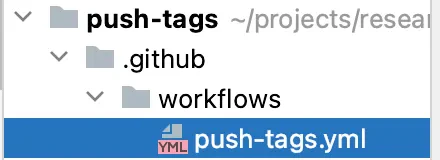
To start, we’ll need to create a YAML file in the directoryworkflows within a .github directory at the root of our
repository as shown in the image below.
Find out more details on why this step is necessary.
The file’s name doesn’t matter, but it has to be inside ./.github/workflows. For this demonstration, I’ll name mine
push-tags.yml
2. The event
For this next step, go ahead and open up the file you just created. The first thing we need to do is instruct the GitHub Actions platform on when this workflow should be triggered via a defined event. To trigger this workflow when a new tag is added, we’ll use the push event with an event filter of tags. If needed, we could also filter for only tags that match a certain pattern, but for this demonstration, we’ll allow the workflow to be triggered when any tag (‘*’ ) is added. I’m also going to add a name property so that this workflow
will be easier to identify in the repository’s Actions tab.
3. The jobs
Next, we need to define the jobs this workflow should run. While unlikely, you don’t want to push tags that reference commits that are older than commits that have already been pushed or on a branch other than our production branch1. To avoid this, create two jobsshould-we-push which will determine if the tag that was just created references a newer
commit on the correct branch, and a second job we-should-push which will handle pushing the new commits to Platform.sh.
All jobs require a runs-on
property to
designate the OS of the
runner,
so for both, you can set them to use ubuntu-latest.
we-should-push job to only run if the
should-we-push job determines this tag contains new commits.
To build dependency between the jobs, you need to add a needs property to the we-should-push job, and an outputs
property to the should-we-push job so that it can pass information to the we-should-push job. Set the
should-we-push job to output a value named push that is set by the do-push step—a step that doesn’t exist yet, but
don’t worry, we’ll create it shortly.
4. Making sure we need to Push
Now let’s start building out the steps in ourshould-we-push job. By default, your runner’s workspace does not contain
the contents of your repository. Before we can evaluate what tags exist, we’ll need to checkout our repository into the
workspace on our
runner.
We can use the actions/checkout action to do this task for us.
However, this action’s default is to only fetch a single commit: the ref/SHA that triggered the workflow. We need the
tag history so we can evaluate if the tag triggering the workflow is from newer commits and on the correct branch. To
alter the behavior of this action, we’ll use the with property and instruct it to instead checkout all history for
tags. We’ll also instruct it to checkout the default (production) branch with the ref property. We can retrieve that
branch name with the github context.
Note: to keep the sample code short, I’m
<snip>ing the code we’ve already covered. The complete workflow file is
available at the end of this article.outputs object of the
steps context so we can reference it
in the next step. Now we’ll create the step that we referenced earlier in the job’s outputs property. This step will
compare the tag that triggered the workflow with the tag we just retrieved to see if they match. If they do, we’ll set
the output value to true so that the we-should-push job can determine if it should run.
should-we-push and now we can move to building out the rest of the we-should-push job.
5. Pushing to Platform.sh
We only want this job to run if the should-we-push job determines the new tag is one we need to push. To set a conditional on the job, we’ll use theif property and reference the output we set in the should-we-push job:
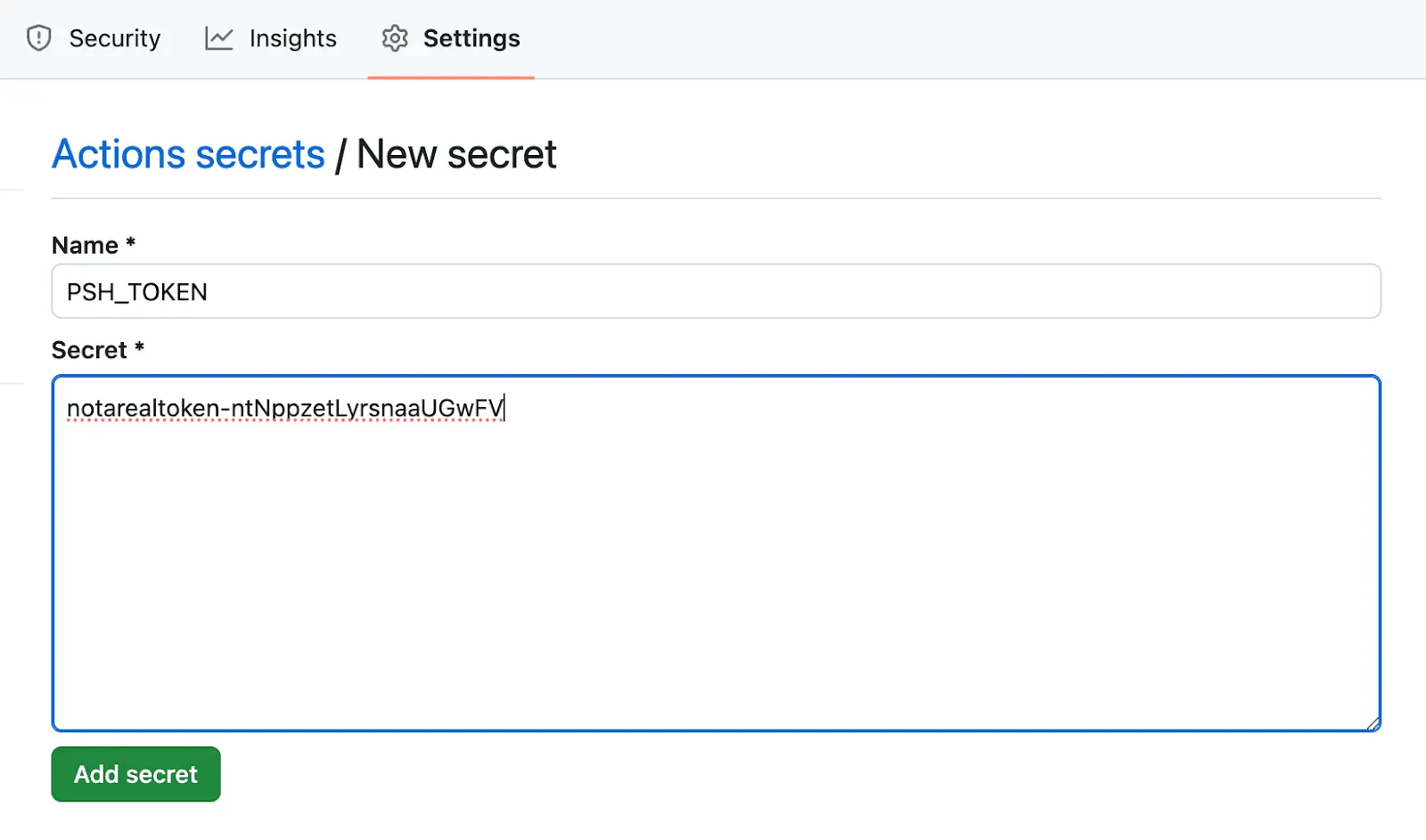
PSH_TOKEN in the secrets
context object. For this, we’re
going to need to:
- Create a Platform.sh API token
- Add that token as a repository secret in GitHub
PSH_TOKEN in the sample code above, so make sure to update the name in the workflow if you decide to name it something else.
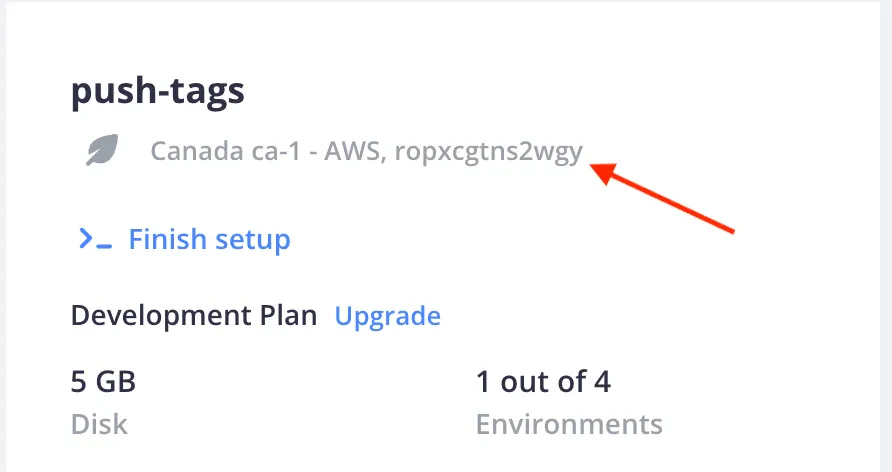
we-should-push job you will need to reference the Platform.sh project ID
associated with this repository.
While you are in the repository secrets area of GitHub, go ahead and add another secret for the project ID. To locate
your project’s ID, if you are logged into the Platform.sh
console,
you can locate your project’s ID under the title of your project, to the right of the project’s region when viewing the
project’s page in the console, as seen below:
PROJID and type/paste in your project ID.
Similar to the first step in the should-we-push job, we need to check out our repository into the runner workspace, as
seen below:
should-we-push determined we’re on the correct branch in the code snippet above, we don’t need to include the
ref property this time. Now you need to install the Platform.sh CLI.
Please note: to keep the sample code below short, we’re <snip>ing the code we’ve already covered. The complete
workflow file is available at the end of this article.
platform remote to our checked-out copy of the repository which includes the Git address for our
mirror of the repository on Platform.sh. However, we won’t be able to push until we generate a Secure Shell (SSH)
certificate to authenticate us when we push, so let’s add a step to do that:
known_hosts file:
All done!
Now that the workflow file is committed into your production branch, any future tags that are pushed to GitHub, or created on GitHub when creating a release will trigger the workflow. If the tag is newer than any other tags (closest to the current commit), it will trigger our second job, push that tag to Platform.sh, and deploy your new code base. And just like that, you’ve limited deployment to Platform.sh only when pushing tags! Stay tuned for part two of our limit deployment series featuring GitLab coming soon!Additional resources
Complete workflow file
The complete workflow file, as mentioned above, is available on GitHub as a gist.Bash parameter substitution explanation
I personally do not like when an article or blog post uses something without an explanation of what is happening or without linking to a good explanation. While I did include a link to the documentation on parameter substitution, it might not be immediately obvious what I’m doing with the substitution I used. Since I also believe you should never copy and paste something online without understanding what it does, I wanted to include a fuller explanation so you have a clear idea of what is occurring. The value we receive from runninggit remote get-url platform --push is going to look something like this:
@ and ends before the :. So let’s break this down:
pshWholeGitAddress. Then in the next line, we run it through
two parameter substitutions:
pshWholeGitAddress), the
part that matches a pattern (*@) from the beginning of our string, up to and including the pattern (indicated by the
use of the # after the variable). So in the case of the string returned from Git, what we match and remove will be
what is highlighted:
git.ca-1.platform.sh:ah242jeyfwteo.git which is assigned to the variable TMP. This is good, but
we don’t want anything starting at : until going to the end of the string. To address this, the next substitution is
going to remove from our string above (stored in the variable TMP), the part that matches the pattern :* from the
end of our string back to and including the pattern itself (indicated by the % after the variable). What we match
and remove is highlighted:
git.ca-1.platform.sh which is assigned to pshGitAddress for us to use with ssh-keyscan.
Footnotes
- We can add a ‘branches’ filter to the ‘push’ event but this creates a logical OR between them so any push to the branch will trigger the workflow. This means we would still need the ‘should-we-push’ job to verify the event is one where we need to push to Platform.sh. Pushing/creating a tag happens less frequently than pushing to the default branch, which is why I’ve suggested only using the tags filter. ↩
- We could potential alter the SSH config to set StrictHostKeyChecking to accept-new or do a quick ssh connection with ‘-o StrictHostKeyChecking=accept-new’ but using ssh-keyscan with the confirmed address seems more succinct. ↩
- Bash parameter substitution is just ONE method out of many to retrieve the server address. You could also use sed, grep, awk or several other methods. ↩
- See full explanation at the end of this article Bash Parameter Substitution Explained ↩