What we learned building an AI feature: evaluations take most of the time, and your existing tools are enough.
In September, we launched upsun init, a CLI command that analyzes your codebase and generates an Upsun configuration file. Previously, we had documented our configuration extensively with examples and templates, and a non-AI version of the same command, but supporting a larger variety of applications would have added a lot of complexity. AI seemed like the right solution for handling many languages, frameworks, databases, and deployment patterns with less effort.
We built this feature as a small team of software engineers, with no data science or machine learning background. We had read enough about AI to know that data and evaluations (evals) would be challenging, but still the degree surprised us. AI integration itself is straightforward, but the domain-specific work consumes most of the time: essentially, determining what “good” output actually looks like.About 90% of the code of our AI component is what you would need in any normal backend service: API structure, input validation, logging, error handling, and tests. The AI itself is a relatively small piece: call an API, parse and validate the response. It’s familiar to anyone who has integrated with external payment processors or authentication systems before. Tool calling and streaming add some complexity but again nothing unusual.The real challenge of AI engineering is managing uncertainty. LLMs are useful precisely because they produce output we cannot fully predict. But we also need reliability: we need to know the service can achieve its goals even though we can’t know all possible results in advance.Engineers deal with unpredictability in other aspects of software - network errors, disk failures, varying load - by gathering data and building safeguards such as retries, timeouts, and redundancy. So the indeterminacy of AI is not an entirely new concept, but it is a lot more prominent, and it can be frustrating. Building a system to validate and assess output is the main part of any non-trivial AI project: as the community likes to say, “evals are all you need”.
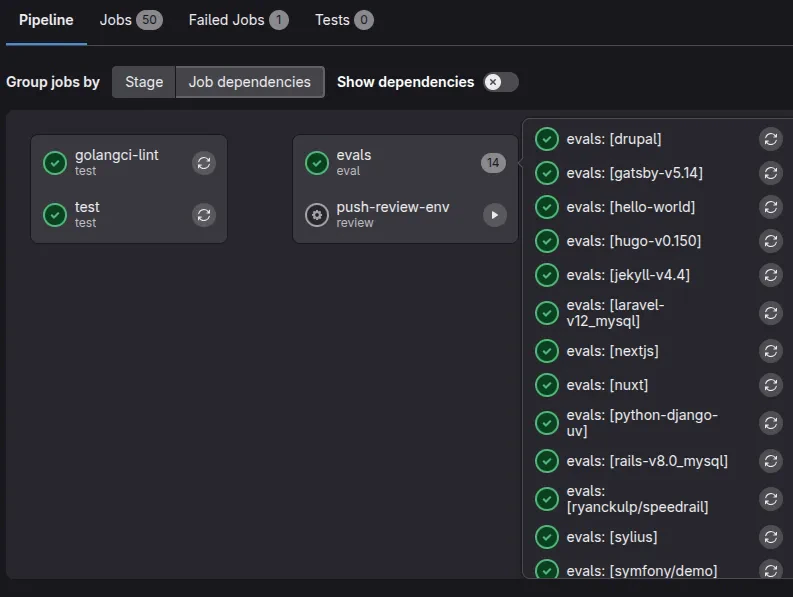
There is a chicken-and-egg problem in AI. To assess the output you would first want to gather a “golden” dataset of ideal output. But how do you build that dataset without a way to assess it? Often the answer will involve asking humans to find, create or label data manually.For our Upsun configuration project, we went through our own documentation and templates and asked colleagues for expertise in various languages and use cases. We created a new internal tool to help us build and test sample Upsun projects with their corresponding YAML configuration.Once we had enough data to work with, we could use our samples to compare against AI output to help create the evals. We integrated these into our existing Go tests, our project’s Makefile, and our GitLab CI infrastructure. Evals run on every commit and in every merge request, and can also be configured with different models or parameters, such as EVAL_MODEL=gpt-5.1 make eval. No special AI tooling is required, and using these common structures means that new engineers can onboard and contribute with confidence.We also focused on performance, minimizing context and tool calling, parallelizing where possible, and preferring smaller and faster models. This contributes to a smoother user experience and helps to speed up the tests. Faster evals mean you can test more samples, models and parameters more frequently. A local eval takes a few seconds, and the full CI pipeline (build, linting, unit tests, and a list of evals) runs in 5-10 minutes, costing roughly 25 cents in AI usage per run. The cost is negligible compared to the value: every commit gets validated, and we can evaluate new models as they become available, without changing our workflow.GitLab CI lets you configure many parallel jobs through a matrix, varying them through environment variables:
The result looks like this:Building our first AI feature turned out to be quite approachable in terms of code, and we didn’t need to use AI-specific tools and frameworks. The hard work is definitely in gathering data and building tests. We learned that we would certainly want to allow plenty of time for this in other AI projects, and that it really helps to keep it simple and use existing practices.
Want to see how AI-assisted configuration works in practice? Start your free trial and try the upsun init command on your own projects. Upsun provides a complete platform for deploying and managing your applications with features like automatic scaling, built-in CI/CD, and now AI-powered configuration.
Last modified on April 27, 2026
Was this page helpful?
Assistant
Responses are generated using AI and may contain mistakes.


 Dispatch
 Cloud
Cloud