> ## Documentation Index
> Fetch the complete documentation index at: https://developer.upsun.com/llms.txt
> Use this file to discover all available pages before exploring further.

# Up(sun) and Running with Forem

export const PostMeta = ({data = {}}) => {
  const {author, date, image} = data;
  const authors = Array.isArray(author) ? author : author ? [author] : [];
  const resolveAuthor = slug => {
    const entry = AUTHOR_MAP[slug] || ({});
    const name = entry.name || slug;
    const github = entry.github || null;
    const linkedin = entry.linkedin || null;
    const url = github ? `https://github.com/${github}` : linkedin || null;
    const avatarUrl = github ? `https://github.com/${github}.png?size=64` : null;
    return {
      name,
      url,
      avatarUrl
    };
  };
  const formattedDate = date ? new Date(date).toLocaleDateString('en-US', {
    year: 'numeric',
    month: 'long',
    day: 'numeric'
  }) : null;
  if (!image && authors.length === 0 && !formattedDate) return null;
  const AUTHOR_MAP = {
    "aaron-collier": {
      "name": "Aaron Collier"
    },
    "aaron-dudenhofer": {
      "name": "Aaron Dudenhofer"
    },
    "aaron-porter": {
      "name": "Aaron Porter"
    },
    "adriaan-odendaal": {
      "name": "Adriaan Odendaal"
    },
    "ajmal": {
      "name": "Ajmal Siddiqui"
    },
    "akalipetis": {
      "name": "Antonis Kalipetis"
    },
    "alexander-varwijk": {
      "name": "Alexander Varwijk"
    },
    "alicia-bevilacqua": {
      "name": "Alicia Bevilacqua"
    },
    "amelie-deguerry": {
      "name": "Amelie Deguerry"
    },
    "anacidre": {
      "name": "Ana Cidre",
      "linkedin": "https://www.linkedin.com/in/ana-cidre"
    },
    "andoni": {
      "name": "Andoni Auzmendi"
    },
    "andrei-taranu": {
      "name": "Andrei (Alex) Taranu",
      "linkedin": "https://www.linkedin.com/in/andrei-alex-taranu/"
    },
    "andrew-baxter": {
      "name": "Andrew Baxter"
    },
    "andrew-melck": {
      "name": "Andrew Melck"
    },
    "antoine-crochet-damais": {
      "name": "Antoine Crochet Damais"
    },
    "augustin-delaporte": {
      "name": "Augustin Delaporte",
      "linkedin": "https://www.linkedin.com/in/augustindelaporte/"
    },
    "branislav-bujisic": {
      "name": "Branislav Bujisic"
    },
    "carl-smith": {
      "name": "Carl Smith"
    },
    "caroline-leroy": {
      "name": "Caroline Leroy"
    },
    "cati-mayer": {
      "name": "Cati Mayer"
    },
    "catplat": {
      "name": "C Trinkwon"
    },
    "ceelolulu": {
      "name": "Celeste van der Watt"
    },
    "chadwcarlson": {
      "name": "Chad Carlson",
      "github": "chadwcarlson",
      "linkedin": "https://www.linkedin.com/in/chadwcarlson"
    },
    "chris-ward": {
      "name": "Chris Ward"
    },
    "chris-yates": {
      "name": "Chris Yates"
    },
    "christian-sieber": {
      "name": "Christian Sieber"
    },
    "christopher-lockheardt": {
      "name": "Christopher Lockheardt"
    },
    "christopher-skene": {
      "name": "Christopher Skene"
    },
    "chuck-morgan": {
      "name": "Chuck Morgan"
    },
    "corey-dockendorf": {
      "name": "Corey Dockendorf"
    },
    "crell": {
      "name": "Crell"
    },
    "damz": {
      "name": "Damz"
    },
    "dan-morrison": {
      "name": "Dan Morrison"
    },
    "davidbonachera": {
      "name": "David Bonachera",
      "github": "davidbonachera",
      "linkedin": "https://www.linkedin.com/in/davidbonachera"
    },
    "dereliahmet1": {
      "name": "Ahmet Faruk Dereli"
    },
    "devicezero": {
      "name": "Jonas Kröger",
      "github": "devicezero",
      "linkedin": "https://www.linkedin.com/in/jonaskroeger/"
    },
    "doug-goldberg": {
      "name": "Doug Goldberg"
    },
    "duncan-naves": {
      "name": "Duncan Naves",
      "github": "duncannaves",
      "linkedin": "https://www.linkedin.com/in/duncan-naves-a94423aa"
    },
    "erika-bustamante": {
      "name": "Erika Bustamante"
    },
    "fabpot": {
      "name": "Fabien Potencier"
    },
    "flovntp": {
      "name": "Florent Huck",
      "github": "flovntp",
      "linkedin": "https://www.linkedin.com/in/florenthuck"
    },
    "fred-plais": {
      "name": "Fred Plais"
    },
    "gauthier-garnier": {
      "name": "Gauthier Garnier"
    },
    "gilzow": {
      "name": "Paul Gilzow"
    },
    "gmoigneu": {
      "name": "Guillaume Moigneu",
      "github": "gmoigneu",
      "linkedin": "https://www.linkedin.com/in/guillaumemoigneu/"
    },
    "gregqualls": {
      "name": "Greg Qualls"
    },
    "guguss": {
      "name": "Augustin Delaporte"
    },
    "haylee-millar": {
      "name": "Haylee Millar"
    },
    "ivana-kotur": {
      "name": "Ivana Kotur"
    },
    "jackrabbithanna": {
      "name": "Mark Hanna"
    },
    "jared-wright": {
      "name": "Jared Wright",
      "github": "jww-sh",
      "linkedin": "https://www.linkedin.com/in/jaredwaynewright"
    },
    "jessica-orozco": {
      "name": "Jessica Orozco"
    },
    "joey-stanford": {
      "name": "Joey Stanford"
    },
    "john-grubb": {
      "name": "John Grubb"
    },
    "jonas-kruger": {
      "name": "Jonas Kruger"
    },
    "kathryn-frazer": {
      "name": "Kathryn Frazer"
    },
    "kemiojo": {
      "name": "Kemi Elizabeth Ojogbede"
    },
    "kieronsambrook-smith": {
      "name": "Kieronsambrook Smith"
    },
    "laurent-arnoud": {
      "name": "Laurent Arnoud",
      "linkedin": "https://www.linkedin.com/in/laurent-arnoud-861b44121/"
    },
    "letoya-boyne": {
      "name": "Letoya Boyne"
    },
    "lolautruche": {
      "name": "Jérôme Vieilledent"
    },
    "lyly-lepinay": {
      "name": "Lyly Lepinay"
    },
    "manauwar-alam": {
      "name": "Manauwar Alam"
    },
    "marc-antoine-porri": {
      "name": "Marc Antoine Porri"
    },
    "maria-antinkaapo": {
      "name": "Maria Antinkaapo"
    },
    "maria-de-anton": {
      "name": "Maria De Anton"
    },
    "mark-dorison": {
      "name": "Mark Dorison"
    },
    "markus-hausammann": {
      "name": "Markus Hausammann"
    },
    "mary-thomas": {
      "name": "Mary Thomas"
    },
    "mathias-bolt-lesniak": {
      "name": "Mathias Bolt Lesniak"
    },
    "mathieu-strauch": {
      "name": "Mathieu Strauch"
    },
    "matthias-van-woensel": {
      "name": "Matthias Van Woensel",
      "linkedin": "https://www.linkedin.com/in/matthias-van-woensel-267a069"
    },
    "michael-sharp": {
      "name": "Michael Sharp"
    },
    "mupsi": {
      "name": "Marine Gandy"
    },
    "natalie-harper": {
      "name": "Natalie Harper"
    },
    "ngommenginger": {
      "name": "Nicolas Gommenginger",
      "linkedin": "https://www.linkedin.com/in/nicolas-gommenginger"
    },
    "nicholas-bennison": {
      "name": "Nicholas Bennison"
    },
    "nicholas-vahalik": {
      "name": "Nicholas Vahalik"
    },
    "nick-hardiman": {
      "name": "Nick Hardiman"
    },
    "nickanderegg": {
      "name": "Nickanderegg"
    },
    "nicolas-grekas": {
      "name": "Nicolas Grekas",
      "github": "nicolas-grekas",
      "linkedin": "https://www.linkedin.com/in/nicolasgrekas/"
    },
    "niti-malwade": {
      "name": "Niti Malwade"
    },
    "opensocialteam": {
      "name": "Opensocialteam"
    },
    "ori-pekelman": {
      "name": "Ori Pekelman"
    },
    "otavio-santana": {
      "name": "Otavio Santana"
    },
    "palwandi": {
      "name": "Pawan Alwandi",
      "github": "pawpy",
      "linkedin": "https://www.linkedin.com/in/pawanalwandi"
    },
    "patrick-boest": {
      "name": "Patrick Boest"
    },
    "patrick-dawkins": {
      "name": "Patrick Dawkins",
      "github": "pjcdawkins",
      "linkedin": "https://www.linkedin.com/in/patrickdawkins"
    },
    "patrick-klima": {
      "name": "Patrick Klima"
    },
    "pjcdawkins": {
      "name": "Pjcdawkins"
    },
    "prineet-kaurbhurji": {
      "name": "Prineet Kaurbhurji"
    },
    "quentin-sinig": {
      "name": "Quentin Sinig"
    },
    "ralt": {
      "name": "Florian Margaine",
      "github": "ralt",
      "linkedin": "https://www.linkedin.com/in/florian-margaine-43971136"
    },
    "ramanathanramakrishnamurthy": {
      "name": "Ramanathanramakrishnamurthy"
    },
    "remi-lejeune": {
      "name": "Rémi Lejeune"
    },
    "ribel": {
      "name": "Taras Kruts"
    },
    "robert-douglass": {
      "name": "Robert Douglass"
    },
    "rudy-weber": {
      "name": "Rudy Weber"
    },
    "ryan-hicks": {
      "name": "Ryan Hicks"
    },
    "sabri-helal": {
      "name": "Sabri Helal"
    },
    "savannah-bergeron": {
      "name": "Savannah Bergeron"
    },
    "shannon-vettes": {
      "name": "Shannon Vettes"
    },
    "shawn-ogasawara": {
      "name": "Shawn Ogasawara",
      "linkedin": "https://www.linkedin.com/in/shawn-ogasawara-83a9a0/"
    },
    "shawna-spoor": {
      "name": "Shawna Spoor"
    },
    "shedrack-akintayo": {
      "name": "Shedrack Akintayo"
    },
    "simon-ruggier": {
      "name": "Simon Ruggier"
    },
    "sophie-van-der-kindere": {
      "name": "Sophie Van Der Kindere"
    },
    "stefanos-thampis": {
      "name": "Stefanos Thampis"
    },
    "stephen-weinberg": {
      "name": "Stephen Weinberg"
    },
    "sukhman-virk": {
      "name": "Sukhman Virk"
    },
    "sumaira-nazir": {
      "name": "Sumaira Nazir"
    },
    "sumer": {
      "name": "Sümer Cip"
    },
    "syed-raza": {
      "name": "Syed Raza"
    },
    "tamara-bacchia": {
      "name": "Tamara Bacchia"
    },
    "tara-arnold": {
      "name": "Tara Arnold"
    },
    "theosakamg": {
      "name": "Mickael Gaillard",
      "github": "theosakamg"
    },
    "thomasdiluccio": {
      "name": "Thomas di Luccio"
    },
    "tim-anderson": {
      "name": "Tim Anderson"
    },
    "tom-helmer-hansen": {
      "name": "Tom Helmer Hansen"
    },
    "tylermills": {
      "name": "Tyler Mills"
    },
    "upsun": {
      "name": "Upsun"
    },
    "veronika-tolkachova": {
      "name": "Veronika Tolkachova",
      "linkedin": "https://www.linkedin.com/in/veronika-tolkachova-169167a2"
    },
    "vince-parker": {
      "name": "Vince Parker"
    },
    "vinnie-russo": {
      "name": "Vincenzo Russo"
    },
    "vrobert78": {
      "name": "Vincent Robert",
      "github": "vrobert78",
      "linkedin": "https://www.linkedin.com/in/vincent-robert-498a883"
    },
    "yuriy-babenko": {
      "name": "Yuriy Babenko"
    },
    "yuriy-gerasimov": {
      "name": "Yuriy Gerasimov"
    }
  };
  return <div className="post-meta">
      {(authors.length > 0 || formattedDate) && <div className="post-meta-info">
          {authors.length > 0 && <div className="post-meta-authors">
              {authors.map(slug => {
    const {name, url, avatarUrl} = resolveAuthor(slug);
    const inner = <>
                    {avatarUrl && <img src={avatarUrl} alt={name} className="post-meta-avatar" />}
                    <span className="post-meta-author-name">{name}</span>
                  </>;
    return url ? <a key={slug} href={url} target="_blank" rel="noopener noreferrer" className="post-meta-author">
                    {inner}
                  </a> : <span key={slug} className="post-meta-author">{inner}</span>;
  })}
            </div>}
          {authors.length > 0 && formattedDate && <span className="post-meta-separator" aria-hidden="true">·</span>}
          {formattedDate && <span className="post-meta-date">{formattedDate}</span>}
        </div>}
      {image && <img src={image} alt="" className="post-meta-image" aria-hidden="true" />}
    </div>;
};

<PostMeta data={{ author: ["gilzow"], date: "2025-01-24T10:00:00+00:00", image: "/images/posts/tutorials/upsun-and-running-forem/forem.webp" }} />

## Overview

This guide provides instructions for deploying and working with [Forem](https://www.forem.com/), an "open-source
software for building modern, independent, and safe communities" on Upsun, by Platform.sh. If you're not familiar with
Forem, it's the platform that powers [DEV.to](http://DEV.to) and is built using
[Ruby on Rails](https://rubyonrails.org/).  Installing Forem manually is not for the faint of heart, and even it's own docs state:

> *"Please note that Forem is a complex piece of software, and hosting and managing it in a cloud environment is non-
> trivial. "*

But I'm always up for a good challenge! So, before we dive in, let's establish some assumptions that we’ve made about you
to ensure you can follow this guide successfully:

* You have [an account set up on Upsun.com](https://upsun.com) and the necessary permissions to create a new project
* You have the [Upsun CLI installed](https://docs.upsun.com/administration/cli.html#1-install)
* You have [authenticated in the CLI](https://docs.upsun.com/administration/cli.html#2-authenticate)
* You have named your application `myapp`

## Setting up the application and repository

To start, we need to clone the Forem repository. From a terminal/command prompt, clone the repo locally:

```bash {filename="Terminal"} theme={null}
git clone https://github.com/forem/forem && cd forem
```

The repository is fairly large, so it may take some time. Take this opportunity to grab yourself a drink and stay
hydrated for the remaining steps.

Once it has finished cloning, we now need to set up some base Upsun configuration files. In your terminal, start the
project initialization:

```bash {filename="Terminal"} theme={null}
upsun project:init
```

The CLI will prompt you for some information about your project. Since Forem is built on Ruby on Rails, we'll need to
select Ruby. Next, it will prompt us for the project's name and lastly, the services we need. In this case, select
PostgreSQL and Redis Persistent.

```{filename="Terminal"} theme={null}
upsun project:init
Welcome to Upsun!
Let's get started with a few questions.

We need to know a bit more about your project. This will only take a minute!

What language is your project using? We support the following: [Ruby]

✓ Detected dependency managers: Yarn
Tell us your project's application name: [myapp]

                       (\_/)
We're almost done...  =(^.^)=

Last but not least, unless you're creating a static website, your project uses services. Let's define them:
Select all the services you are using:
Use arrows to move, space to select, type to filter
> [ ]  MariaDB
  [ ]  MySQL
  [x]  PostgreSQL
  [ ]  Redis
  [x]  Redis Persistent
  [ ]  Memcached
  [ ]  OpenSearch
```

After selecting your services and hitting enter, the Upsun CLI will generate two new files for you:

* `.environment` in the root of the Forem repository and a new directory
* `.upsun` with a single file inside named `config.yaml`

Now go ahead and follow the CLI's instructions to `git add` and `git commit`.

## Ruby Version

We're still not done. These two files require a few more changes to get Forem up and running. In your favorite IDE,

open up `.upsun/config.yaml`. Scroll down to the `type` key and change it from `ruby: 3.2` to `ruby: 3.3`.  Not only do
we want Forem running on the latest version of Ruby, but Forem also requires it in the `.ruby-version` file.

At the time of this writing, Forem pinned the Ruby version to 3.3.0. However,
[new ruby images in Upsun are released on a regular basis to apply security patches](https://docs.upsun.com/languages/ruby.html#other-tips).
To avoid issues when such updates are performed, let's update the `.ruby-version` file to use ruby `~>3.3`. Please
note that if or when you update your clone of Forem from the upstream, if they have updated the `.ruby-version` file, you

## Project configuration adjustments

### Container Profile

[Ruby images by default are assigned](https://docs.upsun.com/manage-resources/adjust-resources.html#default-container-profiles)
a `container_profile` of `HIGH_CPU` while new projects are assigned a
[resource size of 0.5 by default](https://docs.upsun.com/manage-resources/resource-init.html#default-resources),
giving us a mere 224 MB of memory for our Forem app. This is not nearly enough for it to start up and function correctly.
So for now, we'll adjust the container profile to `BALANCED` to give
[Forem 1088 MB of memory while keeping our 0.5CPU](https://docs.upsun.com/manage-resources/adjust-resources.html#advanced-container-profiles).
In the `.upsun/config.yaml` file scroll down to the key `container_profile`: key which will be commented out. Remove the
comment indicator (`#`) and update the key to `container_profile: BALANCED`.

```yaml {filename=".upsun/config.yaml",hl_lines=["6"],linenostart=1} theme={null}
applications:
  myapp:
    source:
      root: "/"
    <snip>
    container_profile: BALANCED
```

<Note>
  **Please note**: When uncommenting a section, make sure you remove both the comment marker `#` as well as the extra
  space. If you don't remove the extra space, you will end up with an `Invalid block mapping key indent` error when the
  configuration file is validated.
</Note>

### Writable locations

By default, the file system in app containers in Upsun is read-only, but Forem requires the ability to write to a
collection of known locations. To address this, we'll need to add a series of writable mounts into the application
container. In the `.upsun/config.yaml` file, scroll down to the `mounts:` key (currently commented out), uncomment it,
and add the following mounts:

```yaml {filename=".upsun/config.yaml",hl_lines=["7-21"],linenostart=1} theme={null}
applications:
  myapp:
    source:
      root: "/"
    <snip>
    mounts:
      /tmp:
        source: tmp
        source_path: tmp
      /public/uploads:
        source: storage
        source_path: uploads
      /public/images:
        source: storage
        source_path: images
      /public/podcasts:
        source: storage
        source_path: podcasts
      /public/packs:
        source: storage
        source_path: packs
```

### Serving Forem

Now we need to instruct Upsun on how we want to serve the Forem application.
[Forem uses Puma as the web server](https://developers.forem.com/technical-overview/stack#-key-app-techservices), so
inside `.upsun/config.yaml` , scroll down to the sub key `web:commands:start`. Replace the current contents of `start:`
with:

```yaml {filename=".upsun/config.yaml",hl_lines=["8"],linenostart=1} theme={null}
applications:
  myapp:
    source:
      root: "/"
    <snip>
    web:
      commands:
        start: "bundle exec puma -e production"
```

We don't need to alter the `upstream` or `upstream:socket_family` keys
[from their defaults](https://docs.upsun.com/create-apps/app-reference/single-runtime-image.html#upstream), so scroll
down and either remove those keys or comment them out.

Next, we need to update the
[`locations`](https://docs.upsun.com/create-apps/app-reference/single-runtime-image.html#locations) key (also a sub-key
of `web`) to the correct `root`. Since we just added several mounts that will contain uploaded files we'll want to be
able to access later, let's go ahead and add a couple of extra properties to this location: `allow` (to serve files that
don't match a specific rule)<sup>1</sup>, and `expires` (how long to cache static assets). Update `locations` to:

```yaml {filename=".upsun/config.yaml",hl_lines=["11", "13-14"],linenostart=1} theme={null}
applications:
  myapp:
    source:
      root: "/"
    <snip>
    web:
      commands:
      <snip>
      locations:
        "/":
          root: public
          passthru: true
          allow: true
          expires: 5m
```

<Note>
  <sup>1</sup>  If you know exactly which assets you want to serve, you can change `allow` to `false` and then add
  matching rules for the assets you want to serve. See
  [https://docs.upsun.com/create-apps/app-reference/single-runtime-image.html#rules](https://docs.upsun.com/create-apps/app-reference/single-runtime-image.html#rules)
</Note>

### Building the application container

We're now ready to define how we want our application container to be built out. The build hook will require several
steps. Here is the entirety of the build hook<sup>2</sup>, then I'll go over each part:

```yaml {filename=".upsun/config.yaml",hl_lines=["8-20"],linenostart=1} theme={null}
applications:
  myapp:
    source:
      root: "/"
    <snip>
    hooks:
      build: |
        set -eux
        n auto && hash -r
        export BUNDLER_VERSION="$(grep -A 1 "BUNDLED WITH" Gemfile.lock | tail -n 1)"
        gem install --no-document bundler -v $BUNDLER_VERSION
        [ -d "$PLATFORM_CACHE_DIR/bundle" ] && \
          rsync -az --delete "$PLATFORM_CACHE_DIR/bundle/" vendor/bundle/ || \
          mkdir -p "$PLATFORM_CACHE_DIR/bundle"
        bundle lock --add-platform x86_64-linux
        bundle install --jobs=4
        rsync -az --delete vendor/bundle/ "$PLATFORM_CACHE_DIR/bundle/"
        yarn add ahoy.js
        mkdir -p public/assets
        bundle exec rails assets:precompile
```

<Note>
  <sup>2</sup> You can also move the entirety of the build hook into a bash script if you prefer. However, make sure you
  pass the file to bash, and don't try to execute directly (ie `bash build.sh` vs `./build.sh` )
</Note>

#### Build steps explained

`set -eux`

Using the `set` builtin, exit (`e`) immediately if a pipeline, simple/compound command, or list does any of the following:

* returns a non-exit code
* treats unset (`u`) variables as an error when performing parameter expansions
* prints a trace of simple commands, `for` commands, `case` commands, `select` commands, and arithmetic `for` commands and their arguments or associated word lists after they are expanded (`x`) and before they are executed.

`n auto && hash -r`

Set the node version based on the contents of the `.nvmrc` file and reset shell's cache of utility locations.

`export BUNDLER_VERSION="$(grep -A 1 "BUNDLED WITH" Gemfile.lock | tail -n 1)"`

Grab the bundler version from the `Gemfile.lock` file and set it as the shell variable `BUNDLER_VERSION` (which we'll
use in the next step).

`gem install --no-document bundler -v $BUNDLER_VERSION`

Install the specific version of bundler as defined by `$BUNDLER_VERSION`

```yaml theme={null}
[ -d "$PLATFORM_CACHE_DIR/bundle" ] && \  
   rsync -az --delete "$PLATFORM_CACHE_DIR/bundle/" vendor/bundle/ || \  
   mkdir -p "$PLATFORM_CACHE_DIR/bundle"
```

If the directory `bundle` exists in `PLATFORM_CACHE_DIR` location, sync its contents into `vendor/bundle`, deleting
any extraneous files from the `vendor/bundle` directory. Otherwise, create the directory `bundle` in the
`PLATFORM_CACHE_DIR` location. This allows us to have our dependencies cached for future builds, thereby speeding up the
build process.

`bundle lock --add-platform x86_64-linux`

Because the `Gemfile.lock` file might have been generated on a different platform, we could end up missing dependencies
that we need for the linux platform. Update the `Gemfile.lock` file by adding any gems that are needed for linux.

`bundle install --jobs=4`

Install our dependencies from the updated Gemfile.lock file

`rsync -az --delete vendor/bundle/ "$PLATFORM_CACHE_DIR/bundle/"`

Sync the contents from `vendor/bundle` back into `"$PLATFORM_CACHE_DIR/bundle/"` so they're available for the next build.

`yarn add ahoy.js`

Add the [ahoy library](https://github.com/ankane/ahoy.js/) for the frontend. Ahoy is used for visit and event tracking
in Forem.

`mkdir -p public/assets`

The next step will compile our assets, so we need to make sure we have an `assets` directory for them to be placed into.

`bundle exec rails assets:precompile`

This allows us to compile all the assets as defined in `config.assets.precompile`.

Once the build hook is completed, we'll have everything generated and ready for our Forem application.

### Container deployments

The next step is to define the things that need to happen for each deployment. In the `.upsun/config.yaml`
file, scroll down until you find the `deploy:` key. Remove the commented line, and replace it with:

```yaml {filename=".upsun/config.yaml",hl_lines=["9-13"],linenostart=1} theme={null}
applications:
  myapp:
    source:
      root: "/"
    <snip>
    hooks:
      <snip>
      deploy: |
        set -eux
        if [ ! -d 'tmp/pids' ]; then
          mkdir tmp/pids
        fi
        #bundle exec rake db:migrate
```

<Note>
  `bundle exec rake db:migrate`

  Normally, during the deploy stage, we would apply any database changes that need to happen. However, you'll notice
  that this is commented out. As of right now we haven't set up our database, so if we were to go ahead and push this code
  to Upsun, our migrations would fail. We'll uncomment it here in a bit.
</Note>

### Workers

Finally, we need to define our worker. Scroll up from the `deploy`: key. Right before you get back to the `locations`
key, you should see a commented key for `workers`. Uncomment it, and update it to:

```yaml {filename=".upsun/config.yaml",linenos=table,hl_lines=["7-9"],linenostart=1} theme={null}
applications:
  myapp:
    source:
      root: "/"
    <snip>
    workers:
      sidekiq:
        commands:
          start: bundle exec sidekiq -timeout 25
```

With that added, we can finally add and commit our changes in this file to git.

```bash {{filename="Terminal"}} theme={null}
git add .upsun/config.yaml && git commit -m "adds remaining changes to config"
```

## Leverage environment variables

Next up, we need to make some modifications to the generated `.environment` file. Specifically, we need to add several
of the items as defined in [.env\_sample](https://github.com/forem/forem/blob/main/.env_sample). Open the `.environment`
file and scroll down to the space between the database-related environment variables and the redis-related variables.

<Note>
  **Note**: I'm going to walk through each group of additions to this file but will include the file in its entirety at
  the end of this post.
</Note>

`upsun project:init` generated the bulk of what we need for the database, minus two. Just after the line for
`export DATABASE_URL`, add the following:

```bash {{filename=".environment"}} theme={null}
export DATABASE_NAME="${DB_PATH}"
export DATABASE_POOL_SIZE=5
```

Move to just below the redis-related values and add:

```bash {{filename=".environment"}} theme={null}
export REDIS_URL="${CACHE_URL}"
```

In both cases, we're just remapping existing values to environment variable names that Forem is expecting, with
`DATABASE_POOL_SIZE` coming straight from the `.env_sample` file.

For the remaining additions, feel free to add them at any location in the file. As this file will be committed to your
repository, for any that contain values that you are not comfortable storing in the repository (e.g. `DEFAULT_EMAIL`),
you can instead create them as
[project variables](https://docs.upsun.com/development/variables/set-variables.html#create-project-variables), either in
the CLI or in the [Upsun console](https://console.upsun.com/).

Next, we need to define the domain where our instance of Forem is running via the `APP_DOMAIN` environment variable.
When you create a preview environment, not only will Upsun clone the data from your production environment, it will also
generate an ephemeral URL for you to use. In order for Forem to operate in this preview environment, the value in
`APP_DOMAIN` will need to point to this new domain. Lucky for us, Upsun provides a
[series of environment variables](https://docs.upsun.com/development/variables/use-variables.html#use-provided-variables)
to inform our app about its runtime configuration, including the new domain(s). In your `.environment` file, add the
following:

```bash {{filename=".environment"}} theme={null}
PRIMARY_URL=$(echo $PLATFORM_ROUTES | base64 --decode | jq -r 'to_entries[] | select(.value.primary == true) | .key')
export APP_DOMAIN=$(echo "${PRIMARY_URL}" | awk -F '[/:]' '{print \$4}')
export APP_PROTOCOL="https://"
```

We'll retrieve the primary URL for this preview environment from the `PLATFORM_ROUTES` environment variable. However,
this is the full URL and not just the domain, so we'll use `awk` to retrieve the domain and set it to `APP_DOMAIN`.
All URLs on Upsun are https, so we'll set `APP_PROTOCOL` to https.

The next round of environment variables we need to set have to do with secrets, so these values need to be random and secure.
Once again, Upsun has provided us with something we can use for this very purpose:
[`PLATFORM_PROJECT_ENTROPY`](https://docs.upsun.com/development/variables/use-variables.html#use-provided-variables).

In your `.environment` file, add the following:

```bash {{filename=".environment"}} theme={null}
export FOREM_OWNER_SECRET=$PLATFORM_PROJECT_ENTROPY
```

Next, we need to let both Rails and Node know which environment type we're running in so they can load the appropriate
configuration files (e.g. from `config/environments`). In Upsun, we can tell which environment type we are in via the
`PLATFORM_ENVIRONMENT_TYPE` environment variable.

<Note>
  **Note**: If you do not want your preview environments to load a different configuration other than production, you can
  statically set this value to `"production"`.
</Note>

In your `.environment file`, add the following:

```bash {{filename=".environment"}} theme={null}
export RAILS_ENV="${PLATFORM_ENVIRONMENT_TYPE}"
export NODE_ENV="${PLATFORM_ENVIRONMENT_TYPE}"
```

The next two values will be specific to your Forem instance:

* Community name
* Default email address

```bash {{filename=".environment"}} theme={null}
export COMMUNITY_NAME="Up(sun) and Running with Forem"
export DEFAULT_EMAIL="upsun.user@upsun.com"
```

The remaining values (with one exception) come directly from the `.env_sample` file:

```bash {{filename=".environment"}} theme={null}
export RAILS_MAX_THREADS=5
export WEB_CONCURRENCY=2
export RACK_TIMEOUT_WAIT_TIMEOUT=100_000
export RACK_TIMEOUT_SERVICE_TIMEOUT=100_000
export SESSION_KEY="_Dev_Community_Session"
# two weeks in seconds
export SESSION_EXPIRY_SECONDS=1209600
export HONEYBADGER_API_KEY="testing"
export HONEYBADGER_JS_API_KEY="testing"
export HONEYBADGER_REPORT_DATA=false
```

The one value that is not originally from `.env_sample` is `HONEYBADGER_REPORT_DATA`. Honeybadger is an application
monitoring service that Forem uses for reporting application errors. If you do not have a Honeybadger API key, or do not
want to report data back to Honeybadger, leave it set to `false`. If you decide to use this service, you will need to
change or remove this value and fill in the remaining `HONEYBADGER_*` sections with your data.

As promised, here is the `.environment` file in its entirety (line breaks removed):

```bash {{filename=".environment"}} theme={null}
# Set database environment variables
export DB_HOST="$POSTGRESQL_HOST"
export DB_PORT="$POSTGRESQL_PORT"
export DB_PATH="$POSTGRESQL_PATH"
export DB_USERNAME="$POSTGRESQL_USERNAME"
export DB_PASSWORD="$POSTGRESQL_PASSWORD"
export DB_SCHEME="postgresql"
export DATABASE_URL="${DB_SCHEME}://${DB_USERNAME}:${DB_PASSWORD}@${DB_HOST}:${DB_PORT}/${DB_PATH}"
export DATABASE_NAME="${DB_PATH}"
export DATABASE_POOL_SIZE=5
# Set Cache environment variables
export CACHE_HOST="$REDIS_PERSISTENT_HOST"
export CACHE_PORT="$REDIS_PERSISTENT_PORT"
export CACHE_SCHEME="$REDIS_PERSISTENT_SCHEME"
export CACHE_URL="${CACHE_SCHEME}://${CACHE_HOST}:${CACHE_PORT}"
export REDIS_URL="${CACHE_URL}"
PRIMARY_URL=$(echo $PLATFORM_ROUTES | base64 --decode | jq -r 'to_entries[] | select(.value.primary == true) | .key')
export APP_DOMAIN=$(echo "${PRIMARY_URL}" | awk -F '[/:]' '{print \$4}')
export APP_PROTOCOL="https://"
export FOREM_OWNER_SECRET=$PLATFORM_PROJECT_ENTROPY
export SECRET_KEY_BASE=$PLATFORM_PROJECT_ENTROPY
export RAILS_ENV="${PLATFORM_ENVIRONMENT_TYPE}"
export NODE_ENV="${PLATFORM_ENVIRONMENT_TYPE}"
export RAILS_MAX_THREADS=5
export WEB_CONCURRENCY=2
export COMMUNITY_NAME="Up(sun) and Running with Forem"
export DEFAULT_EMAIL="upsun.user@uppsun.com"
export RACK_TIMEOUT_WAIT_TIMEOUT=100_000
export RACK_TIMEOUT_SERVICE_TIMEOUT=100_000
export SESSION_KEY="_Dev_Community_Session"
# two weeks in seconds
export SESSION_EXPIRY_SECONDS=1209600
export HONEYBADGER_API_KEY="testing"
export HONEYBADGER_JS_API_KEY="testing"
export HONEYBADGER_REPORT_DATA=false
```

Now we can finally add and commit this file!

```bash {{filename="Terminal"}} theme={null}
git add .environment && git commit -m "adds forem specific environment variables"
```

## Create the Upsun project

Before we can deploy our application, we'll need to create a new project on Upsun. To do so, we'll type the command below into command line:

```bash {{filename="Terminal"}} theme={null}
upsun project:create
```

The CLI tool will now walk you through the creation of a project asking you for your organization, the project's title,
the region you want the application housed, and the branch name (use the same one you set earlier). For now, allow the
CLI tool to set Upsun as your repository's remote, and then select Y to allow the tool to create the project. The Upsun
bot will begin the generation of your Upsun project and once done, will report back the details of your project
including the project's ID, and URL where you can manage the project from the Upsun web console. Don't worry if you
forget any of this information, you can retrieve it later with:

```bash {{filename="Terminal"}} theme={null}
upsun project:info
```

And you can launch the web console for your project at any time by doing the following:

```bash {{filename="Terminal"}} theme={null}
upsun web
```

## First push

We're finally to the point where we can push our repository to Upsun and have it perform the first build:

```bash {{filename="Terminal"}} theme={null}
upsun push
```

This first push will take a few minutes, so take advantage of the opportunity to grab yourself something to drink.

Once the build and deploy is complete, the CLI will report back the URLs assigned to your project. While I know it's
exciting, we're not quite ready to visit our site. We have a few remaining tasks that need to be completed.

## Finish setting up the database

Forem uses [Hypershield](https://github.com/ankane/hypershield) to hide sensitive information, which requires its own
schema. In a moment we'll need to alter roles for our PostgreSQL user, so we need to make sure we have the correct
user name. From the command line:

```bash {{filename="Terminal"}} theme={null}
upsun relationships -P postgresql | grep username
```

This will return the username property. By default the username is `main`, but we want to make sure before proceeding.
The remaining database changes come directly from
[Hypershield's setup documentation](https://github.com/ankane/hypershield?tab=readme-ov-file#database-setup), so feel
free to refer to them if you have questions, or run into issues. From the command line:

```bash {{filename="Terminal"}} theme={null}
upsun sql
```

This will connect us to our PostgreSQL database instance, dropping us into a PostgreSQL session (from here on I'll refer
to it as "ps session").

```bash {{filename="Terminal"}} theme={null}
upsun sql
psql (16.2 (Debian 16.2-1.pgdg120+2), server 15.6 (Debian 15.6-1.pgdg110+2))
Type "help" for help.

main=> 
```

First thing we need to do is to create a schema for Hypershield. In your ps session:

```bash {{filename="Terminal"}} theme={null}
 main=> CREATE SCHEMA hypershield;
```

Once it verifies the schema has been created, we need to grant privileges to the user account we verified earlier
(`main`). If the postgresql username for your instance is different, update `main` to the correct username. In your ps
session:

```bash {{filename="Terminal"}} theme={null}
main=> ALTER DEFAULT PRIVILEGES FOR ROLE main IN SCHEMA hypershield GRANT SELECT ON TABLES to main;
```

Last, alter the role. In your ps session:

```bash {{filename="Terminal"}} theme={null}
main=> ALTER ROLE main SET search_path TO hypershield, main, public;
```

Go ahead and exit the ps session:

```bash {{filename="Terminal"}} theme={null}
main=> exit
```

Now that our database schemas are set up, we need to have Forem set up the database. We'll need to run several steps
from inside the application container, so go ahead and ssh into it:

```bash {{filename="Terminal"}} theme={null}
upsun ssh
```

First we need to have rails create all the necessary tables. Normally it will refuse to do this in a production
environment, so we'll instruct it to bypass the environment checks. In your ssh session, run:

```bash {{filename="Terminal"}} theme={null}
DISABLE_DATABASE_ENVIRONMENT_CHECK=1 bin/rails db:schema:load
```

Once that is complete, we need to run our database migrations that we commented out in our deploy hook previously. In
your ssh session, run:

```bash {{filename="Terminal"}} theme={null}
bundle exec rake db:migrate
```

Now we're finally ready to set up our Forem site! But before you exit your ssh session and head over to the site, we're
going to need the forem owner secret in order to create our administrator account. Earlier we set this to be equal to
`PLATFORM_PROJECT_ENTROPY` so while we're here, let's print the value and copy it so we can use it in the next step.

In your ssh session, run:

```bash {{filename="Terminal"}} theme={null}
printenv | grep OWNER_SECRET
```

Copy the value assigned to `FOREM_OWNER_SECRET`. Now you can `exit` your ssh session and visit your site to begin the
Forem set up!

## Forem setup

We can finally start setting up our Forem instance. To do that we need to visit our new site in a browser. If you don't
remember the site's URL, you can run the following command in terminal:

```bash {{filename="Terminal"}} theme={null}
upsun url --primary
```

Which will open your project's URL in your browser.

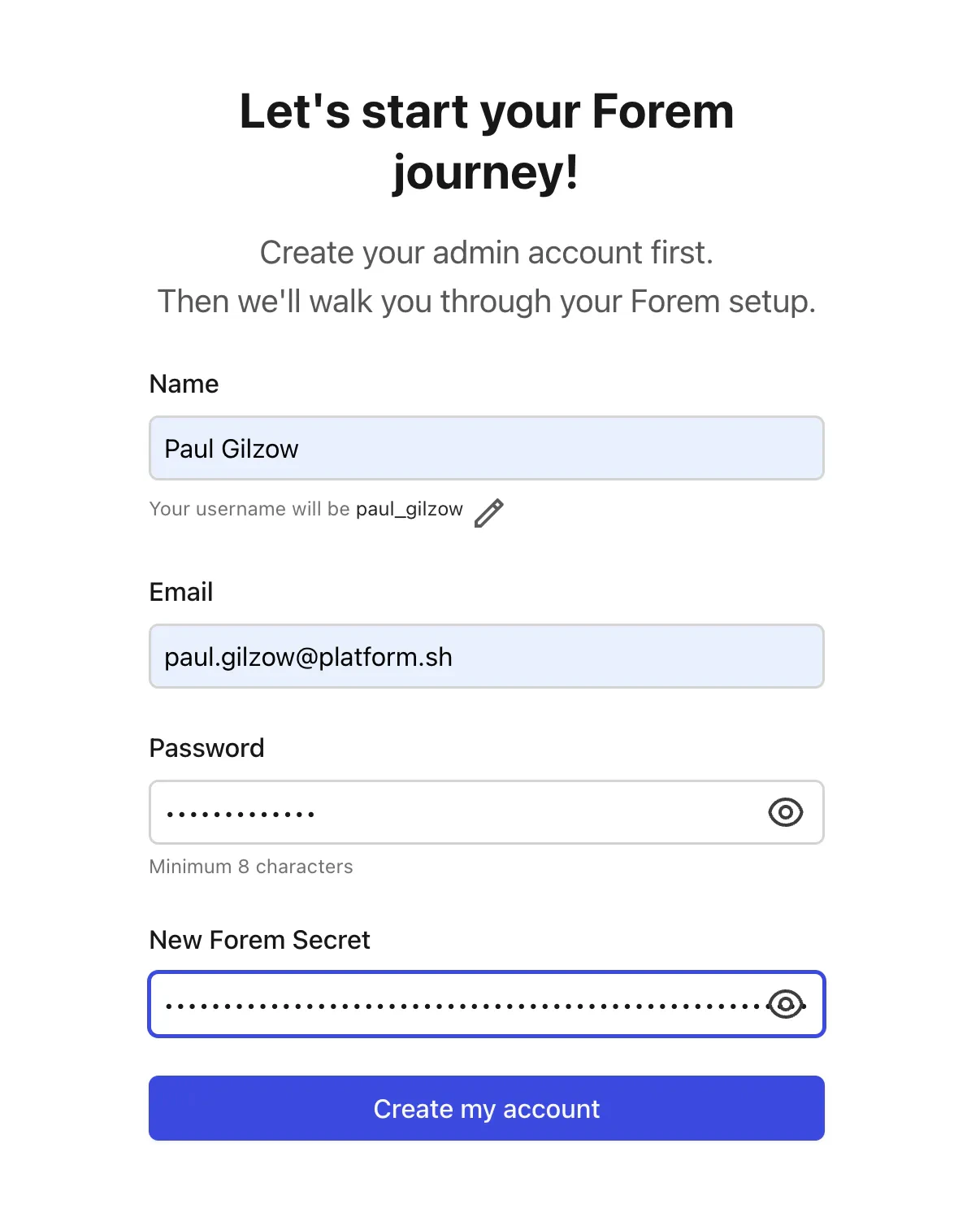
In your browser, click on **Create account** in the upper right. Set up your name, email address, password, and for
"New Forem Secret" paste in the value we copied earlier for `FOREM_OWNER_SECRET`. Click on **Create my account**.

<img src="https://mintcdn.com/upsun-c9761871/OR9CPqO13fyi9LoK/images/posts/tutorials/upsun-and-running-forem/forem-setup.webp?fit=max&auto=format&n=OR9CPqO13fyi9LoK&q=85&s=d14cfb9eee92d414024a2cd6f8d6154c" alt="Create Account" width="1206" height="1492" data-path="images/posts/tutorials/upsun-and-running-forem/forem-setup.webp" />

Forem will now have you set up a few more specifics (Community name, logo, brand color, etc). Fill out the relevant
information, agree to the terms at the bottom, and click **Finish**.

Your Forem site is now up and running! But we're not *quite* done yet.

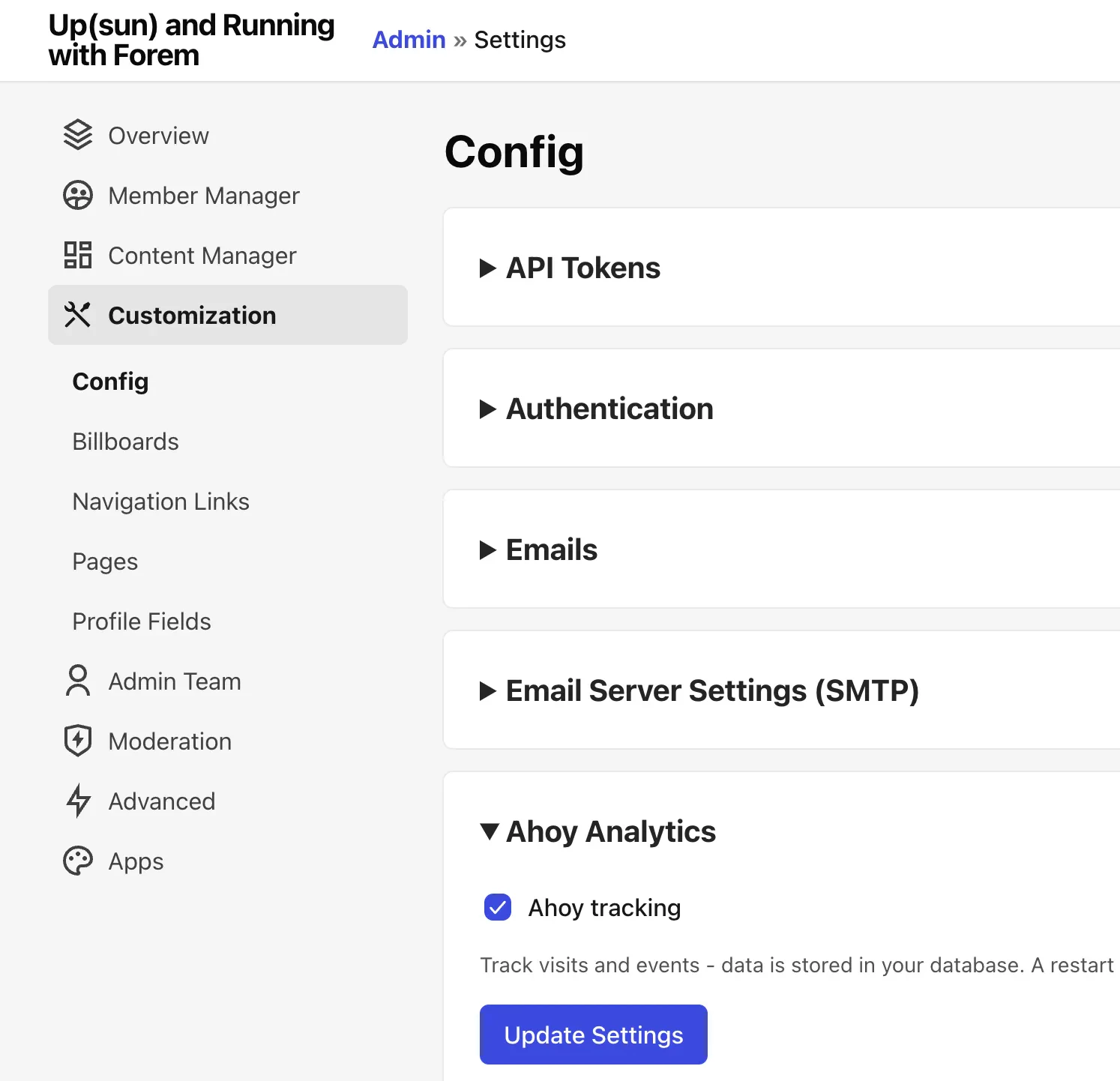
We still need to enable Ahoy, or our tracking won't work correctly. In the upper right corner, click on your avatar,
and then "Admin". On the left hand side, click on Customization. In the resulting Config page, expand the section for
Ahoy Analytics. Check "Ahoy tracking" and then click **Update Settings**.
<img src="https://mintcdn.com/upsun-c9761871/OR9CPqO13fyi9LoK/images/posts/tutorials/upsun-and-running-forem/forem-customization.webp?fit=max&auto=format&n=OR9CPqO13fyi9LoK&q=85&s=4e0b3060bd9ca898252c0c2a0fb97d38" alt="Update Settings" width="1494" height="1442" data-path="images/posts/tutorials/upsun-and-running-forem/forem-customization.webp" />

We now need to restart rails. Back in your terminal, ssh back into the app container, and then run the following to
restart rails:

```bash {{filename="Terminal"}} theme={null}
bin/rails restart
```

At this point we're ready to re-enable database migrations. Back in the `.upsun/config.yaml` scroll back down the
`deploy:` key, and uncomment:

```yaml theme={null}
bundle exec rake db:migrate
```

Finally, add and commit the change, then push to Upsun!

```bash {{filename="Terminal"}} theme={null}
> git add .upsun/config.yaml && git commit -m "enable db:migrations during deploy" && upsun push -y
```

Once this deployment completes, you'll be fully Up(sun) and running with Forem!

## All example files

All the example files referenced in the article above are available in our
[Upsun Snippets repository](https://github.com/upsun/snippets/tree/main/examples/forem).