> ## Documentation Index
> Fetch the complete documentation index at: https://developer.upsun.com/llms.txt
> Use this file to discover all available pages before exploring further.

# OAuth authentication between Next.js and Laravel Passport

> Learn how to implement secure OAuth authentication between a Next.js frontend and Laravel backend using Passport with the Authorization Code Flow and PKCE.


export const PostMeta = ({data = {}}) => {
  const {author, date} = data;
  const authors = Array.isArray(author) ? author : author ? [author] : [];
  const resolveAuthor = slug => {
    const entry = AUTHOR_MAP[slug] || ({});
    const name = entry.name || slug;
    const github = entry.github || null;
    const linkedin = entry.linkedin || null;
    const url = github ? `https://github.com/${github}` : linkedin || null;
    const avatarUrl = github ? `https://github.com/${github}.png?size=64` : null;
    return {
      name,
      url,
      avatarUrl
    };
  };
  const formattedDate = date ? new Date(date).toLocaleDateString('en-US', {
    year: 'numeric',
    month: 'long',
    day: 'numeric'
  }) : null;
  if (authors.length === 0 && !formattedDate) return null;
  const AUTHOR_MAP = {
    "aaron-collier": {
      "name": "Aaron Collier"
    },
    "aaron-dudenhofer": {
      "name": "Aaron Dudenhofer"
    },
    "aaron-porter": {
      "name": "Aaron Porter"
    },
    "adriaan-odendaal": {
      "name": "Adriaan Odendaal"
    },
    "ajmal": {
      "name": "Ajmal Siddiqui"
    },
    "akalipetis": {
      "name": "Antonis Kalipetis"
    },
    "alexander-varwijk": {
      "name": "Alexander Varwijk"
    },
    "alicia-bevilacqua": {
      "name": "Alicia Bevilacqua"
    },
    "amelie-deguerry": {
      "name": "Amelie Deguerry"
    },
    "anacidre": {
      "name": "Ana Cidre",
      "linkedin": "https://www.linkedin.com/in/ana-cidre"
    },
    "andoni": {
      "name": "Andoni Auzmendi"
    },
    "andrei-taranu": {
      "name": "Andrei (Alex) Taranu",
      "linkedin": "https://www.linkedin.com/in/andrei-alex-taranu/"
    },
    "andrew-baxter": {
      "name": "Andrew Baxter"
    },
    "andrew-melck": {
      "name": "Andrew Melck"
    },
    "antoine-crochet-damais": {
      "name": "Antoine Crochet Damais"
    },
    "augustin-delaporte": {
      "name": "Augustin Delaporte",
      "linkedin": "https://www.linkedin.com/in/augustindelaporte/"
    },
    "branislav-bujisic": {
      "name": "Branislav Bujisic"
    },
    "carl-smith": {
      "name": "Carl Smith"
    },
    "caroline-leroy": {
      "name": "Caroline Leroy"
    },
    "cati-mayer": {
      "name": "Cati Mayer"
    },
    "catplat": {
      "name": "C Trinkwon"
    },
    "ceelolulu": {
      "name": "Celeste van der Watt"
    },
    "chadwcarlson": {
      "name": "Chad Carlson",
      "github": "chadwcarlson",
      "linkedin": "https://www.linkedin.com/in/chadwcarlson"
    },
    "chris-ward": {
      "name": "Chris Ward"
    },
    "chris-yates": {
      "name": "Chris Yates"
    },
    "christian-sieber": {
      "name": "Christian Sieber"
    },
    "christopher-lockheardt": {
      "name": "Christopher Lockheardt"
    },
    "christopher-skene": {
      "name": "Christopher Skene"
    },
    "chuck-morgan": {
      "name": "Chuck Morgan"
    },
    "corey-dockendorf": {
      "name": "Corey Dockendorf"
    },
    "crell": {
      "name": "Crell"
    },
    "damz": {
      "name": "Damz"
    },
    "dan-morrison": {
      "name": "Dan Morrison"
    },
    "davidbonachera": {
      "name": "David Bonachera",
      "github": "davidbonachera",
      "linkedin": "https://www.linkedin.com/in/davidbonachera"
    },
    "dereliahmet1": {
      "name": "Ahmet Faruk Dereli"
    },
    "devicezero": {
      "name": "Jonas Kröger",
      "github": "devicezero",
      "linkedin": "https://www.linkedin.com/in/jonaskroeger/"
    },
    "doug-goldberg": {
      "name": "Doug Goldberg"
    },
    "duncan-naves": {
      "name": "Duncan Naves",
      "github": "duncannaves",
      "linkedin": "https://www.linkedin.com/in/duncan-naves-a94423aa"
    },
    "erika-bustamante": {
      "name": "Erika Bustamante"
    },
    "fabpot": {
      "name": "Fabien Potencier"
    },
    "flovntp": {
      "name": "Florent Huck",
      "github": "flovntp",
      "linkedin": "https://www.linkedin.com/in/florenthuck"
    },
    "fred-plais": {
      "name": "Fred Plais"
    },
    "gauthier-garnier": {
      "name": "Gauthier Garnier"
    },
    "gilzow": {
      "name": "Paul Gilzow"
    },
    "gmoigneu": {
      "name": "Guillaume Moigneu",
      "github": "gmoigneu",
      "linkedin": "https://www.linkedin.com/in/guillaumemoigneu/"
    },
    "gregqualls": {
      "name": "Greg Qualls"
    },
    "guguss": {
      "name": "Augustin Delaporte"
    },
    "haylee-millar": {
      "name": "Haylee Millar"
    },
    "ivana-kotur": {
      "name": "Ivana Kotur"
    },
    "jackrabbithanna": {
      "name": "Mark Hanna"
    },
    "jared-wright": {
      "name": "Jared Wright",
      "github": "jww-sh",
      "linkedin": "https://www.linkedin.com/in/jaredwaynewright"
    },
    "jessica-orozco": {
      "name": "Jessica Orozco"
    },
    "joey-stanford": {
      "name": "Joey Stanford"
    },
    "john-grubb": {
      "name": "John Grubb"
    },
    "jonas-kruger": {
      "name": "Jonas Kruger"
    },
    "kathryn-frazer": {
      "name": "Kathryn Frazer"
    },
    "kemiojo": {
      "name": "Kemi Elizabeth Ojogbede"
    },
    "kieronsambrook-smith": {
      "name": "Kieronsambrook Smith"
    },
    "laurent-arnoud": {
      "name": "Laurent Arnoud",
      "linkedin": "https://www.linkedin.com/in/laurent-arnoud-861b44121/"
    },
    "letoya-boyne": {
      "name": "Letoya Boyne"
    },
    "lolautruche": {
      "name": "Jérôme Vieilledent"
    },
    "lyly-lepinay": {
      "name": "Lyly Lepinay"
    },
    "manauwar-alam": {
      "name": "Manauwar Alam"
    },
    "marc-antoine-porri": {
      "name": "Marc Antoine Porri"
    },
    "maria-antinkaapo": {
      "name": "Maria Antinkaapo"
    },
    "maria-de-anton": {
      "name": "Maria De Anton"
    },
    "mark-dorison": {
      "name": "Mark Dorison"
    },
    "markus-hausammann": {
      "name": "Markus Hausammann"
    },
    "mary-thomas": {
      "name": "Mary Thomas"
    },
    "mathias-bolt-lesniak": {
      "name": "Mathias Bolt Lesniak"
    },
    "mathieu-strauch": {
      "name": "Mathieu Strauch"
    },
    "matthias-van-woensel": {
      "name": "Matthias Van Woensel",
      "linkedin": "https://www.linkedin.com/in/matthias-van-woensel-267a069"
    },
    "maz-mohammadi": {
      "name": "Maz Mohammadi"
    },
    "michael-sharp": {
      "name": "Michael Sharp"
    },
    "mupsi": {
      "name": "Marine Gandy"
    },
    "natalie-harper": {
      "name": "Natalie Harper"
    },
    "ngommenginger": {
      "name": "Nicolas Gommenginger",
      "linkedin": "https://www.linkedin.com/in/nicolas-gommenginger"
    },
    "nicholas-bennison": {
      "name": "Nicholas Bennison"
    },
    "nicholas-vahalik": {
      "name": "Nicholas Vahalik"
    },
    "nick-hardiman": {
      "name": "Nick Hardiman"
    },
    "nickanderegg": {
      "name": "Nickanderegg"
    },
    "nicolas-grekas": {
      "name": "Nicolas Grekas",
      "github": "nicolas-grekas",
      "linkedin": "https://www.linkedin.com/in/nicolasgrekas/"
    },
    "niti-malwade": {
      "name": "Niti Malwade"
    },
    "opensocialteam": {
      "name": "Opensocialteam"
    },
    "ori-pekelman": {
      "name": "Ori Pekelman"
    },
    "otavio-santana": {
      "name": "Otavio Santana"
    },
    "palwandi": {
      "name": "Pawan Alwandi",
      "github": "pawpy",
      "linkedin": "https://www.linkedin.com/in/pawanalwandi"
    },
    "patrick-boest": {
      "name": "Patrick Boest"
    },
    "patrick-dawkins": {
      "name": "Patrick Dawkins",
      "github": "pjcdawkins",
      "linkedin": "https://www.linkedin.com/in/patrickdawkins"
    },
    "patrick-klima": {
      "name": "Patrick Klima"
    },
    "pjcdawkins": {
      "name": "Pjcdawkins"
    },
    "prineet-kaurbhurji": {
      "name": "Prineet Kaurbhurji"
    },
    "quentin-sinig": {
      "name": "Quentin Sinig"
    },
    "ralt": {
      "name": "Florian Margaine",
      "github": "ralt",
      "linkedin": "https://www.linkedin.com/in/florian-margaine-43971136"
    },
    "ramanathanramakrishnamurthy": {
      "name": "Ramanathanramakrishnamurthy"
    },
    "remi-lejeune": {
      "name": "Rémi Lejeune"
    },
    "ribel": {
      "name": "Taras Kruts"
    },
    "robert-douglass": {
      "name": "Robert Douglass"
    },
    "rudy-weber": {
      "name": "Rudy Weber"
    },
    "ryan-hicks": {
      "name": "Ryan Hicks"
    },
    "sabri-helal": {
      "name": "Sabri Helal"
    },
    "savannah-bergeron": {
      "name": "Savannah Bergeron"
    },
    "shannon-vettes": {
      "name": "Shannon Vettes"
    },
    "shawn-ogasawara": {
      "name": "Shawn Ogasawara",
      "linkedin": "https://www.linkedin.com/in/shawn-ogasawara-83a9a0/"
    },
    "shawna-spoor": {
      "name": "Shawna Spoor"
    },
    "shedrack-akintayo": {
      "name": "Shedrack Akintayo"
    },
    "simon-ruggier": {
      "name": "Simon Ruggier"
    },
    "sophie-van-der-kindere": {
      "name": "Sophie Van Der Kindere"
    },
    "stefanos-thampis": {
      "name": "Stefanos Thampis"
    },
    "stephen-weinberg": {
      "name": "Stephen Weinberg"
    },
    "sukhman-virk": {
      "name": "Sukhman Virk"
    },
    "sumaira-nazir": {
      "name": "Sumaira Nazir"
    },
    "sumer": {
      "name": "Sümer Cip"
    },
    "syed-raza": {
      "name": "Syed Raza"
    },
    "tamara-bacchia": {
      "name": "Tamara Bacchia"
    },
    "tara-arnold": {
      "name": "Tara Arnold"
    },
    "theosakamg": {
      "name": "Mickael Gaillard",
      "github": "theosakamg"
    },
    "thomasdiluccio": {
      "name": "Thomas di Luccio"
    },
    "tim-anderson": {
      "name": "Tim Anderson"
    },
    "tom-helmer-hansen": {
      "name": "Tom Helmer Hansen"
    },
    "tylermills": {
      "name": "Tyler Mills"
    },
    "upsun": {
      "name": "Upsun"
    },
    "veronika-tolkachova": {
      "name": "Veronika Tolkachova",
      "linkedin": "https://www.linkedin.com/in/veronika-tolkachova-169167a2"
    },
    "vince-parker": {
      "name": "Vince Parker"
    },
    "vinnie-russo": {
      "name": "Vincenzo Russo"
    },
    "vrobert78": {
      "name": "Vincent Robert",
      "github": "vrobert78",
      "linkedin": "https://www.linkedin.com/in/vincent-robert-498a883"
    },
    "yuriy-babenko": {
      "name": "Yuriy Babenko"
    },
    "yuriy-gerasimov": {
      "name": "Yuriy Gerasimov"
    }
  };
  return <div className="post-meta">
      {(authors.length > 0 || formattedDate) && <div className="post-meta-info">
          {authors.length > 0 && <div className="post-meta-authors">
              {authors.map(slug => {
    const {name, url, avatarUrl} = resolveAuthor(slug);
    const inner = <>
                    {avatarUrl && <img src={avatarUrl} alt={name} className="post-meta-avatar" />}
                    <span className="post-meta-author-name">{name}</span>
                  </>;
    return url ? <a key={slug} href={url} target="_blank" rel="noopener noreferrer" className="post-meta-author">
                    {inner}
                  </a> : <span key={slug} className="post-meta-author">{inner}</span>;
  })}
            </div>}
          {authors.length > 0 && formattedDate && <span className="post-meta-separator" aria-hidden="true">·</span>}
          {formattedDate && <span className="post-meta-date">{formattedDate}</span>}
        </div>}
    </div>;
};

<PostMeta data={{ author: ["gmoigneu"], date: "2025-04-28T10:00:00+00:00", image: "/images/posts/tutorials/oauth-nextjs-laravel/oauth-nextjs-laravel.webp" }} />

This tutorial helps you implement a secure OAuth authentication system connecting a Next.js 15 frontend with a Laravel backend. You'll create an Authorization Code Flow with PKCE (Proof Key for Code Exchange), providing robust security for your web applications.

<Warning>
  Throughout this tutorial, CLI prompts and outputs may be shortened for clarity. When following along, you can select any option for the prompts shown that are not explicit in the tutorial - your choices won't affect the final outcome.

  As some code blocks have also been shortened, please always refer to the [complete source files available in the public GitHub repository](https://github.com/upsun/tutorial-next-laravel-oauth).
</Warning>

## Pre-requisites

Before starting, make sure you have these tools installed:

* Git
* PHP 8.2+
* Composer
* Node.js 20+

## Initialize a new local project

Start by creating a new project directory and setting up Git:

```bash {filename="Terminal"} theme={null}
$ mkdir oauth-project && cd oauth-project
$ git init .
```

### Add test hostnames

Configure test domains for local development by adding entries to your hosts file:

```bash {filename="Terminal"} theme={null}
$ sudo vim /etc/hosts
```

Add the following entries to map test domains to your local machine:

```bash {filename="/etc/hosts"} theme={null}
127.0.0.1 api.oauth-project.test next.oauth-project.test
```

These entries allow your browser to resolve the test domains to your local machine, creating a necessary multi-domain setup for OAuth testing.

## Set up a new Next.js 15 project

Create your Next.js frontend application with TypeScript, Tailwind CSS, and the App Router:

```bash {filename="Terminal"} theme={null}
npx create-next-app@latest
Need to install the following packages:
create-next-app@15.3.1
Ok to proceed? (y) 

✔ What is your project named? … next
✔ Would you like to use TypeScript? … Yes
✔ Would you like to use ESLint? … Yes
✔ Would you like to use Tailwind CSS? … Yes
✔ Would you like your code inside a `src/` directory? … Yes
✔ Would you like to use App Router? (recommended) … Yes
✔ Would you like to use Turbopack for `next dev`? … Yes
✔ Would you like to customize the import alias (`@/*` by default)? … No
Creating a new Next.js app in [path]/oauth-project/next.
```

Go into that newly created folder:

```bash {filename="Terminal"} theme={null}
cd next
```

You can enhance your UI with shadcn/ui, a collection of reusable components:

```bash {filename="Terminal"} theme={null}
npx shadcn@latest init
```

Start the development server to test your setup:

```bash {filename="Terminal"} theme={null}
npm run dev

> next@0.1.0 dev
> next dev --turbopack

   ▲ Next.js 15.3.1 (Turbopack)
   - Local:        http://localhost:3000
   - Network:      http://10.1.10.221:3000

 ✓ Starting...
 ✓ Ready in 743ms
```

You can leave the `npm` process running and create a new terminal session for the next steps.

<Info>
  If you use Cursor, here's a [`.cursorrules` file for Next.js](https://github.com/upsun/snippets/blob/main/llm-related/cursorrules/nextjs15.cursorrules).
</Info>

## Bootstrap a new Laravel project

Create a new Laravel backend that will serve as your OAuth server at the root of the project:

```bash {filename="Terminal"} theme={null}
$ composer global require laravel/installer
$ laravel new api

 ┌ Would you like to install a starter kit? ────────────────────┐
 │ No starter kit                                               │
 └──────────────────────────────────────────────────────────────┘

 ┌ Which testing framework do you prefer? ──────────────────────┐
 │ Pest                                                         │
 └──────────────────────────────────────────────────────────────┘

 ┌ Would you like to initialize a Git repository? ──────────────┐
 │ No                                                           │
 └──────────────────────────────────────────────────────────────┘
 
  INFO  Application key set successfully.  

 ┌ Which database will your application use? ───────────────────┐
 │   ○ SQLite                                                   │
 │   ○ MySQL                                                    │
 │ › ● MariaDB                                                  │
 │   ○ PostgreSQL                                               │
 │   ○ SQL Server (Missing PDO extension)                       │
 └──────────────────────────────────────────────────────────────┘
 
 ┌ Default database updated. Would you like to run the default database migrations? ┐
 │ No                                                                               │
 └──────────────────────────────────────────────────────────────────────────────────┘

```

Now `cd` into the `api` folder to install additional packages.

```bash {filename="Terminal"} theme={null}
cd api
```

### Install Sail for local development

Laravel Sail provides a Docker-based development environment, making it easy to run your application with isolated dependencies:

```bash {filename="Terminal"} theme={null}
$ composer require laravel/sail --dev

$ php artisan sail:install

 ┌ Which services would you like to install? ───────────────────┐
 │ › ◼ pgsql                                                  │ │
 │   ◻ mariadb                                                ┃ │
 │   ◻ mongodb                                                │ │
 │   ◼ mailpit                                                  │ │
 │   ◼ valkey                                                 │ │
 └────────────────────────────────────────────────── 3 selected ┘
  Use the space bar to select options.
```

Configure your Laravel environment by editing the `.env` file:

```bash {filename="api/.env"} theme={null}
APP_NAME=OAuth
APP_URL=http://api.oauth-project.test

DB_CONNECTION=pgsql
DB_HOST=pgsql
DB_PORT=5432
DB_DATABASE=oauth
DB_USERNAME=oauth
DB_PASSWORD=oauth

SESSION_DRIVER=redis
SESSION_LIFETIME=120
SESSION_ENCRYPT=false
SESSION_PATH=/
SESSION_DOMAIN=null

BROADCAST_CONNECTION=redis
QUEUE_CONNECTION=redis
CACHE_STORE=redis
```

Create an alias for the sail command to simplify usage. You can add this line in your shell profile (`.bashrc`, `.zshrc`, etc.). Don't forget to `source` that file afterwards or open a new terminal.

```bash {filename="Terminal"} theme={null}
$ alias sail="./vendor/bin/sail"
```

Start the Laravel environment:

```bash {filename="Terminal"} theme={null}
$ sail up
```

<Warning>
  Leave the sail process running. Open up a new terminal for any other command.
</Warning>

You should now see the Laravel welcome page at `http://api.oauth-project.test/`.

For any troubleshooting needs, check the [Sail documentation](https://laravel.com/docs/12.x/sail).

### Install Telescope to debug requests

Laravel Telescope provides debugging tools for your application, including insights into requests, queries, and more:

```bash {filename="Terminal"} theme={null}
$ sail composer require laravel/telescope
$ sail php artisan telescope:install
$ sail php artisan migrate
```

Please refer to the [Telescope documentation](https://laravel.com/docs/12.x/telescope) to configure it properly for production usage if needed.

### Install Passport and the API package

Install Laravel Passport to handle OAuth authentication:

```bash {filename="Terminal"} theme={null}
$ sail php artisan install:api --passport

INFO  Publishing [laravel-assets] assets.  
Copying directory [vendor/laravel/telescope/public] to [public/vendor/telescope]  DONE

No security vulnerability advisories found.

INFO  Published API routes file.  
Would you like to use UUIDs for all client IDs? (yes/no) [no]: yes

INFO  API scaffolding installed. Please add the [Laravel\Passport\HasApiTokens] trait to your User model.
```

Add the `HasApiTokens` trait to your User model:

```php {filename="api/app/Models/User.php"} theme={null}
use Laravel\Passport\HasApiTokens;

use HasFactory, Notifiable, HasApiTokens;
```

Configure the authentication guard in `auth.php`:

```php {filename="api/config/auth.php"} theme={null}
'guards' => [
	'web' => [
		'driver' => 'session',
		'provider' => 'users',
	],
	'api' => [
		'driver' => 'passport',
		'provider' => 'users',
	],
],
```

### Install Fortify for auth boilerplate

Laravel Fortify provides authentication scaffolding without a specific frontend implementation:

```bash {filename="Terminal"} theme={null}
$ sail composer require laravel/fortify

$ sail php artisan fortify:install

   INFO  Fortify scaffolding installed successfully.

$ sail php artisan migrate
```

<Info>
  If you use Cursor, here's a [`.cursorrules` file for Laravel.](https://github.com/upsun/snippets/blob/main/llm-related/cursorrules/laravel.cursorrules).
</Info>

## Deploy both apps on Upsun

Commit your project before deploying to Upsun:

```bash {filename="Terminal"} theme={null}
$ cd ../ # root of project

$ git add next
$ git commit -m "Bootstrap Next.js"

$ git add api
$ git commit -m "Bootstrap Laravel"
```

### Upsun multi-apps configuration

Create a new Upsun project to host both applications:

```bash {filename="Terminal"} theme={null}
$ upsun project:create

Creating a project under the organization)

* Project title (--title)
Default: Untitled Project
> OAuth Project

* Region (--region)
The region where the project will be hosted.
Get a 3% discount on resources for regions with a carbon intensity of less than 100 gCO2eq/kWh.
> ca-1.platform.sh

Default branch (--default-branch)
The default Git branch name for the project (the production environment)
Default: main
> 

Git repository detected: [path]/oauth-project

Set the new project OAuth Project as the remote for this repository? [Y/n] 

The estimated monthly cost of this project is: ---
Pricing information: https://upsun.com/pricing

Are you sure you want to continue? [Y/n] 
Your Upsun project has been requested (subscription ID: [id])

The Upsun Bot is activating your project

      ▄     ▄  
    ▄ ▄█▄▄▄█▄ ▄
    ███▄███▄███
     ▀█▀▀▀▀▀█▀ 
     ▀       ▀ 

Setting the remote project for this repository to: OAuth Project ([project_id])
```

Create a `.upsun/config.yaml` file to configure your multi-applications project. You can copy/paste [the configuration file in the repository](https://github.com/upsun/tutorial-next-laravel-oauth/blob/main/.upsun/config.yaml).

This configuration:

* Routes requests to the appropriate application based on the hostname (`@` (root) and `api.`) [L80-82](https://github.com/upsun/tutorial-next-laravel-oauth/blob/main/.upsun/config.yaml#L80). As we are using the `{all}` value, all added hostnames and Upsun auto-generated hostnames will be directed to the `next` application while all `api.` prefixed hostnames will be routed to the Laravel `api`.
* Sets up PostgreSQL and Valkey (Redis-compatible) services [L85-89](https://github.com/upsun/tutorial-next-laravel-oauth/blob/main/.upsun/config.yaml#L85)
* Configures both applications with proper build and deploy hooks

Now create a `.environment` file for Laravel to set environment variables:

```bash {filename="api/.environment"} theme={null}
export DB_SCHEME="pgsql"
export DATABASE_URL="postgres://${DB_USERNAME}:${DB_PASSWORD}@${DB_HOST}:${DB_PORT}/${DB_PATH}"
export DB_CONNECTION="$DB_SCHEME"
export DB_DATABASE="$DB_PATH"

# Set Cache environment variables
export CACHE_STORE=redis
export CACHE_PREFIX=
export CACHE_URL="${CACHE_SCHEME}://${CACHE_HOST}:${CACHE_PORT}"

export REDIS_CLIENT=phpredis
export REDIS_HOST="$CACHE_HOST"
export REDIS_PORT="$CACHE_PORT"
export REDIS_PASSWORD=null
```

Commit the configuration and the new `.environment`:

```bash {filename="Terminal"} theme={null}
$ git add .upsun/config.yaml .environment
$ git commit -m "Add Upsun configuration and environment"
```

### First deployment

Create an encryption key for Laravel as an environment variable. You can use your local key that has been generated in your local `.env` or create a new one with `sail php artisan key:generate`.

```bash {filename="Terminal"} theme={null}
upsun variable:create --name env:APP_KEY 
* Level (--level)
The level at which to set the variable
  [project    ] Project-wide
  [environment] Environment-specific
> project

* Value (--value)
The variable's value
> base64:zVXg60t5ch[...]=
```

Deploy your project to Upsun:

```bash {filename="Terminal"} theme={null}
$ upsun push -y
Selected project: OAuth Project ([project_id])

Pushing HEAD to the environment main (type: production).
```

## Review of the OAuth flow

Let's understand the OAuth flow you'll implement.

### Understanding OAuth grant types

OAuth 2.0 offers several grant types, each suited for different scenarios. For browser-based applications like yours, the **Authorization Code Flow with Proof Key for Code Exchange (PKCE)** provides the best security.

PKCE (pronounced "pixy") adds security by ensuring that only the application that initiated the authentication flow can exchange the authorization code for tokens. This prevents authorization code interception attacks.

Auth0 provides a great introduction to [different OAuth grant types](https://auth0.com/intro-to-iam/what-is-oauth-2). Here's a helpful diagram by [Alex Bilbie](https://alexbilbie.github.io/guide-to-oauth-2-grants/) to choose the right grant:

![Grants](https://raw.githubusercontent.com/gmoigneu/nextjs-laravel-oath-tutorial/refs/heads/main/resources/oauth-grants.svg)

### Your OAuth flow

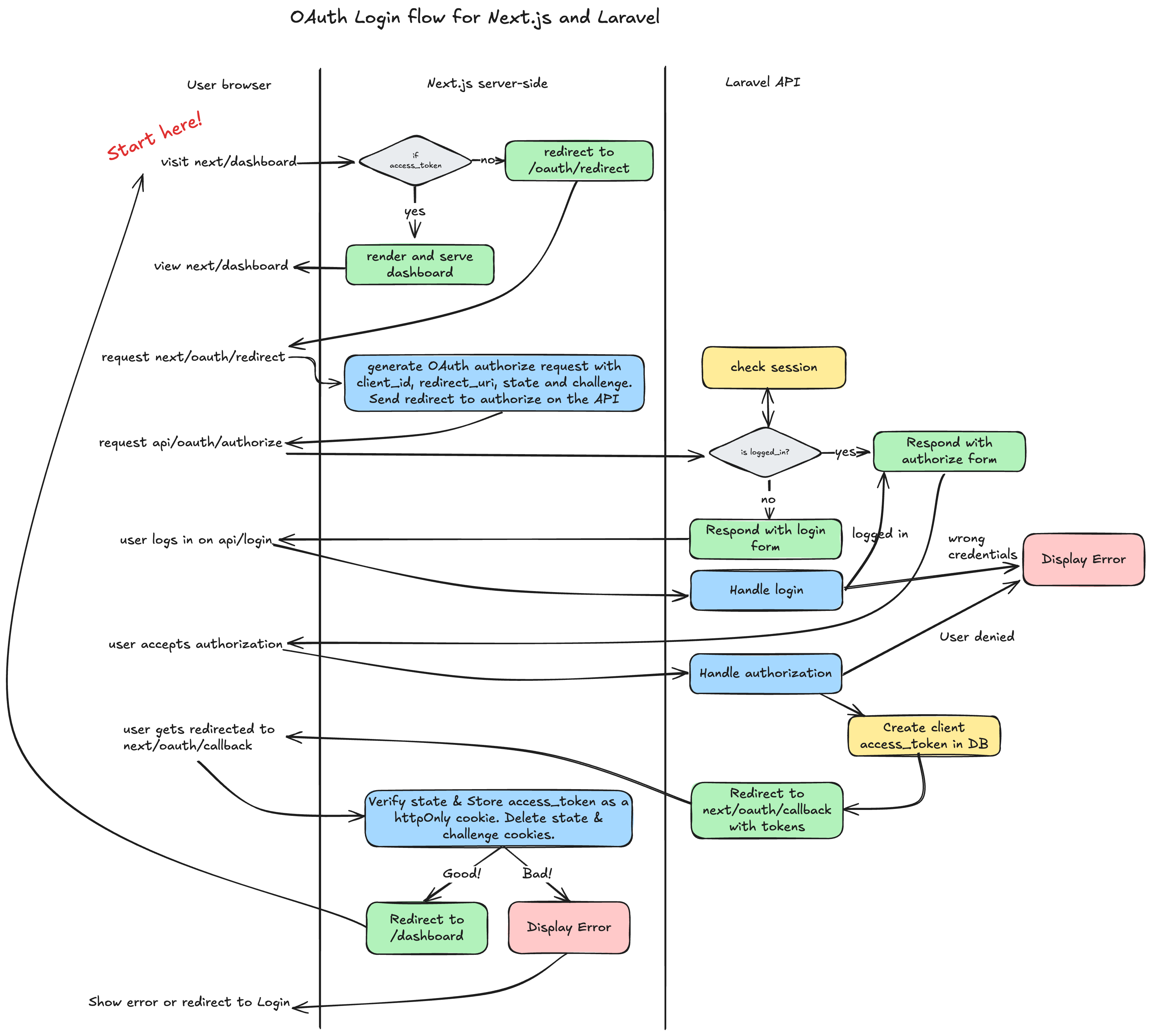
Here's the detailed flow between your Next.js client and Laravel backend:

![Diagram](https://github.com/upsun/tutorial-next-laravel-oauth/blob/main/resources/oauth-flow.png?raw=true)

#### Step-by-step breakdown

**1. User starts the flow**

* User visits `/next/dashboard` in the browser.
* Next.js server checks for an `access_token`:
  * ✅ If found: renders the dashboard.
  * ❌ If not found: redirects to `/oauth/redirect`.

**2. OAuth redirect setup (Next.js)**

* Generates an OAuth `authorize` request with:
  * `client_id`
  * `redirect_uri`
  * `state` (for CSRF protection)
  * `code_challenge` (for PKCE)
* Sends redirect to Laravel API `/api/oauth/authorize`.

**3. Laravel API authorization flow**

* Laravel checks if the user is logged in:
  * ✅ If logged in: shows authorization form.
  * ❌ If not: displays login form.
* After login:
  * Valid credentials → continues the flow.
  * Invalid credentials → shows error.
* If user approves the app:
  * Laravel handles the authorization.
  * Creates and stores a client `access_token` in the database.
  * Redirects to `/next/oauth/callback` with the authorization `code`.

**4. Callback handling (Next.js)**

* Validates the `state` to prevent CSRF attacks.
* Exchanges the `authorization code` and `code_verifier` for an `access_token`.
* Stores the token as an HttpOnly cookie.
* Cleans up temporary cookies (`state`, `challenge`).
* Redirects to `/dashboard` if successful.
* Shows an error page or redirects to login if something fails.

This flow ensures:

* Users authenticate directly with the authentication server
* Access tokens remain secure and inaccessible to browser JavaScript
* The application securely accesses protected resources

## Laravel OAuth implementation with Passport

Laravel Passport simplifies OAuth implementation by handling token generation, storage, and validation. You need to create OAuth clients and implement login and authorization views.

### Create a client and a test user

Create a test user and OAuth client through a database seeder:

```php {filename="api/database/seeders/DatabaseSeeder.php"} theme={null}
<?php

namespace Database\Seeders;

use App\Models\User;
// use Illuminate\Database\Console\Seeds\WithoutModelEvents;
use Illuminate\Database\Seeder;
use Laravel\Passport\Client;

class DatabaseSeeder extends Seeder
{
    /**
     * Seed the application's database.
     */
    public function run(): void
    {
        // User::factory(10)->create();

        User::factory()->create([
            'name' => 'Test User',
            'email' => 'test@example.com',
        ]);

        Client::create([
            'id' => '9ebd8f82-e3fe-4205-87ad-bfe10e03cdd9',
            'name' => 'next.oauth-project.test',
            'secret' => null,
            'redirect' => 'http://next.oauth-project.test:3000/oauth/callback',
            'personal_access_client' => false,
            'password_client' => false,
            'revoked' => false,
        ]);
    }
}
```

This creates:

* A test user with email `test@example.com` [L19](https://github.com/upsun/tutorial-next-laravel-oauth/blob/2724973fd214f9947974429c4c3c2a19175a26a3/api/database/seeders/DatabaseSeeder.php#L19) with a default password set to `password`.
* A public OAuth client (no secret, as required for PKCE) [L29](https://github.com/upsun/tutorial-next-laravel-oauth/blob/2724973fd214f9947974429c4c3c2a19175a26a3/api/database/seeders/DatabaseSeeder.php#L24)
* A redirect URI matching your Next.js callback route [L28](https://github.com/upsun/tutorial-next-laravel-oauth/blob/2724973fd214f9947974429c4c3c2a19175a26a3/api/database/seeders/DatabaseSeeder.php#L28)

Run the seeder to populate your database:

```bash {filename="Terminal"} theme={null}
sail php artisan migrate:refresh --seed
```

### OAuth and Fortify routes

Define API routes for user information and logout:

```php {filename="api/routes/api.php"} theme={null}
<?php

use Illuminate\Http\Request;
use Illuminate\Support\Facades\Route;

Route::group(['middleware' => 'auth:api'], function () {
	Route::get('/user', function (Request $request) {
		return $request->user();
	});

	Route::post('/logout', function (Request $request) {	
		$request->user()->token()->revoke();
		return response()->json(['message' => 'Successfully logged out']);
	});
});
```

These routes are protected by the `auth:api` middleware, ensuring they're only accessible with a valid access token.

Add the login view to the `boot` method of `FortifyServiceProvider` [L46](https://github.com/upsun/tutorial-next-laravel-oauth/blob/2724973fd214f9947974429c4c3c2a19175a26a3/api/app/Providers/FortifyServiceProvider.php#L46):

```php {filename="api/app/Providers/FortifyServiceProvider.php"} theme={null}
	Fortify::loginView(function () {
		return view('auth.login');
	});
```

Create the login view at `api/resources/views/auth/login.blade.php`. You can find an example in the [GitHub repository](https://github.com/upsun/tutorial-next-laravel-oauth/blob/main/api/resources/views/auth/login.blade.php).

Customize the OAuth authorization form by publishing and modifying the Passport views:

```bash {filename="Terminal"} theme={null}
$ sail php artisan vendor:publish --tag=passport-views
```

Edit the authorization form at `api/resources/views/vendor/passport/authorize.blade.php`. Find an example in the [GitHub repository](https://github.com/upsun/tutorial-next-laravel-oauth/blob/main/api/resources/views/vendor/passport/authorize.blade.php).

Test your login page at [http://api.oauth-project.test/login](http://api.oauth-project.test/login) to ensure it works correctly.

## Next.js client implementation

Now for the client-side of your OAuth flow in Next.js. You need to create three key components:

1. A dashboard component that checks authentication and loads user data
2. The `/oauth/redirect` endpoint that initiates the authorization flow
3. The `/oauth/callback` endpoint that processes the authorization response

### Home and dashboard

Create a simple home page with a button linking to your dashboard. First, install the Button component:

```bash {filename="Terminal"} theme={null}
$ cd next/
$ npx shadcn@latest add button
Need to install the following packages:
shadcn@2.5.0
Ok to proceed? (y) 

✔ You need to create a components.json file to add components. Proceed? … yes
✔ Which color would you like to use as the base color? › Neutral
✔ Writing components.json.
✔ Checking registry.
  Installing dependencies.

It looks like you are using React 19. 
Some packages may fail to install due to peer dependency issues in npm (see https://ui.shadcn.com/react-19).

✔ How would you like to proceed? › Use --force
✔ Installing dependencies.
✔ Created 1 file:
  - src/components/ui/button.tsx
```

Create a home page (`next/src/app/page.tsx`) with a dashboard link:

```tsx {filename="next/src/app/page.tsx"} theme={null}
import { Button } from "@/components/ui/button";
import Link from "next/link";

export default function Home() {
  return (
    <div className="h-full w-full flex items-center justify-center min-h-screen font-[family-name:var(--font-geist-sans)]">
        <Button>
          <Link href="/dashboard">Go to the Dashboard</Link>
        </Button>
    </div>
  );
}
```

This creates a simple, centered button linking to your dashboard:

![Home](https://raw.githubusercontent.com/gmoigneu/nextjs-laravel-oath-tutorial/refs/heads/main/resources/home.png)

Next, create a dashboard page that handles authentication checks. Don't forget to also create the components it relies on.

First, add the `shadcn` dependencies:

```bash {filename="Terminal"} theme={null}
npx shadcn@latest add avatar dropdown-menu
```

Create the dashboard page - [View the full implementation](https://github.com/upsun/tutorial-next-laravel-oauth/blob/main/next/src/app/dashboard/page.tsx).

```tsx {filename="next/src/app/dashboard/page.tsx"} theme={null}
export default async function DashboardPage () {
  const cookieStore = await cookies()
  const accessToken = await cookieStore.get('access_token')?.value

  if (!accessToken) {
    console.log('No access token cookie found, redirecting to /login')
    redirect('/oauth/redirect')
  }

  const userData = await getUserData(accessToken)

  if (!userData) {
    console.log('Failed to fetch user data or token invalid, redirecting to /login')
    redirect('/oauth/redirect')
  }

  return(...)
}
```

This code:

1. Checks for an access token in cookies
2. Redirects to the OAuth flow if no token exists
3. Fetches user data to verify the token is valid
4. Redirects to the OAuth flow if the token is invalid or expired
5. Renders the dashboard for authenticated users

Create the two other components that the dashboard includes:

* [`next/src/components/dashboard/navigation-bar.tsx`](https://github.com/upsun/tutorial-next-laravel-oauth/blob/main/next/src/components/dashboard/navigation-bar.tsx)
* [`next/src/components/dashboard/user-dropdown.tsx`](https://github.com/upsun/tutorial-next-laravel-oauth/blob/main/next/src/components/dashboard/user-dropdown.tsx).

### The `/oauth/redirect` endpoint

Create a server action that initiates the OAuth flow at `next/src/app/oauth/redirect/route.ts`. [View the full implementation](https://github.com/upsun/tutorial-next-laravel-oauth/blob/main/next/src/app/oauth/redirect/route.ts).

```tsx {filename="next/src/app/oauth/redirect/route.ts"} theme={null}
import { NextResponse } from 'next/server'
import { cookies } from 'next/headers'
import crypto from 'node:crypto'

export async function GET () {
  try {
    const state = crypto.randomBytes(20).toString('hex') // 40 chars
    const codeVerifier = crypto.randomBytes(64).toString('hex') // 128 chars

    const codeChallenge = crypto
      .createHash('sha256')
      .update(codeVerifier)
      .digest('base64')
      .replace(/\+/g, '-')
      .replace(/\//g, '_')
      .replace(/=+$/, '') // Base64url encoding

    const cookieStore = await cookies()
    const secure = process.env.NODE_ENV === 'production'
    const cookieOptions = {
      httpOnly: true,
      secure,
      path: '/',
      maxAge: 60 * 15 // 15 minutes
    }

    cookieStore.set('oauth_state', state, cookieOptions)
    cookieStore.set('oauth_code_verifier', codeVerifier, cookieOptions)

    const clientId = process.env.OAUTH_CLIENT_ID
    const redirectUri = process.env.OAUTH_REDIRECT_URI
    const authorizeUrl = process.env.OAUTH_AUTHORIZE_URL
    const scope = process.env.OAUTH_SCOPE || '' // Default to empty scope if not set

    if (!clientId || !redirectUri || !authorizeUrl) {
      console.error('Missing OAuth environment variables (OAUTH_CLIENT_ID, OAUTH_REDIRECT_URI, OAUTH_AUTHORIZE_URL)')
      return NextResponse.json({ error: 'Server configuration error.' }, { status: 500 })
    }

    const params = new URLSearchParams({
      client_id: clientId,
      redirect_uri: redirectUri,
      response_type: 'code',
      scope,
      state,
      code_challenge: codeChallenge,
      code_challenge_method: 'S256',
      prompt: 'login'
      // prompt: '', // Add if needed: "none", "consent", or "login"
    })

    const fullAuthorizeUrl = `${authorizeUrl}?${params.toString()}`

    return NextResponse.redirect(fullAuthorizeUrl)
  } catch (error) {
    console.error('Error during OAuth redirect:', error)
    // Return a generic error response to the client
    return NextResponse.json({ error: 'An unexpected error occurred.' }, { status: 500 })
  }
} 
```

This endpoint:

1. Generates a random state value for CSRF protection
2. Creates a code verifier and code challenge for PKCE
3. Stores these values in HTTP-only cookies
4. Builds the authorization URL with required parameters
5. Redirects the user to the Laravel authorization endpoint

The `prompt` parameter controls the authorization server's behavior:

* `login`: Always show the login form
* `consent`: Always show the authorization form
* `none`: Skip forms if the user is already logged in
* Empty: Use default behavior (may skip forms if logged in)

For local development, create a `.env.local` file with the necessary variables:

```bash {filename="next/.env.local"} theme={null}
NEXT_PUBLIC_BASE_URL=http://next.oauth-project.test:3000
OAUTH_CLIENT_ID=9ebd8f82-e3fe-4205-87ad-bfe10e03cdd9
OAUTH_REDIRECT_URI=http://next.oauth-project.test:3000/oauth/callback
OAUTH_AUTHORIZE_URL=http://api.oauth-project.test/oauth/authorize
OAUTH_SCOPE=''
```

These values must match the OAuth client you created in the Laravel seeder.

### The `/oauth/callback` endpoint

Create a callback endpoint to handle the authorization response at `next/src/app/oauth/callback/route.ts`.
[View the full implementation](https://github.com/upsun/tutorial-next-laravel-oauth/blob/main/next/src/app/oauth/callback/route.ts).

```tsx {filename="next/src/app/oauth/callback/route.ts"} theme={null}
import { NextResponse } from 'next/server'
import { cookies } from 'next/headers'

export async function GET (request) {
  const cookieStore = await cookies()
  const storedState = cookieStore.get('oauth_state')?.value
  const storedCodeVerifier = cookieStore.get('oauth_code_verifier')?.value

  // Clear cookies immediately after retrieval
  cookieStore.delete('oauth_state')
  cookieStore.delete('oauth_code_verifier')

  try {
    const { searchParams } = new URL(request.url)
    const state = searchParams.get('state')
    const code = searchParams.get('code')
    const error = searchParams.get('error')

    // --- State Validation & Verifier ---
    [...]

    // --- Environment Variable Checks ---
    [...]

    // --- Token Exchange ---
    const params = new URLSearchParams({
      grant_type: 'authorization_code',
      client_id: clientId,
      redirect_uri: redirectUri,
      code,
      code_verifier: storedCodeVerifier
    })

    const tokenResponse = await fetch(tokenUrl, {
      method: 'POST',
      headers: {
        'Content-Type': 'application/x-www-form-urlencoded'
      },
      body: params.toString()
    })

    // --- Handle Token Response ---
    const tokenData = await tokenResponse.json()

    if (!tokenResponse.ok) {
      console.error('Failed to fetch OAuth tokens:', tokenData)
      [...]
    }

    // --- Success --- 
    // At this point, you have the tokens in tokenData (e.g., access_token, refresh_token, id_token)
    cookieStore.set('access_token', tokenData.access_token, {
      httpOnly: true,
      secure: process.env.NODE_ENV === 'production',
      path: '/',
      maxAge: tokenData.expires_in // Use token's expiration time
    });

    return NextResponse.redirect(new URL('/dashboard', process.env.NEXT_PUBLIC_BASE_URL))

  } catch (error) {
    [...]
  }
} 
```

The callback endpoint:

1. Retrieves and deletes the stored state and code verifier from cookies
2. Validates the state parameter to prevent CSRF attacks
3. Exchanges the authorization code for an access token using the code verifier
4. Stores the access token in an HTTP-only cookie
5. Redirects to the dashboard upon successful authentication

The HTTP-only cookie approach is crucial for security. Unlike localStorage, HTTP-only cookies can't be accessed by JavaScript, protecting tokens from cross-site scripting (XSS) attacks.

Add these additional environment variables to `.env.local`:

```
OAUTH_TOKEN_URI=http://api.oauth-project.test/oauth/token
#OAUTH_LOGOUT_URI=http://api.oauth-project.test/api
API_ENDPOINT=http://api.oauth-project.test/api
```

## Local testing

Verify that all routes are available before testing the complete flow. Check Next.js routes:

```bash {filename="Terminal"} theme={null}
$ cd next
$ npx next-list
Listing routes in src/app:
┌───────────────┬─────────────┬──────────┬──────────┬───────────────┬
│ Function      │ Route       │ Type     │ Metadata │ Server Action │
├───────────────┼─────────────┼──────────┼──────────┼───────────────┼
│ DashboardPage │ /dashboard/ │ ⇠ server │ ×        │ ×             │ 
│ function      │ /           │ ⇠ server │ ×        │ ×             │
└───────────────┴─────────────┴──────────┴──────────┴───────────────┴
┌────────┬───────────────────────┐
│ Method │ Route                 │
├────────┼───────────────────────┤
│ GET    │ /oauth/callback/route │
│ GET    │ /oauth/redirect/route │
└────────┴───────────────────────┘
```

Then check Laravel routes:

```bash {filename="Terminal"} theme={null}
$ cd api
$ sail php artisan route:list

GET|HEAD  /
POST      api/logout
GET|HEAD  api/user 
GET|HEAD  forgot-password
POST      forgot-password
GET|HEAD  login
POST      login
POST      logout
GET|HEAD  oauth/authorize
POST      oauth/authorize
DELETE    oauth/authorize
[...]
POST      oauth/token
POST      oauth/token/refresh
GET|HEAD  oauth/tokens
DELETE    oauth/tokens/{token_id}

Showing [87] routes
```

Now test the full OAuth flow. Go to `http://next.oauth-project.test:3000/` and click "Go to the Dashboard." This should trigger:

1. Redirection to the Laravel login page (`test@example.com` / `password`)
2. After login, presentation of the authorization form
3. After approval, redirection back to your Next.js dashboard

Here's what the flow looks like:

![OAuth demo flow](https://raw.githubusercontent.com/upsun/tutorial-next-laravel-oauth/refs/heads/main/resources/oauth-demo.gif)

<Info>
  If you encounter issues and need to test again, clear cookies on both `next.oauth-project.test:3000` and `api.oauth-project.test` domains. Existing sessions might interfere with testing.
</Info>

## Upsun environments & deployment

When deploying to Upsun, ensure your Next.js app can communicate with the Laravel OAuth server. Upsun provides environment variables with routes for all deployed apps.

Get the API URL with this command:

```bash {filename="Terminal"} theme={null}
$ upsun ssh -A next

 _   _                   
| | | |_ __ ____  _ _ _  
| |_| | '_ (_-< || | ' \ 
 \___/| .__/__/\_,_|_||_|
      |_|                

 Welcome to Upsun.

Environment: main-bvxea6i
Branch: main
Project: rbdomchcjle6y

web@next.0:~$ echo $PLATFORM_ROUTES | base64 --decode | jq -r 'to_entries[] | select(.value.id=="api") | .key'
https://api.main-bvxea6i-rbdomchcjle6y.ca-1.platformsh.site/
```

Create a `.environment` file in the `next` directory to set environment variables during deployment:

```bash {filename="Terminal"} theme={null}
export API_HOST=$(echo $PLATFORM_ROUTES | base64 --decode | jq -r 'to_entries[] | select(.value.id=="api") | .key')
export NEXT_PUBLIC_BASE_URL=$(echo $PLATFORM_ROUTES | base64 --decode | jq -r 'to_entries[] | select(.value.id=="next") | .key')
export API_ENDPOINT=${API_HOST}api
export OAUTH_TOKEN_URI=${API_HOST}oauth/token
export OAUTH_AUTHORIZE_URL=${API_HOST}oauth/authorize
export OAUTH_LOGOUT_URI=${API_HOST}api/logout
export OAUTH_REDIRECT_URI=${NEXT_PUBLIC_BASE_URL}oauth/callback
export OAUTH_SCOPE=''
```

This script extracts URLs for your applications from Upsun's environment variables and sets OAuth endpoints accordingly.

You still need to set the `OAUTH_CLIENT_ID` variable:

```bash {filename="Terminal"} theme={null}
$ upsun variable:create --name env:OAUTH_CLIENT_ID
* Level (--level)
The level at which to set the variable
> project

* Value (--value)
The variable's value
> [your client ID in the Laravel Seeder]

Creating variable env:OAUTH_CLIENT_ID on the project OAuth Project (...)
```

Before deploying, let's move the `faker` dependency to the `require` section in `composer.json` instead of `require-dev`:

```bash {filename="Terminal"} theme={null}
$ composer require fakerphp/faker
fakerphp/faker is currently present in the require-dev key and you ran the command without the --dev flag, which will move it to the require key.
```

This allows your deployed environment to run the database seeder.

Commit everything and deploy:

```bash {filename="Terminal"} theme={null}
$ cd [root of project]
$ git add .
$ git commit -am "Add environment configuration"
$ upsun push -y
```

After deployment, seed the database and generate Passport keys:

```bash {filename="Terminal"} theme={null}
$ upsun ssh -A api
$ php artisan migrate:refresh --seed
$ php artisan passport:keys
```

## Final test and review

Get your application URL with `upsun url` and test the complete flow. You'll see:

1. The Next.js homepage:

![Flow Home](https://raw.githubusercontent.com/upsun/tutorial-next-laravel-oauth/refs/heads/main/resources/final-1.png)

2. Click "Go to dashboard" to trigger the OAuth flow and see the login form:

![Flow Login](https://raw.githubusercontent.com/upsun/tutorial-next-laravel-oauth/refs/heads/main/resources/final-2.png)

3. Enter your credentials (default password: `password`) to see the authorization form:

![Flow Authorization](https://raw.githubusercontent.com/upsun/tutorial-next-laravel-oauth/refs/heads/main/resources/final-3.png)

4. Click "Authorize" to complete the flow and access your dashboard:

![Flow Dashboard](https://raw.githubusercontent.com/upsun/tutorial-next-laravel-oauth/refs/heads/main/resources/final-4.png)

## Implementing the logout feature

A complete authentication system needs a secure logout process. This requires:

1. Clearing tokens stored as HTTP-only cookies in Next.js
2. Revoking the token on the Laravel side
3. Clearing the session on the Laravel side

Add a logout endpoint to your Laravel API routes. *Note: You might already have that change if you copy pasted the file from the example repository*

```php {filename="api/routes/api.php",linenos=table,hl_lines=["4-6"],linenostart=1} theme={null}
Route::group(['middleware' => 'auth:api'], function () {
    [...]
    Route::post('/logout', function (Request $request) {
        $request->user()->token()->revoke();
        $request->user()->session()->delete();
        return response()->json(['message' => 'Successfully logged out']);
    });
});
```

This endpoint revokes the access token and deletes the user's session.

Create a `/logout` endpoint in Next.js. [View the full implementation](https://github.com/upsun/tutorial-next-laravel-oauth/blob/main/next/src/app/logout/route.ts).

```tsx {filename="next/src/app/logout/route.ts"} theme={null}
import { NextResponse } from 'next/server'
import { cookies } from 'next/headers'

// Handle POST requests for logging out
export async function POST () {
  try {
    const cookieStore = await cookies()

    await fetch(process.env.OAUTH_LOGOUT_URI || '', {
      method: 'POST',
      headers: {
        'Content-Type': 'application/json'
      }
    })

    // Delete the main access token cookie
    cookieStore.delete('access_token')

    // Attempt to delete OAuth state/verifier cookies as a cleanup measure
    cookieStore.delete('oauth_state')
    cookieStore.delete('oauth_code_verifier')

    // Get the base URL from the request
    const baseUrl = process.env.NEXT_PUBLIC_BASE_URL

    // Redirect to the homepage
    return NextResponse.redirect(baseUrl + '/', {
      status: 302 // Use 302 Found for temporary redirect after action
    })
  } catch (error) {
    console.error('Error during logout:', error)
    // Return a generic error if something goes wrong
    return NextResponse.json({ error: 'Logout failed.' }, { status: 500 })
  }
}
```

This endpoint calls the Laravel logout API, deletes authentication cookies, and redirects to the homepage.

To actually execute the logout, a handler is present in your `user-dropdown` component. [View the full implementation](https://github.com/upsun/tutorial-next-laravel-oauth/blob/main/next/src/components/dashboard/user-dropdown.tsx).

```tsx {filename="next/src/components/dashboard/user-dropdown.tsx"} theme={null}
. 
// Logout handler that calls the backend endpoint
const handleLogout = async () => {
  const response = await fetch('/logout', { // Use the correct path to your logout endpoint
    method: 'POST',
    headers: {
      'Content-Type': 'application/json' // Adjust if your endpoint expects different Content-Type
    }
  })

  if (response.ok) {
    // Check if the server performed a redirect
    if (response.redirected) {
      // The server handled the redirect (to '/' in this case)
      // Use window.location to force a full page refresh and clear client state
      window.location.href = response.url
    }
  }
}
```

## Conclusion

You've built a secure OAuth authentication system between Next.js and Laravel using the Authorization Code Flow with PKCE. This approach provides strong security by:

* Keeping tokens in HTTP-only cookies, protected from JavaScript access
* Using state parameters to prevent CSRF attacks
* Adding PKCE protection against authorization code interception
* Properly revoking tokens during logout

You can extend this system with additional features like:

* Refresh token handling for longer sessions
* Scoped permissions for granular access control
* Role-based authorization
* Multi-factor authentication

For more information, check these resources:

* [Laravel Passport documentation](https://laravel.com/docs/12.x/passport)
* [OAuth 2.0 specification](https://oauth.net/2/)
* [PKCE extension for OAuth](https://oauth.net/2/pkce/)
* [Upsun documentation](https://docs.upsun.com/)

Find the complete code for this tutorial in the [GitHub repository](https://github.com/upsun/tutorial-next-laravel-oauth).