> ## Documentation Index
> Fetch the complete documentation index at: https://developer.upsun.com/llms.txt
> Use this file to discover all available pages before exploring further.

# How to automate load tests with Gatling

export const PostMeta = ({data = {}}) => {
  const {author, date, image} = data;
  const authors = Array.isArray(author) ? author : author ? [author] : [];
  const resolveAuthor = slug => {
    const entry = AUTHOR_MAP[slug] || ({});
    const name = entry.name || slug;
    const github = entry.github || null;
    const linkedin = entry.linkedin || null;
    const url = github ? `https://github.com/${github}` : linkedin || null;
    const avatarUrl = github ? `https://github.com/${github}.png?size=64` : null;
    return {
      name,
      url,
      avatarUrl
    };
  };
  const formattedDate = date ? new Date(date).toLocaleDateString('en-US', {
    year: 'numeric',
    month: 'long',
    day: 'numeric'
  }) : null;
  if (!image && authors.length === 0 && !formattedDate) return null;
  const AUTHOR_MAP = {
    "aaron-collier": {
      "name": "Aaron Collier"
    },
    "aaron-dudenhofer": {
      "name": "Aaron Dudenhofer"
    },
    "aaron-porter": {
      "name": "Aaron Porter"
    },
    "adriaan-odendaal": {
      "name": "Adriaan Odendaal"
    },
    "ajmal": {
      "name": "Ajmal Siddiqui"
    },
    "akalipetis": {
      "name": "Antonis Kalipetis"
    },
    "alexander-varwijk": {
      "name": "Alexander Varwijk"
    },
    "alicia-bevilacqua": {
      "name": "Alicia Bevilacqua"
    },
    "amelie-deguerry": {
      "name": "Amelie Deguerry"
    },
    "anacidre": {
      "name": "Ana Cidre",
      "linkedin": "https://www.linkedin.com/in/ana-cidre"
    },
    "andoni": {
      "name": "Andoni Auzmendi"
    },
    "andrei-taranu": {
      "name": "Andrei (Alex) Taranu",
      "linkedin": "https://www.linkedin.com/in/andrei-alex-taranu/"
    },
    "andrew-baxter": {
      "name": "Andrew Baxter"
    },
    "andrew-melck": {
      "name": "Andrew Melck"
    },
    "antoine-crochet-damais": {
      "name": "Antoine Crochet Damais"
    },
    "augustin-delaporte": {
      "name": "Augustin Delaporte",
      "linkedin": "https://www.linkedin.com/in/augustindelaporte/"
    },
    "branislav-bujisic": {
      "name": "Branislav Bujisic"
    },
    "carl-smith": {
      "name": "Carl Smith"
    },
    "caroline-leroy": {
      "name": "Caroline Leroy"
    },
    "cati-mayer": {
      "name": "Cati Mayer"
    },
    "catplat": {
      "name": "C Trinkwon"
    },
    "ceelolulu": {
      "name": "Celeste van der Watt"
    },
    "chadwcarlson": {
      "name": "Chad Carlson",
      "github": "chadwcarlson",
      "linkedin": "https://www.linkedin.com/in/chadwcarlson"
    },
    "chris-ward": {
      "name": "Chris Ward"
    },
    "chris-yates": {
      "name": "Chris Yates"
    },
    "christian-sieber": {
      "name": "Christian Sieber"
    },
    "christopher-lockheardt": {
      "name": "Christopher Lockheardt"
    },
    "christopher-skene": {
      "name": "Christopher Skene"
    },
    "chuck-morgan": {
      "name": "Chuck Morgan"
    },
    "corey-dockendorf": {
      "name": "Corey Dockendorf"
    },
    "crell": {
      "name": "Crell"
    },
    "damz": {
      "name": "Damz"
    },
    "dan-morrison": {
      "name": "Dan Morrison"
    },
    "davidbonachera": {
      "name": "David Bonachera",
      "github": "davidbonachera",
      "linkedin": "https://www.linkedin.com/in/davidbonachera"
    },
    "dereliahmet1": {
      "name": "Ahmet Faruk Dereli"
    },
    "devicezero": {
      "name": "Jonas Kröger",
      "github": "devicezero",
      "linkedin": "https://www.linkedin.com/in/jonaskroeger/"
    },
    "doug-goldberg": {
      "name": "Doug Goldberg"
    },
    "duncan-naves": {
      "name": "Duncan Naves",
      "github": "duncannaves",
      "linkedin": "https://www.linkedin.com/in/duncan-naves-a94423aa"
    },
    "erika-bustamante": {
      "name": "Erika Bustamante"
    },
    "fabpot": {
      "name": "Fabien Potencier"
    },
    "flovntp": {
      "name": "Florent Huck",
      "github": "flovntp",
      "linkedin": "https://www.linkedin.com/in/florenthuck"
    },
    "fred-plais": {
      "name": "Fred Plais"
    },
    "gauthier-garnier": {
      "name": "Gauthier Garnier"
    },
    "gilzow": {
      "name": "Paul Gilzow"
    },
    "gmoigneu": {
      "name": "Guillaume Moigneu",
      "github": "gmoigneu",
      "linkedin": "https://www.linkedin.com/in/guillaumemoigneu/"
    },
    "gregqualls": {
      "name": "Greg Qualls"
    },
    "guguss": {
      "name": "Augustin Delaporte"
    },
    "haylee-millar": {
      "name": "Haylee Millar"
    },
    "ivana-kotur": {
      "name": "Ivana Kotur"
    },
    "jackrabbithanna": {
      "name": "Mark Hanna"
    },
    "jared-wright": {
      "name": "Jared Wright",
      "github": "jww-sh",
      "linkedin": "https://www.linkedin.com/in/jaredwaynewright"
    },
    "jessica-orozco": {
      "name": "Jessica Orozco"
    },
    "joey-stanford": {
      "name": "Joey Stanford"
    },
    "john-grubb": {
      "name": "John Grubb"
    },
    "jonas-kruger": {
      "name": "Jonas Kruger"
    },
    "kathryn-frazer": {
      "name": "Kathryn Frazer"
    },
    "kemiojo": {
      "name": "Kemi Elizabeth Ojogbede"
    },
    "kieronsambrook-smith": {
      "name": "Kieronsambrook Smith"
    },
    "laurent-arnoud": {
      "name": "Laurent Arnoud"
    },
    "letoya-boyne": {
      "name": "Letoya Boyne"
    },
    "lolautruche": {
      "name": "Jérôme Vieilledent"
    },
    "lyly-lepinay": {
      "name": "Lyly Lepinay"
    },
    "manauwar-alam": {
      "name": "Manauwar Alam"
    },
    "marc-antoine-porri": {
      "name": "Marc Antoine Porri"
    },
    "maria-antinkaapo": {
      "name": "Maria Antinkaapo"
    },
    "maria-de-anton": {
      "name": "Maria De Anton"
    },
    "mark-dorison": {
      "name": "Mark Dorison"
    },
    "markus-hausammann": {
      "name": "Markus Hausammann"
    },
    "mary-thomas": {
      "name": "Mary Thomas"
    },
    "mathias-bolt-lesniak": {
      "name": "Mathias Bolt Lesniak"
    },
    "mathieu-strauch": {
      "name": "Mathieu Strauch"
    },
    "matthias-van-woensel": {
      "name": "Matthias Van Woensel",
      "linkedin": "https://www.linkedin.com/in/matthias-van-woensel-267a069"
    },
    "michael-sharp": {
      "name": "Michael Sharp"
    },
    "mupsi": {
      "name": "Marine Gandy"
    },
    "natalie-harper": {
      "name": "Natalie Harper"
    },
    "ngommenginger": {
      "name": "Nicolas Gommenginger",
      "linkedin": "https://www.linkedin.com/in/nicolas-gommenginger"
    },
    "nicholas-bennison": {
      "name": "Nicholas Bennison"
    },
    "nicholas-vahalik": {
      "name": "Nicholas Vahalik"
    },
    "nick-hardiman": {
      "name": "Nick Hardiman"
    },
    "nickanderegg": {
      "name": "Nickanderegg"
    },
    "nicolas-grekas": {
      "name": "Nicolas Grekas",
      "github": "nicolas-grekas",
      "linkedin": "https://www.linkedin.com/in/nicolasgrekas/"
    },
    "niti-malwade": {
      "name": "Niti Malwade"
    },
    "opensocialteam": {
      "name": "Opensocialteam"
    },
    "ori-pekelman": {
      "name": "Ori Pekelman"
    },
    "otavio-santana": {
      "name": "Otavio Santana"
    },
    "palwandi": {
      "name": "Pawan Alwandi",
      "github": "pawpy",
      "linkedin": "https://www.linkedin.com/in/pawanalwandi"
    },
    "patrick-boest": {
      "name": "Patrick Boest"
    },
    "patrick-dawkins": {
      "name": "Patrick Dawkins",
      "github": "pjcdawkins",
      "linkedin": "https://www.linkedin.com/in/patrickdawkins"
    },
    "patrick-klima": {
      "name": "Patrick Klima"
    },
    "pjcdawkins": {
      "name": "Pjcdawkins"
    },
    "prineet-kaurbhurji": {
      "name": "Prineet Kaurbhurji"
    },
    "quentin-sinig": {
      "name": "Quentin Sinig"
    },
    "ralt": {
      "name": "Florian Margaine",
      "github": "ralt",
      "linkedin": "https://www.linkedin.com/in/florian-margaine-43971136"
    },
    "ramanathanramakrishnamurthy": {
      "name": "Ramanathanramakrishnamurthy"
    },
    "remi-lejeune": {
      "name": "Rémi Lejeune"
    },
    "ribel": {
      "name": "Taras Kruts"
    },
    "robert-douglass": {
      "name": "Robert Douglass"
    },
    "rudy-weber": {
      "name": "Rudy Weber"
    },
    "ryan-hicks": {
      "name": "Ryan Hicks"
    },
    "sabri-helal": {
      "name": "Sabri Helal"
    },
    "savannah-bergeron": {
      "name": "Savannah Bergeron"
    },
    "shannon-vettes": {
      "name": "Shannon Vettes"
    },
    "shawn-ogasawara": {
      "name": "Shawn Ogasawara",
      "linkedin": "https://www.linkedin.com/in/shawn-ogasawara-83a9a0/"
    },
    "shawna-spoor": {
      "name": "Shawna Spoor"
    },
    "shedrack-akintayo": {
      "name": "Shedrack Akintayo"
    },
    "simon-ruggier": {
      "name": "Simon Ruggier"
    },
    "sophie-van-der-kindere": {
      "name": "Sophie Van Der Kindere"
    },
    "stefanos-thampis": {
      "name": "Stefanos Thampis"
    },
    "stephen-weinberg": {
      "name": "Stephen Weinberg"
    },
    "sukhman-virk": {
      "name": "Sukhman Virk"
    },
    "sumaira-nazir": {
      "name": "Sumaira Nazir"
    },
    "sumer": {
      "name": "Sümer Cip"
    },
    "syed-raza": {
      "name": "Syed Raza"
    },
    "tamara-bacchia": {
      "name": "Tamara Bacchia"
    },
    "tara-arnold": {
      "name": "Tara Arnold"
    },
    "theosakamg": {
      "name": "Mickael Gaillard",
      "github": "theosakamg"
    },
    "thomasdiluccio": {
      "name": "Thomas di Luccio"
    },
    "tim-anderson": {
      "name": "Tim Anderson"
    },
    "tom-helmer-hansen": {
      "name": "Tom Helmer Hansen"
    },
    "tylermills": {
      "name": "Tyler Mills"
    },
    "upsun": {
      "name": "Upsun"
    },
    "veronika-tolkachova": {
      "name": "Veronika Tolkachova",
      "linkedin": "https://www.linkedin.com/in/veronika-tolkachova-169167a2"
    },
    "vince-parker": {
      "name": "Vince Parker"
    },
    "vinnie-russo": {
      "name": "Vincenzo Russo"
    },
    "vrobert78": {
      "name": "Vincent Robert",
      "github": "vrobert78",
      "linkedin": "https://www.linkedin.com/in/vincent-robert-498a883"
    },
    "yuriy-babenko": {
      "name": "Yuriy Babenko"
    },
    "yuriy-gerasimov": {
      "name": "Yuriy Gerasimov"
    }
  };
  return <div className="post-meta">
      {(authors.length > 0 || formattedDate) && <div className="post-meta-info">
          {authors.length > 0 && <div className="post-meta-authors">
              {authors.map(slug => {
    const {name, url, avatarUrl} = resolveAuthor(slug);
    const inner = <>
                    {avatarUrl && <img src={avatarUrl} alt={name} className="post-meta-avatar" />}
                    <span className="post-meta-author-name">{name}</span>
                  </>;
    return url ? <a key={slug} href={url} target="_blank" rel="noopener noreferrer" className="post-meta-author">
                    {inner}
                  </a> : <span key={slug} className="post-meta-author">{inner}</span>;
  })}
            </div>}
          {authors.length > 0 && formattedDate && <span className="post-meta-separator" aria-hidden="true">·</span>}
          {formattedDate && <span className="post-meta-date">{formattedDate}</span>}
        </div>}
      {image && <img src={image} alt="" className="post-meta-image" aria-hidden="true" />}
    </div>;
};

<PostMeta data={{ author: ["flovntp"], date: "2024-09-20T12:30:05-04:00", image: "/images/posts/how-tos/automate-with-gatling-1/gatling.webp" }} />

When I was on your side of the keyboard, developing cool and funny applications (more or less :D), load tests were (most of the time) executed a few days before going live.
We sometimes discover rabbits in the hole, doing too much stuff, and then, we switch to firefighter mode to solve all of the issues. That was not a great experience.

All applications should be load tested, from the beginning and along the way, as a default.
We will see in this guide how to set up your Upsun project for running automatic load tests on each push on your Upsun preview environments.

In this article, we'll add an [Activity Script](https://docs.upsun.com/integrations/activity/reference.html) [integration](https://docs.upsun.com/integrations/activity.html), that will in turn call a [runtime operation](https://docs.upsun.com/create-apps/runtime-operations.html), which will then execute a [Gatling](https://gatling.io/) simulation to load test our environment.
Gatling CORP is a french company and they provide tools to load test your application, with two versions of their product: a Community (free) and Cloud (Enterprise) version of their product.

<Note>
  **Note:**

  If you want to learn more about what and why it is important to load test your application, please see [this blog post](https://gatling.io/blog/why-we-test-the-beginners-guide-to-why-load-testing-is-important) from Peter Dukta (Gatling), you will find everything you want.
</Note>

## Gatling and load tests

<Note>
  **Assumptions:**

  * You already have a project hosted on Upsun.
  * You have the Upsun CLI installed.
</Note>

### Install the Javascript SDK

First step is to install the Javascript SDK from Gatling documentation.
To install it locally, run the following commands:

```bash {filename="Terminal"} theme={null}
wget https://github.com/gatling/gatling-js-demo/archive/refs/heads/main.zip
unzip gatling-js-demo-main.zip 
mv gatling-js-demo-main gatling
rm -Rf gatling-js-demo-main.zip
git add gatling && git commit -m “Add Gatling SDK”
```

### Install dependencies

To install Gatling libraries during the build hook, add the following in your `.upsun/config.yaml` file:

```yaml {filename=".upsun/config.yaml",hl_lines=["5-7", "12-14"],linenostart=1} theme={null}
applications:
  app:
    mounts:
      # ...
      "/.gatling": { source: storage, source_path: "gatling" }
      "/.cache": { source: storage, source_path: "node-cache" }
      "/gatling/javascript/target": { source: storage, source_path: "gatling-target" }
    hooks:
      build: |
        set -x -e
        # ...
        cd gatling/javascript
        npm install
        npx gatling install --gatling-home $(pwd)
```

Then add your config.yaml file to your Git history:

```bash {filename="Terminal"} theme={null}
git add .upsun/config.yaml && git commit -m "install Node + Gatling dependencies"
```

### Define a simulation

Create a new `gatling/javascript/src/myfirstsimulation.gatling.js` file with the following source code:

```js {filename="gatling/javascript/src/myfirstsimulation.gatling.js"} theme={null}
import {scenario,simulation,constantUsersPerSec} from "@gatling.io/core";
import {http} from "@gatling.io/http";
import { getParameter } from "@gatling.io/core";

const uri = getParameter(
   "uri", // Dynamic uri of your preview environment
   "localhost" // Default value for your local testing (optional)
);

export default simulation((setUp) => {
   // Add the HttpProtocolBuilder:
   const httpProtocol =
       http.baseUrl(uri)
           .acceptHeader("application/json")
           .contentTypeHeader("application/json");
   // Add the ScenarioBuilder:
   const homepageScenario = scenario("Scenario Homepage")
       .exec(http(uri).get("/"));

   // Add the setUp block:
   setUp(homepageScenario.injectOpen(constantUsersPerSec(2).during(60))).protocols(httpProtocol);
});
```

<Note>
  For your homepagescenario scenario to load test your dynamic preview environment url, we will inject an uri parameter (line 6) during the [run command call ](https://docs.gatling.io/reference/integrations/build-tools/js-cli/#running-your-simulations)(see next steps).
</Note>

Then add your `myfirstsimulation.gatling.js` file to your Git history:

```bash {filename="Terminal"} theme={null}
git add gatling/javascript/src/myfirstsimulation.gatling.js && git commit -m "Create Gatling simulation"
```

### Get environment URI

To dynamically get the current environment URI, from the `PLATFORM_ROUTES` environment variable, you can use an `.environment` file that will dynamically build it.
Create a new `.environment` file, at the root of your application with the following lines:

```bash {filename=".environment"} theme={null}
export URI=$(echo $PLATFORM_ROUTES | base64 --decode | jq -r 'to_entries[] | select (.value.upstream == "app") | .key')
```

Then add this `.environment` file to your Git history.

```bash {filename="Terminal"} theme={null}
git add .environment && git commit -m "Add URI envVar"
```

### Define runtime operation

[Runtime operations](https://docs.upsun.com/create-apps/runtime-operations.html) allow you to trigger one-off commands or scripts on your application (preview) container. We will then be able to execute it using an Activity script integration.
Update your `.upsun/config.yaml` file with the following:

```yaml {filename=".upsun/config.yaml",hl_lines=["4-11"],linenostart=1} theme={null}
application:
  app:
    operations:
      gatling_myfirstsimulation:
        role: admin
        commands:
          start: |
            if [ "$PLATFORM_ENVIRONMENT_TYPE" != production ]; then
              cd gatling/javascript
              npx gatling run --simulation="myfirstsimulation" --gatling-home $(pwd) uri=$URI   
            fi
```

<Note>
  The `npx gatling run` command has a `uri=$URI` parameter, using the previously created URI environment variable.
</Note>

Then add your `.upsun/config.yaml` file to your Git history.

```bash {filename="Terminal"} theme={null}
git add .upsun/config.yaml && git commit -m "Add Gatling runtime operation"
```

### Create activity script

Create a new Javascript file (our Activity script file) at the root of your source code, `gatling-worker.js` ([source here](https://github.com/upsun/snippets/blob/main/src/gatling/gatling-worker.js)) with the following command line:

```bash {filename="Terminal"} theme={null}
curl -L https://raw.githubusercontent.com/upsun/snippets/main/src/gatling/gatling-worker.js > gatling-worker.js
git add gatling-worker.js && git commit -m "Add Activity Script gatling-worker.js"
upsun push
```

This activity script uses an [API Token](https://docs.upsun.com/administration/cli/api-tokens.html#2-create-an-api-token), as an [environment variable](https://docs.upsun.com/development/variables.html), to connect to the current environment and execute the previously defined [runtime operation](https://docs.upsun.com/create-apps/runtime-operations.html) using the Upsun API. We need to define this environment variable for the integration of our activity script, and later add an API Token environment variable.

<Note>
  You will be able to run this runtime operation on demand from both command line (CLI) and the Console.
</Note>

### Add integration

Let say we would like to load tests our environment, each time we push new source code on it (corresponding event is `environment.push`).

```bash {filename="Terminal"} theme={null}
upsun integration:add --type script --file ./gatling-worker.js --events environment.push \
    --states complete --environments *
```

<Note>
  A complete list of possible events is available as the [Activity script type definition](https://docs.upsun.com/integrations/activity/reference.html#type). Any of those Activity Script types can be added as an event list in the `--events event1,event2,...` option.
</Note>

### API tokens

First, get the previous integration ID using the following command:

```bash {filename="Terminal"} theme={null}
upsun integration:list
```

Then, create a new [API Token from the Console](https://docs.upsun.com/administration/cli/api-tokens.html#2-create-an-api-token), keep the value in your hand, and replace it in this terminal command:

```bash {filename="Terminal"} theme={null}
upsun project:curl /integrations/<INTEGRATION_ID>/variables -X POST \
    -d '{"name": "api_token", "value": "<API_TOKEN>", "is_sensitive": true, "is_json": false}'
```

<Note>
  Replace `<INTEGRATION_ID>`and `<API_TOKEN>` with the corresponding values previously create
</Note>

You can verify that the variable has been created with this command:

```bash {filename="Terminal"} theme={null}
upsun project:curl /integrations/<INTEGRATION_ID>/variables
```

### Time to test

To test it, create a new feature branch and push an update to your preview environment, you will see an activity script event that will contain logs of your load tests.
When opening the log of the `gatling_myfirstsimulation`  runtime operation, you will see the full load test report.

### Online report

At the end of this report, you will see that Gatling simulation generates a local HTML report to get the full view of the simulation.

```txt {filename="Logs from gatling_myfirstsimulation runtime operation"} theme={null}
Reports generated, please open the following file: file:///app/gatling/javascript/target/gatling/jssimulation-20240912123722990/index.html
```

To allow remote access to this HTML report file, you just need to allow a new routes by adding a new `web.locations` rule to your application.
To generate in your report the corresponding report url, you will also need to change your runtime operation to display it.

In your `.upsun/config.yaml` file, update the following:

```yaml {filename=".upsun/config.yaml",hl_lines=["6-8", "15-24"],linenostart=1} theme={null}
applications:
  app:
    web:
      locations:
        #...
        "/gatling":
          root: "gatling"
          passthru: true

    operations:
      gatling_myfirstsimulation:
        role: admin
        commands:
          start: |
            if [ "$PLATFORM_ENVIRONMENT_TYPE" != production ]; then
              cd gatling/javascript
              echo "Gatling simulation myfirstsimulation in progress, please wait."
              return=$(npx gatling run --simulation="myfirstsimulation" uri=$URI --gatling-home $(pwd))
              echo "$return"
              
              # adding online link
              filepath=$(echo $return | sed 's/.*file:\/\/\/app\///')
              echo "To access online report, follow this link: $URI$filepath"
            fi
```

Then deploy this change:

```bash {filename="Terminal"} theme={null}
git add .upsun/config.yaml && git commit -m "adding Gatling web rule" && upsun push -y
```

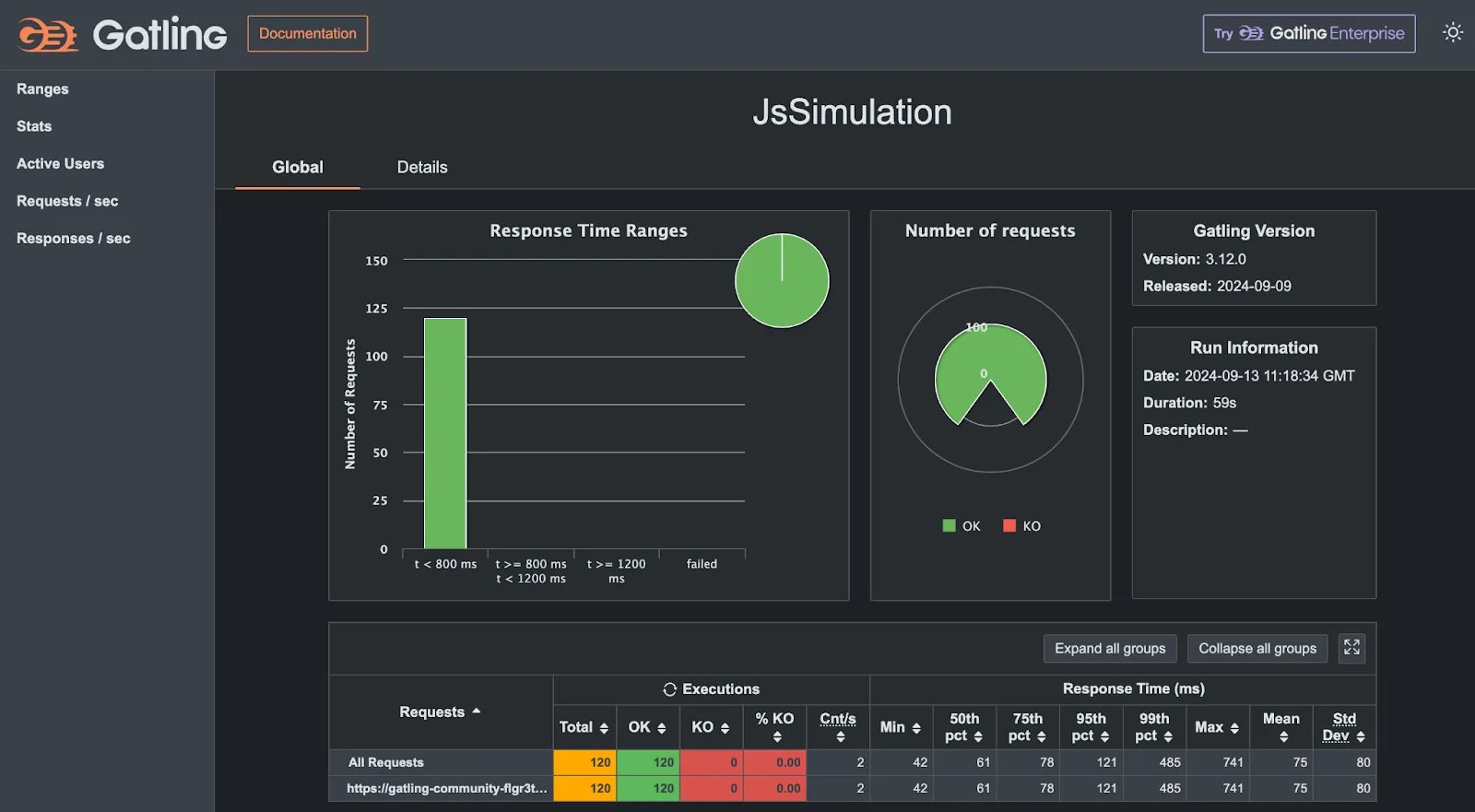
When deploy is finished, you will find, at the end of the runtime operation logs, the generated url of your Gatling load test report and you just need to copy/paste it to your browser, something like:

<img src="https://mintcdn.com/upsun-c9761871/tziXiwEbbKjwbX3l/images/posts/how-tos/automate-with-gatling-1/gatling-dash.webp?fit=max&auto=format&n=tziXiwEbbKjwbX3l&q=85&s=c2eb23251e23ba4a0f42299d9db69045" alt="Gatling Community Edition view, running on an Upsun environment at /gatling, showing response time ranges for 120 requests to the homepage as defined by simulation myfirstsimulation." width="1600" height="881" data-path="images/posts/how-tos/automate-with-gatling-1/gatling-dash.webp" />

### Troubleshooting

If during deployment, when installing Gatling, you get an error telling that the process has been killed, this means that your container is not having enough RAM.

```bash theme={null}
2:22:54 PM Downloading GraalVM Community Edition 22.0.2 to /app/.gatling/tmp/download/graalvm.tar.gz
Unpacking GraalVM to /app/.gatling/graalvm/22.0.2
W: Killed
```

As the Gatling javascript SDK is using [Graalvm JDK](https://www.graalvm.org/) to run load tests locally on the application container, resources (RAM) needs to be adjusted.
By default, PHP containers use a `HIGH_CPU` container profile, which means 0.5 CPU and 224MB of RAM.\
We need to increase the allocated RAM by updating the container profile of our application container to `BALANCED` (0.5CPU & 1088MB RAM)

```yaml {filename=".upsun/config.yaml",hl_lines=["4"],linenostart=1} theme={null}
applications:
  app:
    #...
    container_profile: BALANCED
```

## Conclusions

Load testing your application is crucial if you are running applications with a lot of
traffic spikes or if you’re facing TV show effects.

In this guide, we took a look at how to set up an on-demand set of load tests with Gatling community edition that could be triggered (and observed) on a new Upsun preview environment using a runtime operation.
Some next steps could include automatically triggering these operations when preview environments (merge/pull requests) are opened.

An additional caveat to consider is that load testing in this way -- running Gatling within Upsun application containers -- will consume resources in your projects.
In a follow-up posts, we will see how to use the Gatling Cloud (and so, external resources) to run load tests.

Remain up-to-date on the latest from us over on our social media and community channels: [DEV.to](https://dev.to/upsun),
[Reddit](https://www.reddit.com/r/upsun/), and [Discord](https://discord.gg/upsun).