{authors.length > 0 &&
}
{authors.map(slug => {
const {name, url, avatarUrl} = resolveAuthor(slug);
const inner = <>
{avatarUrl &&  }
{name}
;
return url ?
{inner}
: {inner};
})}
}
{name}
;
return url ?
{inner}
: {inner};
})}
}
{authors.length > 0 && formattedDate && }
{formattedDate && {formattedDate}}
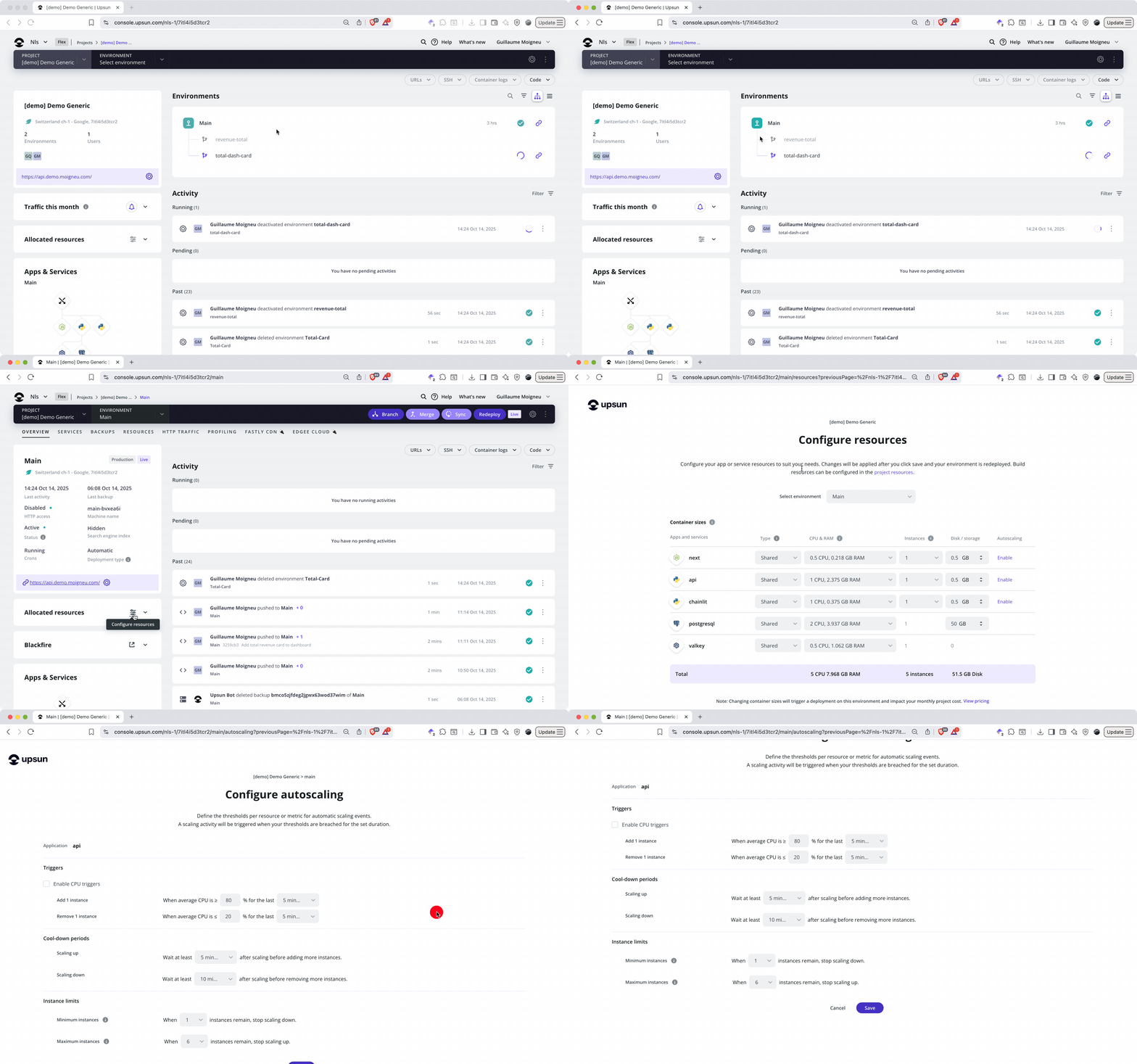 1. Click **Configure resources** in the project card
2. Locate the autoscaling column for your application
3. Select **Enable**
4. Configure your thresholds and guardrails:
* **Scale-up threshold**: CPU percentage that triggers instance addition (default: 80%)
* **Scale-down threshold**: CPU percentage that triggers instance removal (default: 20%)
* **Evaluation period**: How long metrics must exceed thresholds (1-60 minutes, default: 5)
* **Cooldown window**: Wait time between scaling actions (default: 5 minutes)
* **Minimum instances**: Baseline capacity that's always available (default: 1)
* **Maximum instances**: Upper limit to prevent runaway scaling (default: 8, region-dependent)
### Understand your guardrails
Minimum and maximum instance counts act as safety boundaries. Setting minimum instances to 2 ensures your application maintains redundancy even during low traffic periods. This prevents a single point of failure and gives you instant capacity if traffic arrives suddenly.
Maximum instances protect against unexpected scaling costs. If your application experiences abnormal behavior (perhaps a bug causing excessive CPU usage), the maximum cap prevents unlimited resource consumption.
### Available triggers
Currently, autoscaling responds to **average CPU utilization** as its primary trigger. This metric provides a reliable indicator of application load across most workload types. Future releases will add memory-based triggers for applications with different resource consumption patterns.
## Autoscaling for different roles
### For developers: Implementation patterns
When you enable autoscaling, your application architecture becomes critical. Store session data in Redis or another shared service rather than in memory or local filesystem—sessions won't transfer between instances, breaking user experience. Similarly, use object storage (S3-compatible services) or network storage for uploaded files, since mount points on one instance won't appear on others.
Design your application to be stateless. Each instance should handle requests identically without depending on previous requests processe
### For technical leads: Capacity planning
Autoscaling shifts capacity planning from prediction to configuration. Set your scale-up threshold based on acceptable response times. If 80% CPU correlates with sub-200ms responses, that threshold maintains performance during growth. Evaluation periods balance responsiveness against stability. Short periods (2-3 minutes) respond quickly but may scale unnecessarily for brief spikes, while longer periods (10-15 minutes) provide stability at the cost of slower response.
For applications with predictable traffic patterns, like daily peaks at specific hours, consider scheduling vertical resource adjustments to supplement autoscaling. Scale CPU and RAM on your baseline instances before known traffic increases, then let autoscaling handle horizontal expansion as needed.
### For business decision-makers: Cost and availability optimization
Traditional fixed-capacity infrastructure requires paying for peak capacity around the clock. A retail site needing 8 application instances during holiday shopping peaks runs those 8 instances all year, including slow January weeks when traffic drops 70%. Autoscaling aligns costs with revenue-generating activity. During low-traffic periods, infrastructure scales down to minimum instances, reducing spend. When traffic and sales increase, scaling adds capacity automatically.
Reliability improves through automatic response to load. Manual scaling requires someone to notice performance degradation, access infrastructure controls, and trigger scaling actions. By the time this happens, users may have already experienced slow responses or errors. Autoscaling responds within minutes of detecting elevated load, often before human intervention would begin.
## Monitor autoscaling behavior
### Metrics and dashboards
Upsun provides several visibility layers for autoscaling activity. The [Infrastructure Metrics dashboard](https://docs.upsun.com/increase-observability/metrics/http-metrics.html) displays current instance count alongside CPU, memory, and request metrics. Track how scaling responds to traffic patterns and identify opportunities to refine thresholds.
Application metrics through Blackfire integration show performance impact at the code level. Compare response times and throughput across different instance counts to verify scaling improves application behavior as expected.
### Alerts and notifications
The Console displays scaling events with specific icons:
* Bell icon: Threshold alerts (e.g., "CPU above 80% for 5 minutes")
* Resources icon: Scaling actions (e.g., "1 instance added to application")
Configure custom notifications by setting up activity scripts that respond to `environment.alert` events. Send [Slack messages](https://docs.upsun.com/integrations/activity/slack.html), emails, or [webhook notifications](https://docs.upsun.com/integrations/activity/webhooks.html) when scaling occurs. This provides operational awareness without requiring constant dashboard monitoring.
### CLI access
Use the Upsun CLI to review [scaling events](https://docs.upsun.com/integrations/activity/reference.html#type) programmatically:
```bash {filename="Terminal"} theme={null}
upsun activity:list --type environment.alert
upsun activity:list --type environment.resources.update
```
These commands show historical scaling actions, including timestamps, triggering conditions, and resulting instance counts.
## Cost implications and billing
Autoscaling projects bill for consumed resources. Each instance added through autoscaling incurs the same charges as a manually configured instance with equivalent CPU and RAM.
Calculate maximum potential costs by multiplying your single-instance resource allocation by your maximum instance count. An application configured for 2 CPU and 4 GB RAM with maximum instances of 8 could consume up to 16 CPU and 32 GB RAM during peak scaling.
Monitor actual usage patterns through the billing dashboard. Compare costs across time periods to identify opportunities for optimization. If your application consistently runs at maximum instances, either traffic has permanently increased (requiring higher baseline resources), or your thresholds need adjustment to prevent aggressive scaling.
## Best practices and optimization strategies
### Threshold tuning
Start with default thresholds (80% scale-up, 20% scale-down) and adjust based on observed behavior. Applications with consistent, predictable load benefit from tighter thresholds (75% up, 30% down) that maintain resources closer to actual needs. Applications with spiky, unpredictable traffic need wider thresholds to prevent constant scaling fluctuations.
Monitor the frequency of scaling events. Multiple scale-up and scale-down cycles within an hour suggest overly sensitive thresholds or too-short evaluation periods. Adjust one parameter at a time to isolate the effect of each change.
### Application design for horizontal scaling
External services (databases, caches, search indexes) should live outside your application containers. Upsun's service architecture supports this naturally. Your application containers connect to services through configuration, allowing instances to share data stores without architectural changes.
Avoid local state within application containers. Each instance should handle requests identically, without depending on previous requests processed by the same instance. Store session data in [Redis](https://docs.upsun.com/add-services/redis.md), [Valkey](https://docs.upsun.com/add-services/valkey.md), or your database. Never store sessions in local memory or filesystem. Redis and Valkey offer the best performance for session storage with their in-memory architecture, while database storage provides an alternative if you already have a database service configured. This ensures the load balancer can distribute traffic efficiently across all available instances without breaking user sessions.
For file storage and volumes, use [Network Storage](https://docs.upsun.com/add-services/network-storage.md) to ensure all application instances can access the same files. Standard mounts are local to each container. Files written to one instance won't appear on others. Network Storage provides a shared filesystem accessible across all instances, perfect for user uploads, generated assets, or any files that need to persist across your horizontally scaled application layer. Configure Network Storage as a service in your project, then mount it in your application configuration following the guidelines for [composable images](https://docs.upsun.com/create-apps/app-reference/composable-image.md#mounts) or [single-runtime images](https://docs.upsun.com/create-apps/app-reference/single-runtime-image.md#mounts).
### Evaluation periods and cooldown windows
Longer evaluation periods (10-15 minutes) work well for applications where traffic changes gradually. E-commerce sites often see traffic build over 30-60 minutes as promotions spread through email and social media. A 15-minute evaluation period prevents scaling for temporary spikes while responding appropriately to sustained growth.
API services handling burst traffic need shorter periods (3-5 minutes). These applications see rapid load changes that require quick response. Balance this against cooldown windows to prevent oscillation.
### Managing cron jobs
[Cron jobs](https://docs.upsun.com/create-apps/app-reference/single-runtime-image.html#crons) executing during scaling events continue on their original instance until completion. This prevents interrupted tasks but means CPU-intensive cron jobs may trigger scale-ups.
Schedule resource-intensive jobs during known low-traffic periods. Database maintenance, report generation, and data processing work better late at night or early morning when autoscaling runs at minimum capacity.
Alternatively, move long-running tasks to dedicated [worker](https://docs.upsun.com/create-apps/app-reference/single-runtime-image.html#workers) containers that scale independently. Separate [cron job](https://docs.upsun.com/create-apps/app-reference/single-runtime-image.html#crons) execution from request handling, giving you fine-grained control over resources for each workload type.
## Advanced scenario: Multi-app autoscaling
Upsun's [multi-app architecture](https://docs.upsun.com/create-apps.html#use-multiple-apps) allows different applications within a single project to scale independently. Consider a headless commerce implementation:
* **API application** (Node.js): Handles product data, cart operations, checkout
* **Frontend application** (Next.js): Delivers server-rendered pages to users
* **Admin application** (PHP): Provides merchant dashboard for order management
Enable autoscaling on each application with different thresholds:
* API: 70% scale-up (CPU-intensive data processing), minimum 2 instances
* Frontend: 80% scale-up (lighter workload), minimum 2 instances
* Admin: Manual scaling only (predictable load from internal users)
During a marketing campaign, the frontend and API scale independently based on their respective loads. The admin application maintains fixed capacity since merchant activity doesn't correlate with customer traffic.
## Limitations and current support
Autoscaling currently supports:
* Application containers (PHP, Node.js, Python, Go, Java, Ruby, .NET)
* CPU-based triggers
* Upsun Flex product tier
* All environment types (development, staging, production)
Autoscaling does not support:
* Services (databases, caches, search indexes)
* Worker containers and background job queues
* Memory-based triggers (planned for future release)
* Scaling to zero instances
## Related resources
**Configuration and management**:
* [Resource configuration](https://docs.upsun.com/manage-resources/adjust-resources.html)
* [Resource initialization strategies](https://docs.upsun.com/manage-resources/resource-init.html)
* [Manual horizontal scaling](https://docs.upsun.com/manage-resources/adjust-resources.html#horizontal-scaling)
**Monitoring and observability**:
* [Infrastructure metrics](https://docs.upsun.com/increase-observability/metrics.html)
* [Application performance monitoring](https://docs.upsun.com/increase-observability/application-metrics.html)
* [Blackfire integration](https://docs.upsun.com/increase-observability/application-metrics/blackfire.html)
**Cost management**:
* [Monitor billing](https://docs.upsun.com/administration/billing/bp-monitor-billing.html)
* [Upsun pricing](https://www.upsun.com/pricing/)
***
**Get started with autoscaling**:
Create a free Upsun account at [upsun.com](https://upsun.com) and enable autoscaling on your first project. Configure thresholds based on your application's performance characteristics, then monitor scaling behavior through the Console metrics dashboard. Adjust settings as you learn your application's patterns, finding the balance between performance, stability, and cost that works for your specific workload.
1. Click **Configure resources** in the project card
2. Locate the autoscaling column for your application
3. Select **Enable**
4. Configure your thresholds and guardrails:
* **Scale-up threshold**: CPU percentage that triggers instance addition (default: 80%)
* **Scale-down threshold**: CPU percentage that triggers instance removal (default: 20%)
* **Evaluation period**: How long metrics must exceed thresholds (1-60 minutes, default: 5)
* **Cooldown window**: Wait time between scaling actions (default: 5 minutes)
* **Minimum instances**: Baseline capacity that's always available (default: 1)
* **Maximum instances**: Upper limit to prevent runaway scaling (default: 8, region-dependent)
### Understand your guardrails
Minimum and maximum instance counts act as safety boundaries. Setting minimum instances to 2 ensures your application maintains redundancy even during low traffic periods. This prevents a single point of failure and gives you instant capacity if traffic arrives suddenly.
Maximum instances protect against unexpected scaling costs. If your application experiences abnormal behavior (perhaps a bug causing excessive CPU usage), the maximum cap prevents unlimited resource consumption.
### Available triggers
Currently, autoscaling responds to **average CPU utilization** as its primary trigger. This metric provides a reliable indicator of application load across most workload types. Future releases will add memory-based triggers for applications with different resource consumption patterns.
## Autoscaling for different roles
### For developers: Implementation patterns
When you enable autoscaling, your application architecture becomes critical. Store session data in Redis or another shared service rather than in memory or local filesystem—sessions won't transfer between instances, breaking user experience. Similarly, use object storage (S3-compatible services) or network storage for uploaded files, since mount points on one instance won't appear on others.
Design your application to be stateless. Each instance should handle requests identically without depending on previous requests processe
### For technical leads: Capacity planning
Autoscaling shifts capacity planning from prediction to configuration. Set your scale-up threshold based on acceptable response times. If 80% CPU correlates with sub-200ms responses, that threshold maintains performance during growth. Evaluation periods balance responsiveness against stability. Short periods (2-3 minutes) respond quickly but may scale unnecessarily for brief spikes, while longer periods (10-15 minutes) provide stability at the cost of slower response.
For applications with predictable traffic patterns, like daily peaks at specific hours, consider scheduling vertical resource adjustments to supplement autoscaling. Scale CPU and RAM on your baseline instances before known traffic increases, then let autoscaling handle horizontal expansion as needed.
### For business decision-makers: Cost and availability optimization
Traditional fixed-capacity infrastructure requires paying for peak capacity around the clock. A retail site needing 8 application instances during holiday shopping peaks runs those 8 instances all year, including slow January weeks when traffic drops 70%. Autoscaling aligns costs with revenue-generating activity. During low-traffic periods, infrastructure scales down to minimum instances, reducing spend. When traffic and sales increase, scaling adds capacity automatically.
Reliability improves through automatic response to load. Manual scaling requires someone to notice performance degradation, access infrastructure controls, and trigger scaling actions. By the time this happens, users may have already experienced slow responses or errors. Autoscaling responds within minutes of detecting elevated load, often before human intervention would begin.
## Monitor autoscaling behavior
### Metrics and dashboards
Upsun provides several visibility layers for autoscaling activity. The [Infrastructure Metrics dashboard](https://docs.upsun.com/increase-observability/metrics/http-metrics.html) displays current instance count alongside CPU, memory, and request metrics. Track how scaling responds to traffic patterns and identify opportunities to refine thresholds.
Application metrics through Blackfire integration show performance impact at the code level. Compare response times and throughput across different instance counts to verify scaling improves application behavior as expected.
### Alerts and notifications
The Console displays scaling events with specific icons:
* Bell icon: Threshold alerts (e.g., "CPU above 80% for 5 minutes")
* Resources icon: Scaling actions (e.g., "1 instance added to application")
Configure custom notifications by setting up activity scripts that respond to `environment.alert` events. Send [Slack messages](https://docs.upsun.com/integrations/activity/slack.html), emails, or [webhook notifications](https://docs.upsun.com/integrations/activity/webhooks.html) when scaling occurs. This provides operational awareness without requiring constant dashboard monitoring.
### CLI access
Use the Upsun CLI to review [scaling events](https://docs.upsun.com/integrations/activity/reference.html#type) programmatically:
```bash {filename="Terminal"} theme={null}
upsun activity:list --type environment.alert
upsun activity:list --type environment.resources.update
```
These commands show historical scaling actions, including timestamps, triggering conditions, and resulting instance counts.
## Cost implications and billing
Autoscaling projects bill for consumed resources. Each instance added through autoscaling incurs the same charges as a manually configured instance with equivalent CPU and RAM.
Calculate maximum potential costs by multiplying your single-instance resource allocation by your maximum instance count. An application configured for 2 CPU and 4 GB RAM with maximum instances of 8 could consume up to 16 CPU and 32 GB RAM during peak scaling.
Monitor actual usage patterns through the billing dashboard. Compare costs across time periods to identify opportunities for optimization. If your application consistently runs at maximum instances, either traffic has permanently increased (requiring higher baseline resources), or your thresholds need adjustment to prevent aggressive scaling.
## Best practices and optimization strategies
### Threshold tuning
Start with default thresholds (80% scale-up, 20% scale-down) and adjust based on observed behavior. Applications with consistent, predictable load benefit from tighter thresholds (75% up, 30% down) that maintain resources closer to actual needs. Applications with spiky, unpredictable traffic need wider thresholds to prevent constant scaling fluctuations.
Monitor the frequency of scaling events. Multiple scale-up and scale-down cycles within an hour suggest overly sensitive thresholds or too-short evaluation periods. Adjust one parameter at a time to isolate the effect of each change.
### Application design for horizontal scaling
External services (databases, caches, search indexes) should live outside your application containers. Upsun's service architecture supports this naturally. Your application containers connect to services through configuration, allowing instances to share data stores without architectural changes.
Avoid local state within application containers. Each instance should handle requests identically, without depending on previous requests processed by the same instance. Store session data in [Redis](https://docs.upsun.com/add-services/redis.md), [Valkey](https://docs.upsun.com/add-services/valkey.md), or your database. Never store sessions in local memory or filesystem. Redis and Valkey offer the best performance for session storage with their in-memory architecture, while database storage provides an alternative if you already have a database service configured. This ensures the load balancer can distribute traffic efficiently across all available instances without breaking user sessions.
For file storage and volumes, use [Network Storage](https://docs.upsun.com/add-services/network-storage.md) to ensure all application instances can access the same files. Standard mounts are local to each container. Files written to one instance won't appear on others. Network Storage provides a shared filesystem accessible across all instances, perfect for user uploads, generated assets, or any files that need to persist across your horizontally scaled application layer. Configure Network Storage as a service in your project, then mount it in your application configuration following the guidelines for [composable images](https://docs.upsun.com/create-apps/app-reference/composable-image.md#mounts) or [single-runtime images](https://docs.upsun.com/create-apps/app-reference/single-runtime-image.md#mounts).
### Evaluation periods and cooldown windows
Longer evaluation periods (10-15 minutes) work well for applications where traffic changes gradually. E-commerce sites often see traffic build over 30-60 minutes as promotions spread through email and social media. A 15-minute evaluation period prevents scaling for temporary spikes while responding appropriately to sustained growth.
API services handling burst traffic need shorter periods (3-5 minutes). These applications see rapid load changes that require quick response. Balance this against cooldown windows to prevent oscillation.
### Managing cron jobs
[Cron jobs](https://docs.upsun.com/create-apps/app-reference/single-runtime-image.html#crons) executing during scaling events continue on their original instance until completion. This prevents interrupted tasks but means CPU-intensive cron jobs may trigger scale-ups.
Schedule resource-intensive jobs during known low-traffic periods. Database maintenance, report generation, and data processing work better late at night or early morning when autoscaling runs at minimum capacity.
Alternatively, move long-running tasks to dedicated [worker](https://docs.upsun.com/create-apps/app-reference/single-runtime-image.html#workers) containers that scale independently. Separate [cron job](https://docs.upsun.com/create-apps/app-reference/single-runtime-image.html#crons) execution from request handling, giving you fine-grained control over resources for each workload type.
## Advanced scenario: Multi-app autoscaling
Upsun's [multi-app architecture](https://docs.upsun.com/create-apps.html#use-multiple-apps) allows different applications within a single project to scale independently. Consider a headless commerce implementation:
* **API application** (Node.js): Handles product data, cart operations, checkout
* **Frontend application** (Next.js): Delivers server-rendered pages to users
* **Admin application** (PHP): Provides merchant dashboard for order management
Enable autoscaling on each application with different thresholds:
* API: 70% scale-up (CPU-intensive data processing), minimum 2 instances
* Frontend: 80% scale-up (lighter workload), minimum 2 instances
* Admin: Manual scaling only (predictable load from internal users)
During a marketing campaign, the frontend and API scale independently based on their respective loads. The admin application maintains fixed capacity since merchant activity doesn't correlate with customer traffic.
## Limitations and current support
Autoscaling currently supports:
* Application containers (PHP, Node.js, Python, Go, Java, Ruby, .NET)
* CPU-based triggers
* Upsun Flex product tier
* All environment types (development, staging, production)
Autoscaling does not support:
* Services (databases, caches, search indexes)
* Worker containers and background job queues
* Memory-based triggers (planned for future release)
* Scaling to zero instances
## Related resources
**Configuration and management**:
* [Resource configuration](https://docs.upsun.com/manage-resources/adjust-resources.html)
* [Resource initialization strategies](https://docs.upsun.com/manage-resources/resource-init.html)
* [Manual horizontal scaling](https://docs.upsun.com/manage-resources/adjust-resources.html#horizontal-scaling)
**Monitoring and observability**:
* [Infrastructure metrics](https://docs.upsun.com/increase-observability/metrics.html)
* [Application performance monitoring](https://docs.upsun.com/increase-observability/application-metrics.html)
* [Blackfire integration](https://docs.upsun.com/increase-observability/application-metrics/blackfire.html)
**Cost management**:
* [Monitor billing](https://docs.upsun.com/administration/billing/bp-monitor-billing.html)
* [Upsun pricing](https://www.upsun.com/pricing/)
***
**Get started with autoscaling**:
Create a free Upsun account at [upsun.com](https://upsun.com) and enable autoscaling on your first project. Configure thresholds based on your application's performance characteristics, then monitor scaling behavior through the Console metrics dashboard. Adjust settings as you learn your application's patterns, finding the balance between performance, stability, and cost that works for your specific workload.