> ## Documentation Index
> Fetch the complete documentation index at: https://developer.upsun.com/llms.txt
> Use this file to discover all available pages before exploring further.

# How to automatically inject multi-app endpoints as environment variables

> Learn how to use Upsun route identifiers and the PLATFORM_ROUTES variable to easily get and use the hostnames of dynamically deployed applications in your project.


export const PostMeta = ({data = {}}) => {
  const {author, date, image} = data;
  const authors = Array.isArray(author) ? author : author ? [author] : [];
  const resolveAuthor = slug => {
    const entry = AUTHOR_MAP[slug] || ({});
    const name = entry.name || slug;
    const github = entry.github || null;
    const linkedin = entry.linkedin || null;
    const url = github ? `https://github.com/${github}` : linkedin || null;
    const avatarUrl = github ? `https://github.com/${github}.png?size=64` : null;
    return {
      name,
      url,
      avatarUrl
    };
  };
  const formattedDate = date ? new Date(date).toLocaleDateString('en-US', {
    year: 'numeric',
    month: 'long',
    day: 'numeric'
  }) : null;
  if (!image && authors.length === 0 && !formattedDate) return null;
  const AUTHOR_MAP = {
    "aaron-collier": {
      "name": "Aaron Collier"
    },
    "aaron-dudenhofer": {
      "name": "Aaron Dudenhofer"
    },
    "aaron-porter": {
      "name": "Aaron Porter"
    },
    "adriaan-odendaal": {
      "name": "Adriaan Odendaal"
    },
    "ajmal": {
      "name": "Ajmal Siddiqui"
    },
    "akalipetis": {
      "name": "Antonis Kalipetis"
    },
    "alexander-varwijk": {
      "name": "Alexander Varwijk"
    },
    "alicia-bevilacqua": {
      "name": "Alicia Bevilacqua"
    },
    "amelie-deguerry": {
      "name": "Amelie Deguerry"
    },
    "anacidre": {
      "name": "Ana Cidre",
      "linkedin": "https://www.linkedin.com/in/ana-cidre"
    },
    "andoni": {
      "name": "Andoni Auzmendi"
    },
    "andrei-taranu": {
      "name": "Andrei (Alex) Taranu",
      "linkedin": "https://www.linkedin.com/in/andrei-alex-taranu/"
    },
    "andrew-baxter": {
      "name": "Andrew Baxter"
    },
    "andrew-melck": {
      "name": "Andrew Melck"
    },
    "antoine-crochet-damais": {
      "name": "Antoine Crochet Damais"
    },
    "augustin-delaporte": {
      "name": "Augustin Delaporte",
      "linkedin": "https://www.linkedin.com/in/augustindelaporte/"
    },
    "branislav-bujisic": {
      "name": "Branislav Bujisic"
    },
    "carl-smith": {
      "name": "Carl Smith"
    },
    "caroline-leroy": {
      "name": "Caroline Leroy"
    },
    "cati-mayer": {
      "name": "Cati Mayer"
    },
    "catplat": {
      "name": "C Trinkwon"
    },
    "ceelolulu": {
      "name": "Celeste van der Watt"
    },
    "chadwcarlson": {
      "name": "Chad Carlson",
      "github": "chadwcarlson",
      "linkedin": "https://www.linkedin.com/in/chadwcarlson"
    },
    "chris-ward": {
      "name": "Chris Ward"
    },
    "chris-yates": {
      "name": "Chris Yates"
    },
    "christian-sieber": {
      "name": "Christian Sieber"
    },
    "christopher-lockheardt": {
      "name": "Christopher Lockheardt"
    },
    "christopher-skene": {
      "name": "Christopher Skene"
    },
    "chuck-morgan": {
      "name": "Chuck Morgan"
    },
    "corey-dockendorf": {
      "name": "Corey Dockendorf"
    },
    "crell": {
      "name": "Crell"
    },
    "damz": {
      "name": "Damz"
    },
    "dan-morrison": {
      "name": "Dan Morrison"
    },
    "davidbonachera": {
      "name": "David Bonachera",
      "github": "davidbonachera",
      "linkedin": "https://www.linkedin.com/in/davidbonachera"
    },
    "dereliahmet1": {
      "name": "Ahmet Faruk Dereli"
    },
    "devicezero": {
      "name": "Jonas Kröger",
      "github": "devicezero",
      "linkedin": "https://www.linkedin.com/in/jonaskroeger/"
    },
    "doug-goldberg": {
      "name": "Doug Goldberg"
    },
    "duncan-naves": {
      "name": "Duncan Naves",
      "github": "duncannaves",
      "linkedin": "https://www.linkedin.com/in/duncan-naves-a94423aa"
    },
    "erika-bustamante": {
      "name": "Erika Bustamante"
    },
    "fabpot": {
      "name": "Fabien Potencier"
    },
    "flovntp": {
      "name": "Florent Huck",
      "github": "flovntp",
      "linkedin": "https://www.linkedin.com/in/florenthuck"
    },
    "fred-plais": {
      "name": "Fred Plais"
    },
    "gauthier-garnier": {
      "name": "Gauthier Garnier"
    },
    "gilzow": {
      "name": "Paul Gilzow"
    },
    "gmoigneu": {
      "name": "Guillaume Moigneu",
      "github": "gmoigneu",
      "linkedin": "https://www.linkedin.com/in/guillaumemoigneu/"
    },
    "gregqualls": {
      "name": "Greg Qualls"
    },
    "guguss": {
      "name": "Augustin Delaporte"
    },
    "haylee-millar": {
      "name": "Haylee Millar"
    },
    "ivana-kotur": {
      "name": "Ivana Kotur"
    },
    "jackrabbithanna": {
      "name": "Mark Hanna"
    },
    "jared-wright": {
      "name": "Jared Wright",
      "github": "jww-sh",
      "linkedin": "https://www.linkedin.com/in/jaredwaynewright"
    },
    "jessica-orozco": {
      "name": "Jessica Orozco"
    },
    "joey-stanford": {
      "name": "Joey Stanford"
    },
    "john-grubb": {
      "name": "John Grubb"
    },
    "jonas-kruger": {
      "name": "Jonas Kruger"
    },
    "kathryn-frazer": {
      "name": "Kathryn Frazer"
    },
    "kemiojo": {
      "name": "Kemi Elizabeth Ojogbede"
    },
    "kieronsambrook-smith": {
      "name": "Kieronsambrook Smith"
    },
    "laurent-arnoud": {
      "name": "Laurent Arnoud"
    },
    "letoya-boyne": {
      "name": "Letoya Boyne"
    },
    "lolautruche": {
      "name": "Jérôme Vieilledent"
    },
    "lyly-lepinay": {
      "name": "Lyly Lepinay"
    },
    "manauwar-alam": {
      "name": "Manauwar Alam"
    },
    "marc-antoine-porri": {
      "name": "Marc Antoine Porri"
    },
    "maria-antinkaapo": {
      "name": "Maria Antinkaapo"
    },
    "maria-de-anton": {
      "name": "Maria De Anton"
    },
    "mark-dorison": {
      "name": "Mark Dorison"
    },
    "markus-hausammann": {
      "name": "Markus Hausammann"
    },
    "mary-thomas": {
      "name": "Mary Thomas"
    },
    "mathias-bolt-lesniak": {
      "name": "Mathias Bolt Lesniak"
    },
    "mathieu-strauch": {
      "name": "Mathieu Strauch"
    },
    "matthias-van-woensel": {
      "name": "Matthias Van Woensel",
      "linkedin": "https://www.linkedin.com/in/matthias-van-woensel-267a069"
    },
    "michael-sharp": {
      "name": "Michael Sharp"
    },
    "mupsi": {
      "name": "Marine Gandy"
    },
    "natalie-harper": {
      "name": "Natalie Harper"
    },
    "ngommenginger": {
      "name": "Nicolas Gommenginger",
      "linkedin": "https://www.linkedin.com/in/nicolas-gommenginger"
    },
    "nicholas-bennison": {
      "name": "Nicholas Bennison"
    },
    "nicholas-vahalik": {
      "name": "Nicholas Vahalik"
    },
    "nick-hardiman": {
      "name": "Nick Hardiman"
    },
    "nickanderegg": {
      "name": "Nickanderegg"
    },
    "nicolas-grekas": {
      "name": "Nicolas Grekas",
      "github": "nicolas-grekas",
      "linkedin": "https://www.linkedin.com/in/nicolasgrekas/"
    },
    "niti-malwade": {
      "name": "Niti Malwade"
    },
    "opensocialteam": {
      "name": "Opensocialteam"
    },
    "ori-pekelman": {
      "name": "Ori Pekelman"
    },
    "otavio-santana": {
      "name": "Otavio Santana"
    },
    "palwandi": {
      "name": "Pawan Alwandi",
      "github": "pawpy",
      "linkedin": "https://www.linkedin.com/in/pawanalwandi"
    },
    "patrick-boest": {
      "name": "Patrick Boest"
    },
    "patrick-dawkins": {
      "name": "Patrick Dawkins",
      "github": "pjcdawkins",
      "linkedin": "https://www.linkedin.com/in/patrickdawkins"
    },
    "patrick-klima": {
      "name": "Patrick Klima"
    },
    "pjcdawkins": {
      "name": "Pjcdawkins"
    },
    "prineet-kaurbhurji": {
      "name": "Prineet Kaurbhurji"
    },
    "quentin-sinig": {
      "name": "Quentin Sinig"
    },
    "ralt": {
      "name": "Florian Margaine",
      "github": "ralt",
      "linkedin": "https://www.linkedin.com/in/florian-margaine-43971136"
    },
    "ramanathanramakrishnamurthy": {
      "name": "Ramanathanramakrishnamurthy"
    },
    "remi-lejeune": {
      "name": "Rémi Lejeune"
    },
    "ribel": {
      "name": "Taras Kruts"
    },
    "robert-douglass": {
      "name": "Robert Douglass"
    },
    "rudy-weber": {
      "name": "Rudy Weber"
    },
    "ryan-hicks": {
      "name": "Ryan Hicks"
    },
    "sabri-helal": {
      "name": "Sabri Helal"
    },
    "savannah-bergeron": {
      "name": "Savannah Bergeron"
    },
    "shannon-vettes": {
      "name": "Shannon Vettes"
    },
    "shawn-ogasawara": {
      "name": "Shawn Ogasawara",
      "linkedin": "https://www.linkedin.com/in/shawn-ogasawara-83a9a0/"
    },
    "shawna-spoor": {
      "name": "Shawna Spoor"
    },
    "shedrack-akintayo": {
      "name": "Shedrack Akintayo"
    },
    "simon-ruggier": {
      "name": "Simon Ruggier"
    },
    "sophie-van-der-kindere": {
      "name": "Sophie Van Der Kindere"
    },
    "stefanos-thampis": {
      "name": "Stefanos Thampis"
    },
    "stephen-weinberg": {
      "name": "Stephen Weinberg"
    },
    "sukhman-virk": {
      "name": "Sukhman Virk"
    },
    "sumaira-nazir": {
      "name": "Sumaira Nazir"
    },
    "sumer": {
      "name": "Sümer Cip"
    },
    "syed-raza": {
      "name": "Syed Raza"
    },
    "tamara-bacchia": {
      "name": "Tamara Bacchia"
    },
    "tara-arnold": {
      "name": "Tara Arnold"
    },
    "theosakamg": {
      "name": "Mickael Gaillard",
      "github": "theosakamg"
    },
    "thomasdiluccio": {
      "name": "Thomas di Luccio"
    },
    "tim-anderson": {
      "name": "Tim Anderson"
    },
    "tom-helmer-hansen": {
      "name": "Tom Helmer Hansen"
    },
    "tylermills": {
      "name": "Tyler Mills"
    },
    "upsun": {
      "name": "Upsun"
    },
    "veronika-tolkachova": {
      "name": "Veronika Tolkachova",
      "linkedin": "https://www.linkedin.com/in/veronika-tolkachova-169167a2"
    },
    "vince-parker": {
      "name": "Vince Parker"
    },
    "vinnie-russo": {
      "name": "Vincenzo Russo"
    },
    "vrobert78": {
      "name": "Vincent Robert",
      "github": "vrobert78",
      "linkedin": "https://www.linkedin.com/in/vincent-robert-498a883"
    },
    "yuriy-babenko": {
      "name": "Yuriy Babenko"
    },
    "yuriy-gerasimov": {
      "name": "Yuriy Gerasimov"
    }
  };
  return <div className="post-meta">
      {(authors.length > 0 || formattedDate) && <div className="post-meta-info">
          {authors.length > 0 && <div className="post-meta-authors">
              {authors.map(slug => {
    const {name, url, avatarUrl} = resolveAuthor(slug);
    const inner = <>
                    {avatarUrl && <img src={avatarUrl} alt={name} className="post-meta-avatar" />}
                    <span className="post-meta-author-name">{name}</span>
                  </>;
    return url ? <a key={slug} href={url} target="_blank" rel="noopener noreferrer" className="post-meta-author">
                    {inner}
                  </a> : <span key={slug} className="post-meta-author">{inner}</span>;
  })}
            </div>}
          {authors.length > 0 && formattedDate && <span className="post-meta-separator" aria-hidden="true">·</span>}
          {formattedDate && <span className="post-meta-date">{formattedDate}</span>}
        </div>}
      {image && <img src={image} alt="" className="post-meta-image" aria-hidden="true" />}
    </div>;
};

<PostMeta data={{ author: ["gmoigneu"], date: "2025-04-28T17:00:00+00:00", image: "/images/posts/hands-on/route-ids-env/route-ids-env.webp" }} />

Many projects deployed on Upsun contain multiple applications. For example, you might have a frontend application and a separate backend API, or several microservices working together.

Upsun lets you [create relationships between your applications](https://docs.upsun.com/create-apps/multi-app/relationships.html), similar to how you connect services like databases. However, these relationships are mainly for server-side communication over the internal network. Sometimes, one application needs the *public* hostname, or Uniform Resource Identifier (URI), of another application in the same project.

For instance, imagine a **Next.js frontend** application. It might need to call your **API application** from both server components (running on the server) and client components (running in the user's browser). To do this, the frontend needs the API's public URI.

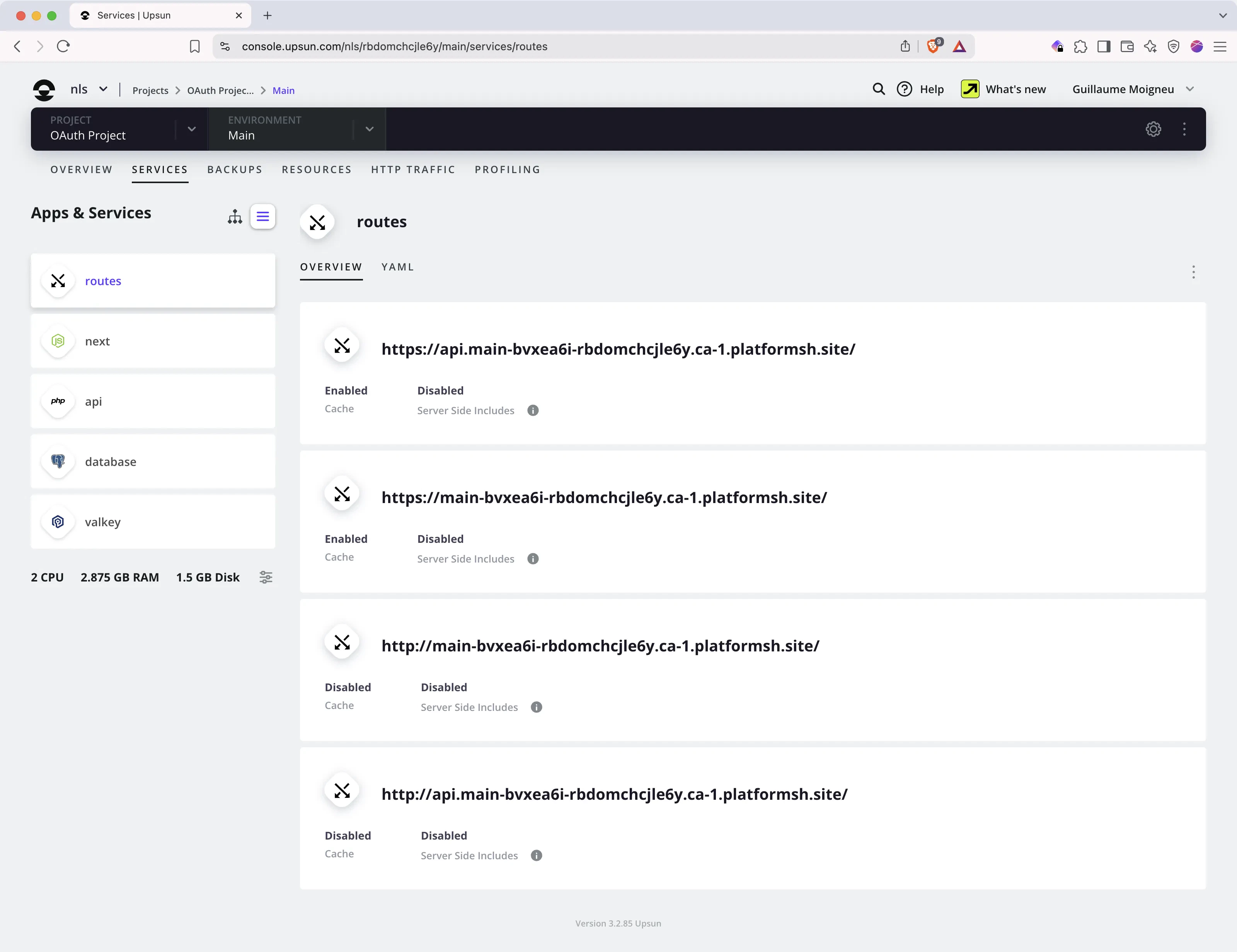
Every application container deployed on Upsun automatically gets an environment variable called `PLATFORM_ROUTES`. This variable contains information about all the project's routes. This guide uses the following example project structure:

<img src="https://mintcdn.com/upsun-c9761871/tziXiwEbbKjwbX3l/images/posts/hands-on/route-ids-env/project.webp?fit=max&auto=format&n=tziXiwEbbKjwbX3l&q=85&s=97f660d31988dffb8440170c7da9dcfc" alt="Multi-Apps project" width="3200" height="2464" data-path="images/posts/hands-on/route-ids-env/project.webp" />

## Define route identifiers

First, define your application routes in your project's routing configuration, within `.upsun/config.yaml`. Here's a basic example:

```yaml {filename=".upsun/config.yaml"} theme={null}
routes:
  "https://api.{all}/":
    type: upstream
    upstream: "api:http"
  "https://{all}/": 
    type: upstream
    upstream: "next:http"
```

To easily reference these routes later, add an `id` attribute to each one. Choose a meaningful string for the ID. Using the application name often works well:

```yaml {filename=".upsun/config.yaml",linenos=table,hl_lines=["5","9"],linenostart=1} theme={null}
routes:
  "https://api.{all}/":
    type: upstream
    upstream: "api:http"
    id: api # Identifier for the API route
  "https://{all}/": 
    type: upstream
    upstream: "next:http"
    id: next # Identifier for the Next.js frontend route
```

Read the full Upsun documentation on [Route identifiers](https://docs.upsun.com/define-routes.html#route-identifiers).

## Fetch specific URIs from `$PLATFORM_ROUTES`

After deploying these changes, connect to one of your application containers using the Upsun CLI. For example, use `upsun ssh -A api` where `api` is your application's name. Inside the container, you can view the `PLATFORM_ROUTES` variable:

```bash {filename="Terminal"} theme={null}
web@api.0:~$ echo $PLATFORM_ROUTES 
eyJodHRwOi8vYXBpLm1haW4tYnZ4ZWE2aS1yY...........
```

The output is a base64 encoded JSON string. To see the actual JSON content, you need to decode it:

```bash {filename="Terminal"} theme={null}
web@api.0:~$ echo $PLATFORM_ROUTES | base64 --decode
{"http://api.main-bvxea6i-abcdefgh.ca-1.platformsh.site/": {"id": null, "original_url": "http://api.{all}/", "primary": false, "production_url": "http://api.main-bvxea6i-abcdefgh.ca-1.platformsh.site/", "to": "https://api.main-bvxea6i-abcdefgh.ca-1.platformsh.site/", "type": "redirect"}, "http://main-bvxea6i-abcdefgh.ca-1.platformsh.site/": {"attributes": {}, "id": null, "original_url": "http://{all}/", "primary": false, "production_url": "http://main-bvxea6i-abcdefgh.ca-1.platformsh.site/", "to": "https://main-bvxea6i-abcdefgh.ca-1.platformsh.site/", "type": "redirect"}, "https://api.main-bvxea6i-abcdefgh.ca-1.platformsh.site/": {"attributes": {}, "id": "api", "original_url": "https://api.{all}/", "primary": true, "production_url": "https://api.main-bvxea6i-abcdefgh.ca-1.platformsh.site/", "type": "upstream", "upstream": "api"}, "https://main-bvxea6i-abcdefgh.ca-1.platformsh.site/": {"attributes": {}, "id": "next", "original_url": "https://{all}/", "primary": false, "production_url": "https://main-bvxea6i-abcdefgh.ca-1.platformsh.site/", "type": "upstream", "upstream": "next"}}
```

You can make this JSON easier to read by piping it through `jq`. `jq` is a command-line tool for processing JSON data. It helps you parse, filter, and transform JSON, which is useful when working with APIs and configuration files. You can find more information on the [jq website](https://jqlang.org/).

***

```bash {filename="Terminal"} theme={null}
web@api.0:~$ echo $PLATFORM_ROUTES | base64 --decode | jq
{
  "http://api.main-bvxea6i-abcdefgh.ca-1.platformsh.site/": {
    "id": null,
    "original_url": "http://api.{all}/",
    "primary": false,
    "production_url": "http://api.main-bvxea6i-abcdefgh.ca-1.platformsh.site/",
    "to": "https://api.main-bvxea6i-abcdefgh.ca-1.platformsh.site/",
    "type": "redirect"
  },
  "http://main-bvxea6i-abcdefgh.ca-1.platformsh.site/": {
    "attributes": {},
    ...
  },
  "https://api.main-bvxea6i-abcdefgh.ca-1.platformsh.site/": {
     "attributes": {},
     "id": "api",
     ...
  },
  "https://main-bvxea6i-abcdefgh.ca-1.platformsh.site/": {
     "attributes": {},
     "id": "next",
     ...
  }
}
```

That's much better!

Now, you need a `jq` query to extract the specific URI you want, using the route `id` defined earlier. Here's how you can select the URI associated with the `id` "api":

```bash {filename="Terminal"} theme={null}
web@api.0:~$ echo $PLATFORM_ROUTES | base64 --decode | jq -r 'to_entries[] | select(.value.id=="api") | .key'
https://api.main-bvxea6i-abcdefgh.ca-1.platformsh.site/
```

Here's how that `jq` query works:
*(You can experiment with this query and the example JSON using the [online jq playground](https://play.jqlang.org/s/MWvtpbqG5ExfBgB).)*

1. `to_entries[]`: Converts the JSON object into an array where each item has a `key` (the URI) and a `value` (the route details object). The `[]` processes each item in the array.
2. `select(.value.id=="api")`: Filters these items, keeping only those where the `id` field inside the `value` object equals `"api"`. Change `"api"` to the route ID you need.
3. `.key`: Extracts the `key` field (the URI) from the filtered item.
4. The `-r` flag tells `jq` to output the raw value instead of its JSON representation.

Now you know how to get a specific URI. The next step is making this URI available to your applications as an environment variable.

## Set up environment variables using `.environment`

Upsun lets you define environment variables dynamically during the build process. You do this using a special script file named `.environment` placed in your application's source code directory. Find more details in the [documentation on setting variables via script](https://docs.upsun.com/development/variables/set-variables.html#set-variables-via-script).

Suppose your Next.js application needs an `API_HOST` variable with the API's URI. And your API application needs a `NEXT_PUBLIC_BASE_URL` variable with the frontend's URI. You can create a `.environment` file using the `jq` queries from the previous step.

<Warning>
  ⚠️ Important: If multiple applications need these variables, place a copy of the `.environment` file in each application's source directory.
</Warning>

```bash {filename=".environment"} theme={null}
# This file runs during deployment to set environment variables.
# Place it in the root directory of applications that need these variables.

# Export the API host URI (identified by id: api)
export API_HOST=$(echo $PLATFORM_ROUTES | base64 --decode | jq -r 'to_entries[] | select(.value.id=="api") | .key')

# Export the Next.js frontend URI (identified by id: next)
# NEXT_PUBLIC_BASE_URL is a common convention for Next.js public variables.
export NEXT_PUBLIC_BASE_URL=$(echo $PLATFORM_ROUTES | base64 --decode | jq -r 'to_entries[] | select(.value.id=="next") | .key')

```

Commit the `.environment` file(s) to your repository and push the changes to Upsun. After the deployment finishes, connect to an application container again and check the variables:

```bash {filename="Terminal"} theme={null}
web@api.0:~$ echo $API_HOST
https://api.main-bvxea6i-abcdefgh.ca-1.platformsh.site/
web@api.0:~$ echo $NEXT_PUBLIC_BASE_URL
https://main-bvxea6i-abcdefgh.ca-1.platformsh.site/
```

Your applications can now access these URIs directly through the environment variables:

```php theme={null}
# In PHP
echo getenv('API_HOST');

# In Node.js
console.log(process.env.API_HOST);

# In Python
import os
print(os.environ.get("API_HOST"))
```

## Bonus tip: Use these variables in statically exported JavaScript applications

JavaScript applications that are statically exported (like some Next.js static exports or Create React App builds) generate their assets and configuration during a build phase.

The way most static generators work is that they will replace the `process.env.*` variables at build time with their actual values. Let's take an example with a variable called `API_ENDPOINT`.

This `API_ENDPOINT` variable has a value of `https://api.example.com` in either your `.env` file or the server environment variable. Your Javascript code refers to that variable with `process.env.API_ENDPOINT`.

When you are triggering the generation of the static export with `npm run build`, the `process.env.API_ENDPOINT` get replaced in the generated code with the actual value `https://api.example.com`.

While it does seem to be a satisfactory way of doing it, it creates a problem when that code needs to run on multiple environments where that variable could have different values.

On `production`, you might want to query `https://api.example.com` but `staging` should target \`\`[https://staging.api.example.com\`](https://staging.api.example.com`).

"Hard-coding" the value during prevent us from running the exact same build on different environments with different configurations make the build process undertiministic. Upsun's goal is to run the exact same applications builds on all environment to guarantee the exact same behaviors during testing.

### Injecting different variable values on different environments

In our example, the client application running in the user's browser needs to be able to query a different `API_ENDPOINT` based on the environment it is running in. Let's explore two approaches.

#### Approach 1: Dynamically constructing the URI (If applicable)

The simplest approach, **if your routes structure allows it**, is to dynamically construct the necessary URI in the browser. For example, consider these routes again:

```yaml {filename=".upsun/config.yaml"} theme={null}
routes:
  "https://api.{all}/":
    type: upstream
    upstream: "api:http"
  "https://{all}/":
    type: upstream
    upstream: "next:http"
```

Here, the API endpoint (`api.{all}`) is always on the same base domain as the frontend (`{all}`), just prefixed with `api.`. You could potentially use the browser's current `location.hostname` to figure out the API endpoint:

```ts theme={null}
// Example function to get the API endpoint
export const getAPIEndpoint = (): string => {
  // Check if running server-side (Node.js) where build-time env var might exist
  // Ensure NEXT_PUBLIC_API_ENDPOINT is set during build if needed server-side
  if (typeof window === 'undefined' && process.env.NEXT_PUBLIC_API_ENDPOINT) {
    return process.env.NEXT_PUBLIC_API_ENDPOINT;
  }

  // Check if running in a browser
  if (typeof window !== 'undefined') {
    // Construct the API endpoint from the browser's hostname
    return `https://api.${window.location.hostname}`;
  }

  // Fallback or error if environment is unknown
  throw new Error("Cannot determine API endpoint: Unknown environment.");
};
```

However, this dynamic construction might not always work, especially if you don't control the API endpoint naming structure or if the relationship between frontend and API hostnames is more complex.

#### Approach 2: Using a Deploy Hook and Runtime Configuration File

When dynamic construction isn't suitable, the recommended alternative is to write the necessary environment-specific variables to a JSON configuration file during the `deploy` hook. This hook runs after your application build is complete and deployed to the server, at which point it has access to runtime environment variables, services, and mounts.

Let's assume your project uses an `API_ENDPOINT` environment variable whose value changes per environment (e.g., defined using Upsun's [environment variables features](https://docs.upsun.com/development/variables.html)).

During the `deploy` hook, you can read this variable's value and store it in a publicly accessible JSON file, for example, `variables.json`.

First, ensure you have a writable mount defined in your application configuration where you can store this file:

```yaml {filename=".upsun/config.yaml"} theme={null}
# .upsun/app.yaml or .upsun/config.yaml depending on your setup

# Define a writable mount named 'storage'
mounts:
  'storage':
    source: storage # Use 'local:files/storage' for local storage
    source_path: '' # Optional: subdirectory within the source
```

Next, make this storage location accessible via HTTP so the frontend JavaScript can fetch the file. Configure this in your `web` settings:

```yaml {filename=".upsun/config.yaml"} theme={null}
# .upsun/app.yaml or .upsun/config.yaml

web:
  locations:
    # Make the 'storage' mount publicly readable at /storage
    /storage:
      root: "storage" # Corresponds to the mount name
      passthru: true  # Allow direct access to files
      scripts: false
      allow: true
      expires: -1     # Disable caching or set appropriate headers
```

*Note: Adjust `passthru`, `scripts`, `allow`, and `expires` based on your security and caching needs.*

Finally, add the `deploy` hook to write the environment variable into the JSON file within the mounted directory. The path `/app/storage` typically corresponds to the `storage` mount point inside the container:

```yaml {filename=".upsun/config.yaml"} theme={null}
# .upsun/app.yaml or .upsun/config.yaml

hooks:
  deploy: |
    # Write the environment variable to a JSON file
    printf '{"API_ENDPOINT": "%s"}\\n' "$API_ENDPOINT" > /app/storage/variables.json
```

Your application can then fetch this `/storage/variables.json` file at runtime using a library like `axios` or the native `fetch` API to get the correct `API_ENDPOINT` for the current environment:

```ts theme={null}
// Using native fetch API
fetch('/storage/variables.json')
  .then(response => {
    if (!response.ok) {
      throw new Error(`HTTP error! status: ${response.status}`);
    }
    return response.json(); // Parses the JSON response body
  })
  .then(data => {
    const apiEndpoint = data.API_ENDPOINT;
    console.log('API Endpoint from fetch:', apiEndpoint);
    // Use the apiEndpoint in your application
  })
  .catch(error => {
    console.error('Error fetching config:', error);
  });

// Using axios (assuming axios is installed and imported)
// import axios from 'axios';

axios.get('/storage/variables.json')
  .then(response => {
    const apiEndpoint = response.data.API_ENDPOINT; // axios automatically parses JSON
    console.log('API Endpoint from axios:', apiEndpoint);
    // Use the apiEndpoint in your application
  })
  .catch(error => {
    console.error('Error fetching config with axios:', error);
  });
```

Choose the method that best suits your project structure and needs. Both methods allows a single build artifact to be deployed across different environments, each retrieving its specific configuration at runtime.

This approach ensures your application build remains deterministic while allowing runtime flexibility for environment-specific settings like API endpoints.