{authors.length > 0 &&
}
{authors.map(slug => {
const {name, url, avatarUrl} = resolveAuthor(slug);
const inner = <>
{avatarUrl &&  }
{name}
;
return url ?
{inner}
: {inner};
})}
}
{name}
;
return url ?
{inner}
: {inner};
})}
}
{authors.length > 0 && formattedDate && }
{formattedDate && {formattedDate}}
 ## Prerequisites
Before you start, make sure you have:
* An [Upsun account](https://upsun.com/) with a project deployed
* A PostgreSQL service configured in your `.upsun/config.yaml`
* The [Upsun CLI](https://docs.upsun.com/administration/cli.html) installed and authenticated
* For [Option 1](#option-1-run-harlequin-locally-with-an-ssh-tunnel): Python 3.10+ and [uv](https://docs.astral.sh/uv/) (or pip) installed locally
Your project should have a [PostgreSQL](https://docs.upsun.com/anchors/services/postgresql/) service defined. If you don't have one yet, add this to your `.upsun/config.yaml`:
```yaml {filename=".upsun/config.yaml",hl_lines=["1-3","8-9"],linenostart=1} theme={null}
services:
postgresql:
type: postgresql:16
applications:
myapp:
# ... your app config
relationships:
database: "postgresql:postgresql"
```
## Option 1: Run Harlequin locally with an SSH tunnel
This approach keeps Harlequin on your local machine and connects to Upsun through a secure SSH tunnel. It's ideal for day-to-day development when you want quick access to your database without modifying your deployment.
### Install Harlequin with the PostgreSQL adapter
Harlequin uses adapters to connect to different database types. Install both Harlequin and its PostgreSQL adapter:
```bash {filename="Terminal"} theme={null}
uv tool install 'harlequin[postgres]'
```
Alternatively, you can use pip:
```bash {filename="Terminal"} theme={null}
pip install harlequin harlequin-postgres
```
Or Homebrew on macOS:
```bash {filename="Terminal"} theme={null}
brew install harlequin
```
Verify the installation:
```bash {filename="Terminal"} theme={null}
harlequin --version
harlequin, version 2.5.0
Installed Adapters:
- duckdb, version 2.5.0
- sqlite, version 2.5.0
- postgres, version 1.3.0
```
### Open an SSH tunnel to your Upsun services
The Upsun CLI can create [SSH tunnels](https://docs.upsun.com/anchors/ssh/tunnel/direct/) to all services in your environment. Run:
```bash {filename="Terminal"} theme={null}
upsun tunnel:open
```
You'll see output similar to:
```bash {filename="Terminal"} theme={null}
upsun tunnel:open
Enter a number to choose an app:
[0] api
[1] chainlit
[2] next
> 0
SSH tunnel opened to postgresql at: postgresql://main:main@127.0.0.1:30000/main
SSH tunnel opened to cache at: valkey://127.0.0.1:30001
Logs are written to: /Users/nls/.upsun-cli/tunnels.log
List tunnels with: upsun tunnels
View tunnel details with: upsun tunnel:info
Close tunnels with: upsun tunnel:close
Save encoded tunnel details to the PLATFORM_RELATIONSHIPS variable using:
export PLATFORM_RELATIONSHIPS="$(upsun tunnel:info --encode)"
```
Note the connection details. In this example:
* **Host**: `127.0.0.1`
* **Port**: `30000`
* **Username**: `main`
* **Password**: `main`
* **Database**: `main`
Your values may differ depending on your configuration.
### Connect Harlequin to the tunnel
With the tunnel open, launch Harlequin using the connection details:
```bash {filename="Terminal"} theme={null}
harlequin -a postgres "postgres://main:main@127.0.0.1:30000/main"
```
You can also pass the connection parameters individually:
```bash {filename="Terminal"} theme={null}
harlequin -a postgres -h 127.0.0.1 -p 30000 -U main --password main -d main
```
Harlequin opens in your terminal, ready to explore your database.
### Explore your database
## Prerequisites
Before you start, make sure you have:
* An [Upsun account](https://upsun.com/) with a project deployed
* A PostgreSQL service configured in your `.upsun/config.yaml`
* The [Upsun CLI](https://docs.upsun.com/administration/cli.html) installed and authenticated
* For [Option 1](#option-1-run-harlequin-locally-with-an-ssh-tunnel): Python 3.10+ and [uv](https://docs.astral.sh/uv/) (or pip) installed locally
Your project should have a [PostgreSQL](https://docs.upsun.com/anchors/services/postgresql/) service defined. If you don't have one yet, add this to your `.upsun/config.yaml`:
```yaml {filename=".upsun/config.yaml",hl_lines=["1-3","8-9"],linenostart=1} theme={null}
services:
postgresql:
type: postgresql:16
applications:
myapp:
# ... your app config
relationships:
database: "postgresql:postgresql"
```
## Option 1: Run Harlequin locally with an SSH tunnel
This approach keeps Harlequin on your local machine and connects to Upsun through a secure SSH tunnel. It's ideal for day-to-day development when you want quick access to your database without modifying your deployment.
### Install Harlequin with the PostgreSQL adapter
Harlequin uses adapters to connect to different database types. Install both Harlequin and its PostgreSQL adapter:
```bash {filename="Terminal"} theme={null}
uv tool install 'harlequin[postgres]'
```
Alternatively, you can use pip:
```bash {filename="Terminal"} theme={null}
pip install harlequin harlequin-postgres
```
Or Homebrew on macOS:
```bash {filename="Terminal"} theme={null}
brew install harlequin
```
Verify the installation:
```bash {filename="Terminal"} theme={null}
harlequin --version
harlequin, version 2.5.0
Installed Adapters:
- duckdb, version 2.5.0
- sqlite, version 2.5.0
- postgres, version 1.3.0
```
### Open an SSH tunnel to your Upsun services
The Upsun CLI can create [SSH tunnels](https://docs.upsun.com/anchors/ssh/tunnel/direct/) to all services in your environment. Run:
```bash {filename="Terminal"} theme={null}
upsun tunnel:open
```
You'll see output similar to:
```bash {filename="Terminal"} theme={null}
upsun tunnel:open
Enter a number to choose an app:
[0] api
[1] chainlit
[2] next
> 0
SSH tunnel opened to postgresql at: postgresql://main:main@127.0.0.1:30000/main
SSH tunnel opened to cache at: valkey://127.0.0.1:30001
Logs are written to: /Users/nls/.upsun-cli/tunnels.log
List tunnels with: upsun tunnels
View tunnel details with: upsun tunnel:info
Close tunnels with: upsun tunnel:close
Save encoded tunnel details to the PLATFORM_RELATIONSHIPS variable using:
export PLATFORM_RELATIONSHIPS="$(upsun tunnel:info --encode)"
```
Note the connection details. In this example:
* **Host**: `127.0.0.1`
* **Port**: `30000`
* **Username**: `main`
* **Password**: `main`
* **Database**: `main`
Your values may differ depending on your configuration.
### Connect Harlequin to the tunnel
With the tunnel open, launch Harlequin using the connection details:
```bash {filename="Terminal"} theme={null}
harlequin -a postgres "postgres://main:main@127.0.0.1:30000/main"
```
You can also pass the connection parameters individually:
```bash {filename="Terminal"} theme={null}
harlequin -a postgres -h 127.0.0.1 -p 30000 -U main --password main -d main
```
Harlequin opens in your terminal, ready to explore your database.
### Explore your database
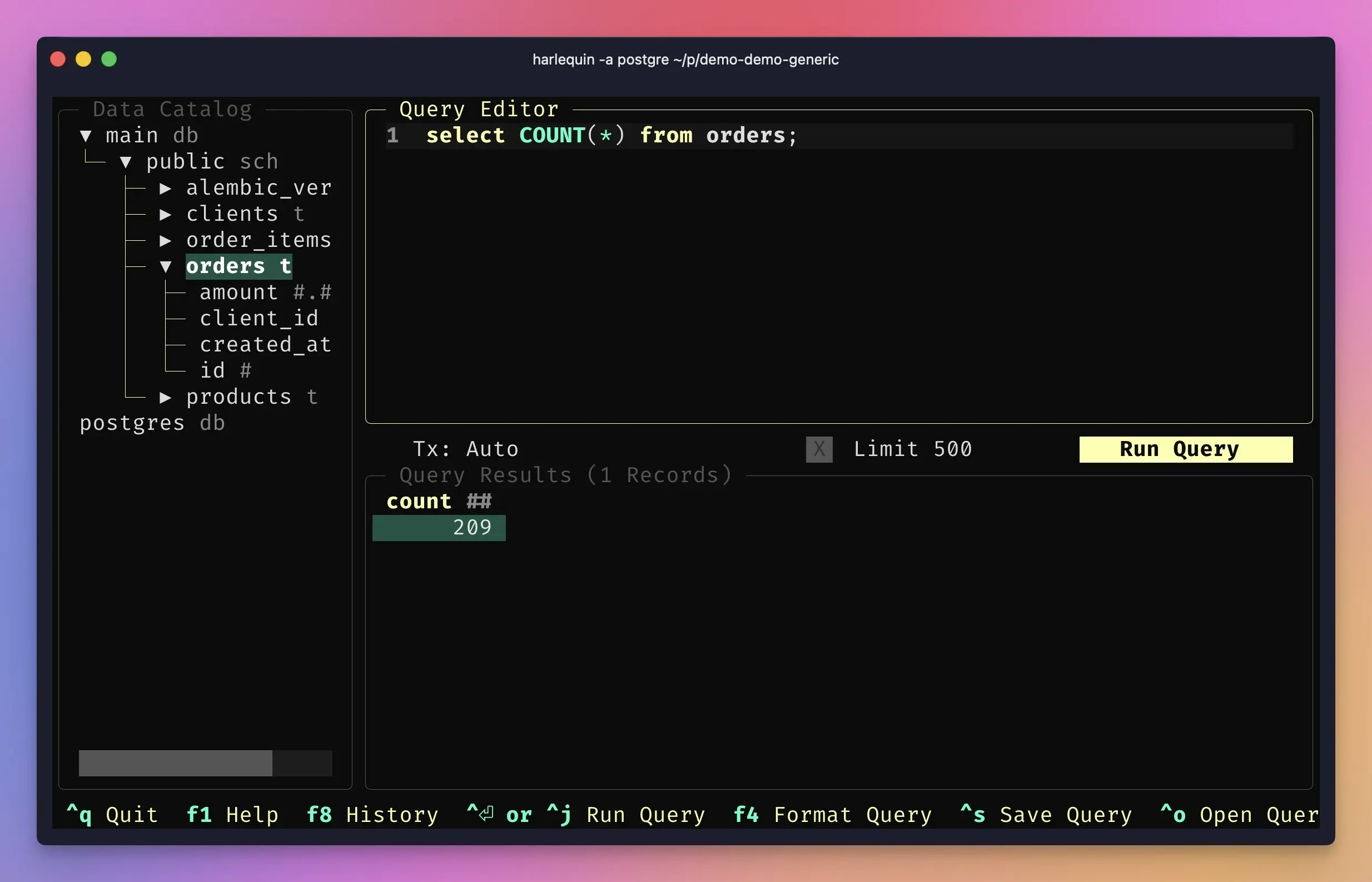 Once connected, you can:
* **Browse the data catalog**: The left sidebar shows all schemas, tables, and columns in your database
* **Write queries**: The center pane is a full-featured editor with syntax highlighting and autocomplete (press `Ctrl+Space` to trigger suggestions)
* **View results**: Execute queries with `Ctrl+Enter` and scroll through results in the bottom pane
* **Export data**: Select results and export to CSV, JSON, or Parquet formats
Press `F1` to see all keyboard shortcuts.
When you're done, close the tunnel:
```bash {filename="Terminal"} theme={null}
upsun tunnel:close
```
## Option 2: Install Harlequin on Upsun
If you prefer to keep your tools on the platform, or want consistent access for your team, you can install Harlequin directly in your Upsun environment. Since Harlequin is a terminal UI, you'll access it by [SSH-ing into your container](https://docs.upsun.com/anchors/ssh/tunnel/app/).
### Add Harlequin to your build hook
Modify your `.upsun/config.yaml` to install Harlequin during the build phase. Add the pip install command to your existing build hook:
```yaml {filename=".upsun/config.yaml",hl_lines=["4-6","10"],linenostart=1} theme={null}
applications:
myapp:
type: python:3.13
dependencies:
python3:
uv: "*"
hooks:
build: |
set -eux
uv tool install --python 3.13 'harlequin[postgres]'
# Add your other build commands here
relationships:
database: "postgresql:postgresql"
# ... rest of your config
```
If your application isn't Python-based, you can still install Harlequin. Python is available in most Upsun containers. Add a build hook that installs it:
```yaml {filename=".upsun/config.yaml",hl_lines=["4-6","10"],linenostart=1} theme={null}
applications:
myapp:
type: nodejs:22 # or php:8.3, etc.
dependencies:
python3:
uv: "*"
hooks:
build: |
set -eux
uv tool install --python 3.13 'harlequin[postgres]'
# Your other build commands
relationships:
database: "postgresql:postgresql"
# ... rest of your config
```
### Deploy your changes
Commit and push your configuration changes:
```bash {filename="Terminal"} theme={null}
git add .upsun/config.yaml
git commit -m "Add Harlequin SQL IDE"
upsun push
```
Wait for the deployment to complete.
### SSH into your environment
Connect to your running container:
```bash {filename="Terminal"} theme={null}
upsun ssh
```
### Launch Harlequin
Upsun generate one environment variable for the database DSN automatically (see [Service Environment variables](https://docs.upsun.com/anchors/variables/environment/service/)):
```bash {filename="Terminal"} theme={null}
web@api.0:~$ env | grep DATABASE
DATABASE_URL=postgresql://main:main@postgresql.internal:5432/main
```
The name can vary as it is using the `relationships` name in the `myapp` section of the `.upsun/config.yaml` file (e.g. `database:` in the example above)
You can now launch Harlequin:
```bash {filename="Terminal"} theme={null}
/app/.local/bin/harlequin -a postgres $DATABASE_URL
```
If you want to avoid specifying the whole path, update your `PATH` variable in the deploy hook of your application:
```yaml {filename=".upsun/config.yaml",hl_lines=["4"],linenostart=1} theme={null}
hooks:
deploy: |
set -x -e
export PATH="$PATH:/app/.local/bin/"
```
## Tips and best practices
### Create a shell alias for quick access
If you use Option 1 frequently, add an alias to your shell configuration:
```bash {filename="~/.bashrc or ~/.zshrc"} theme={null}
alias upsun-harlequin='upsun tunnel:open && harlequin -a postgres "$(upsun tunnel:info --property=database.0.url)"'
```
### Use read-only credentials for safety
When exploring production data, consider creating a read-only PostgreSQL user to prevent accidental modifications. You can configure additional database endpoints in your services configuration.
### Keyboard shortcuts
Here are the most useful Harlequin shortcuts:
| Action | Shortcut |
| -------------------- | ------------ |
| Execute query | `Ctrl+Enter` |
| Autocomplete | `Ctrl+Space` |
| New query tab | `Ctrl+N` |
| Close tab | `Ctrl+W` |
| Focus data catalog | `Ctrl+B` |
| Help / all shortcuts | `F1` |
| Quit | `Ctrl+Q` |
### Query history
Harlequin automatically saves your query history. Press `F8` to browse previous queries and re-run them.
## Conclusion
You now have two ways to use Harlequin with your Upsun PostgreSQL database:
1. **Local installation with SSH tunnel**: Best for individual developers who want quick, on-demand access
2. **Installed on Upsun**: Best for team environments or when you want tools available directly on the platform
Both approaches give you a powerful, visual way to explore and query your data without leaving the terminal.
For more Harlequin features and configuration options, check out the [official documentation](https://harlequin.sh/docs/getting-started).
Ready to try it out? [Create a free Upsun account](https://upsun.com/) and deploy your first PostgreSQL-powered application.
Once connected, you can:
* **Browse the data catalog**: The left sidebar shows all schemas, tables, and columns in your database
* **Write queries**: The center pane is a full-featured editor with syntax highlighting and autocomplete (press `Ctrl+Space` to trigger suggestions)
* **View results**: Execute queries with `Ctrl+Enter` and scroll through results in the bottom pane
* **Export data**: Select results and export to CSV, JSON, or Parquet formats
Press `F1` to see all keyboard shortcuts.
When you're done, close the tunnel:
```bash {filename="Terminal"} theme={null}
upsun tunnel:close
```
## Option 2: Install Harlequin on Upsun
If you prefer to keep your tools on the platform, or want consistent access for your team, you can install Harlequin directly in your Upsun environment. Since Harlequin is a terminal UI, you'll access it by [SSH-ing into your container](https://docs.upsun.com/anchors/ssh/tunnel/app/).
### Add Harlequin to your build hook
Modify your `.upsun/config.yaml` to install Harlequin during the build phase. Add the pip install command to your existing build hook:
```yaml {filename=".upsun/config.yaml",hl_lines=["4-6","10"],linenostart=1} theme={null}
applications:
myapp:
type: python:3.13
dependencies:
python3:
uv: "*"
hooks:
build: |
set -eux
uv tool install --python 3.13 'harlequin[postgres]'
# Add your other build commands here
relationships:
database: "postgresql:postgresql"
# ... rest of your config
```
If your application isn't Python-based, you can still install Harlequin. Python is available in most Upsun containers. Add a build hook that installs it:
```yaml {filename=".upsun/config.yaml",hl_lines=["4-6","10"],linenostart=1} theme={null}
applications:
myapp:
type: nodejs:22 # or php:8.3, etc.
dependencies:
python3:
uv: "*"
hooks:
build: |
set -eux
uv tool install --python 3.13 'harlequin[postgres]'
# Your other build commands
relationships:
database: "postgresql:postgresql"
# ... rest of your config
```
### Deploy your changes
Commit and push your configuration changes:
```bash {filename="Terminal"} theme={null}
git add .upsun/config.yaml
git commit -m "Add Harlequin SQL IDE"
upsun push
```
Wait for the deployment to complete.
### SSH into your environment
Connect to your running container:
```bash {filename="Terminal"} theme={null}
upsun ssh
```
### Launch Harlequin
Upsun generate one environment variable for the database DSN automatically (see [Service Environment variables](https://docs.upsun.com/anchors/variables/environment/service/)):
```bash {filename="Terminal"} theme={null}
web@api.0:~$ env | grep DATABASE
DATABASE_URL=postgresql://main:main@postgresql.internal:5432/main
```
The name can vary as it is using the `relationships` name in the `myapp` section of the `.upsun/config.yaml` file (e.g. `database:` in the example above)
You can now launch Harlequin:
```bash {filename="Terminal"} theme={null}
/app/.local/bin/harlequin -a postgres $DATABASE_URL
```
If you want to avoid specifying the whole path, update your `PATH` variable in the deploy hook of your application:
```yaml {filename=".upsun/config.yaml",hl_lines=["4"],linenostart=1} theme={null}
hooks:
deploy: |
set -x -e
export PATH="$PATH:/app/.local/bin/"
```
## Tips and best practices
### Create a shell alias for quick access
If you use Option 1 frequently, add an alias to your shell configuration:
```bash {filename="~/.bashrc or ~/.zshrc"} theme={null}
alias upsun-harlequin='upsun tunnel:open && harlequin -a postgres "$(upsun tunnel:info --property=database.0.url)"'
```
### Use read-only credentials for safety
When exploring production data, consider creating a read-only PostgreSQL user to prevent accidental modifications. You can configure additional database endpoints in your services configuration.
### Keyboard shortcuts
Here are the most useful Harlequin shortcuts:
| Action | Shortcut |
| -------------------- | ------------ |
| Execute query | `Ctrl+Enter` |
| Autocomplete | `Ctrl+Space` |
| New query tab | `Ctrl+N` |
| Close tab | `Ctrl+W` |
| Focus data catalog | `Ctrl+B` |
| Help / all shortcuts | `F1` |
| Quit | `Ctrl+Q` |
### Query history
Harlequin automatically saves your query history. Press `F8` to browse previous queries and re-run them.
## Conclusion
You now have two ways to use Harlequin with your Upsun PostgreSQL database:
1. **Local installation with SSH tunnel**: Best for individual developers who want quick, on-demand access
2. **Installed on Upsun**: Best for team environments or when you want tools available directly on the platform
Both approaches give you a powerful, visual way to explore and query your data without leaving the terminal.
For more Harlequin features and configuration options, check out the [official documentation](https://harlequin.sh/docs/getting-started).
Ready to try it out? [Create a free Upsun account](https://upsun.com/) and deploy your first PostgreSQL-powered application.