> ## Documentation Index
> Fetch the complete documentation index at: https://developer.upsun.com/llms.txt
> Use this file to discover all available pages before exploring further.

# Limit deployments to Platform.sh only with tags: part one

export const PostMeta = ({data = {}}) => {
  const {author, date} = data;
  const authors = Array.isArray(author) ? author : author ? [author] : [];
  const resolveAuthor = slug => {
    const entry = AUTHOR_MAP[slug] || ({});
    const name = entry.name || slug;
    const github = entry.github || null;
    const linkedin = entry.linkedin || null;
    const url = github ? `https://github.com/${github}` : linkedin || null;
    const avatarUrl = github ? `https://github.com/${github}.png?size=64` : null;
    return {
      name,
      url,
      avatarUrl
    };
  };
  const formattedDate = date ? new Date(date).toLocaleDateString('en-US', {
    year: 'numeric',
    month: 'long',
    day: 'numeric'
  }) : null;
  if (authors.length === 0 && !formattedDate) return null;
  const AUTHOR_MAP = {
    "aaron-collier": {
      "name": "Aaron Collier"
    },
    "aaron-dudenhofer": {
      "name": "Aaron Dudenhofer"
    },
    "aaron-porter": {
      "name": "Aaron Porter"
    },
    "adriaan-odendaal": {
      "name": "Adriaan Odendaal"
    },
    "ajmal": {
      "name": "Ajmal Siddiqui"
    },
    "akalipetis": {
      "name": "Antonis Kalipetis"
    },
    "alexander-varwijk": {
      "name": "Alexander Varwijk"
    },
    "alicia-bevilacqua": {
      "name": "Alicia Bevilacqua"
    },
    "amelie-deguerry": {
      "name": "Amelie Deguerry"
    },
    "anacidre": {
      "name": "Ana Cidre",
      "linkedin": "https://www.linkedin.com/in/ana-cidre"
    },
    "andoni": {
      "name": "Andoni Auzmendi"
    },
    "andrei-taranu": {
      "name": "Andrei (Alex) Taranu",
      "linkedin": "https://www.linkedin.com/in/andrei-alex-taranu/"
    },
    "andrew-baxter": {
      "name": "Andrew Baxter"
    },
    "andrew-melck": {
      "name": "Andrew Melck"
    },
    "antoine-crochet-damais": {
      "name": "Antoine Crochet Damais"
    },
    "augustin-delaporte": {
      "name": "Augustin Delaporte",
      "linkedin": "https://www.linkedin.com/in/augustindelaporte/"
    },
    "branislav-bujisic": {
      "name": "Branislav Bujisic"
    },
    "carl-smith": {
      "name": "Carl Smith"
    },
    "caroline-leroy": {
      "name": "Caroline Leroy"
    },
    "cati-mayer": {
      "name": "Cati Mayer"
    },
    "catplat": {
      "name": "C Trinkwon"
    },
    "ceelolulu": {
      "name": "Celeste van der Watt"
    },
    "chadwcarlson": {
      "name": "Chad Carlson",
      "github": "chadwcarlson",
      "linkedin": "https://www.linkedin.com/in/chadwcarlson"
    },
    "chris-ward": {
      "name": "Chris Ward"
    },
    "chris-yates": {
      "name": "Chris Yates"
    },
    "christian-sieber": {
      "name": "Christian Sieber"
    },
    "christopher-lockheardt": {
      "name": "Christopher Lockheardt"
    },
    "christopher-skene": {
      "name": "Christopher Skene"
    },
    "chuck-morgan": {
      "name": "Chuck Morgan"
    },
    "corey-dockendorf": {
      "name": "Corey Dockendorf"
    },
    "crell": {
      "name": "Crell"
    },
    "damz": {
      "name": "Damz"
    },
    "dan-morrison": {
      "name": "Dan Morrison"
    },
    "davidbonachera": {
      "name": "David Bonachera",
      "github": "davidbonachera",
      "linkedin": "https://www.linkedin.com/in/davidbonachera"
    },
    "dereliahmet1": {
      "name": "Ahmet Faruk Dereli"
    },
    "devicezero": {
      "name": "Jonas Kröger",
      "github": "devicezero",
      "linkedin": "https://www.linkedin.com/in/jonaskroeger/"
    },
    "doug-goldberg": {
      "name": "Doug Goldberg"
    },
    "duncan-naves": {
      "name": "Duncan Naves",
      "github": "duncannaves",
      "linkedin": "https://www.linkedin.com/in/duncan-naves-a94423aa"
    },
    "erika-bustamante": {
      "name": "Erika Bustamante"
    },
    "fabpot": {
      "name": "Fabien Potencier"
    },
    "flovntp": {
      "name": "Florent Huck",
      "github": "flovntp",
      "linkedin": "https://www.linkedin.com/in/florenthuck"
    },
    "fred-plais": {
      "name": "Fred Plais"
    },
    "gauthier-garnier": {
      "name": "Gauthier Garnier"
    },
    "gilzow": {
      "name": "Paul Gilzow"
    },
    "gmoigneu": {
      "name": "Guillaume Moigneu",
      "github": "gmoigneu",
      "linkedin": "https://www.linkedin.com/in/guillaumemoigneu/"
    },
    "gregqualls": {
      "name": "Greg Qualls"
    },
    "guguss": {
      "name": "Augustin Delaporte"
    },
    "haylee-millar": {
      "name": "Haylee Millar"
    },
    "ivana-kotur": {
      "name": "Ivana Kotur"
    },
    "jackrabbithanna": {
      "name": "Mark Hanna"
    },
    "jared-wright": {
      "name": "Jared Wright",
      "github": "jww-sh",
      "linkedin": "https://www.linkedin.com/in/jaredwaynewright"
    },
    "jessica-orozco": {
      "name": "Jessica Orozco"
    },
    "joey-stanford": {
      "name": "Joey Stanford"
    },
    "john-grubb": {
      "name": "John Grubb"
    },
    "jonas-kruger": {
      "name": "Jonas Kruger"
    },
    "kathryn-frazer": {
      "name": "Kathryn Frazer"
    },
    "kemiojo": {
      "name": "Kemi Elizabeth Ojogbede"
    },
    "kieronsambrook-smith": {
      "name": "Kieronsambrook Smith"
    },
    "laurent-arnoud": {
      "name": "Laurent Arnoud",
      "linkedin": "https://www.linkedin.com/in/laurent-arnoud-861b44121/"
    },
    "letoya-boyne": {
      "name": "Letoya Boyne"
    },
    "lolautruche": {
      "name": "Jérôme Vieilledent"
    },
    "lyly-lepinay": {
      "name": "Lyly Lepinay"
    },
    "manauwar-alam": {
      "name": "Manauwar Alam"
    },
    "marc-antoine-porri": {
      "name": "Marc Antoine Porri"
    },
    "maria-antinkaapo": {
      "name": "Maria Antinkaapo"
    },
    "maria-de-anton": {
      "name": "Maria De Anton"
    },
    "mark-dorison": {
      "name": "Mark Dorison"
    },
    "markus-hausammann": {
      "name": "Markus Hausammann"
    },
    "mary-thomas": {
      "name": "Mary Thomas"
    },
    "mathias-bolt-lesniak": {
      "name": "Mathias Bolt Lesniak"
    },
    "mathieu-strauch": {
      "name": "Mathieu Strauch"
    },
    "matthias-van-woensel": {
      "name": "Matthias Van Woensel",
      "linkedin": "https://www.linkedin.com/in/matthias-van-woensel-267a069"
    },
    "maz-mohammadi": {
      "name": "Maz Mohammadi"
    },
    "michael-sharp": {
      "name": "Michael Sharp"
    },
    "mupsi": {
      "name": "Marine Gandy"
    },
    "natalie-harper": {
      "name": "Natalie Harper"
    },
    "ngommenginger": {
      "name": "Nicolas Gommenginger",
      "linkedin": "https://www.linkedin.com/in/nicolas-gommenginger"
    },
    "nicholas-bennison": {
      "name": "Nicholas Bennison"
    },
    "nicholas-vahalik": {
      "name": "Nicholas Vahalik"
    },
    "nick-hardiman": {
      "name": "Nick Hardiman"
    },
    "nickanderegg": {
      "name": "Nickanderegg"
    },
    "nicolas-grekas": {
      "name": "Nicolas Grekas",
      "github": "nicolas-grekas",
      "linkedin": "https://www.linkedin.com/in/nicolasgrekas/"
    },
    "niti-malwade": {
      "name": "Niti Malwade"
    },
    "opensocialteam": {
      "name": "Opensocialteam"
    },
    "ori-pekelman": {
      "name": "Ori Pekelman"
    },
    "otavio-santana": {
      "name": "Otavio Santana"
    },
    "palwandi": {
      "name": "Pawan Alwandi",
      "github": "pawpy",
      "linkedin": "https://www.linkedin.com/in/pawanalwandi"
    },
    "patrick-boest": {
      "name": "Patrick Boest"
    },
    "patrick-dawkins": {
      "name": "Patrick Dawkins",
      "github": "pjcdawkins",
      "linkedin": "https://www.linkedin.com/in/patrickdawkins"
    },
    "patrick-klima": {
      "name": "Patrick Klima"
    },
    "pjcdawkins": {
      "name": "Pjcdawkins"
    },
    "prineet-kaurbhurji": {
      "name": "Prineet Kaurbhurji"
    },
    "quentin-sinig": {
      "name": "Quentin Sinig"
    },
    "ralt": {
      "name": "Florian Margaine",
      "github": "ralt",
      "linkedin": "https://www.linkedin.com/in/florian-margaine-43971136"
    },
    "ramanathanramakrishnamurthy": {
      "name": "Ramanathanramakrishnamurthy"
    },
    "remi-lejeune": {
      "name": "Rémi Lejeune"
    },
    "ribel": {
      "name": "Taras Kruts"
    },
    "robert-douglass": {
      "name": "Robert Douglass"
    },
    "rudy-weber": {
      "name": "Rudy Weber"
    },
    "ryan-hicks": {
      "name": "Ryan Hicks"
    },
    "sabri-helal": {
      "name": "Sabri Helal"
    },
    "savannah-bergeron": {
      "name": "Savannah Bergeron"
    },
    "shannon-vettes": {
      "name": "Shannon Vettes"
    },
    "shawn-ogasawara": {
      "name": "Shawn Ogasawara",
      "linkedin": "https://www.linkedin.com/in/shawn-ogasawara-83a9a0/"
    },
    "shawna-spoor": {
      "name": "Shawna Spoor"
    },
    "shedrack-akintayo": {
      "name": "Shedrack Akintayo"
    },
    "simon-ruggier": {
      "name": "Simon Ruggier"
    },
    "sophie-van-der-kindere": {
      "name": "Sophie Van Der Kindere"
    },
    "stefanos-thampis": {
      "name": "Stefanos Thampis"
    },
    "stephen-weinberg": {
      "name": "Stephen Weinberg"
    },
    "sukhman-virk": {
      "name": "Sukhman Virk"
    },
    "sumaira-nazir": {
      "name": "Sumaira Nazir"
    },
    "sumer": {
      "name": "Sümer Cip"
    },
    "syed-raza": {
      "name": "Syed Raza"
    },
    "tamara-bacchia": {
      "name": "Tamara Bacchia"
    },
    "tara-arnold": {
      "name": "Tara Arnold"
    },
    "theosakamg": {
      "name": "Mickael Gaillard",
      "github": "theosakamg"
    },
    "thomasdiluccio": {
      "name": "Thomas di Luccio"
    },
    "tim-anderson": {
      "name": "Tim Anderson"
    },
    "tom-helmer-hansen": {
      "name": "Tom Helmer Hansen"
    },
    "tylermills": {
      "name": "Tyler Mills"
    },
    "upsun": {
      "name": "Upsun"
    },
    "veronika-tolkachova": {
      "name": "Veronika Tolkachova",
      "linkedin": "https://www.linkedin.com/in/veronika-tolkachova-169167a2"
    },
    "vince-parker": {
      "name": "Vince Parker"
    },
    "vinnie-russo": {
      "name": "Vincenzo Russo"
    },
    "vrobert78": {
      "name": "Vincent Robert",
      "github": "vrobert78",
      "linkedin": "https://www.linkedin.com/in/vincent-robert-498a883"
    },
    "yuriy-babenko": {
      "name": "Yuriy Babenko"
    },
    "yuriy-gerasimov": {
      "name": "Yuriy Gerasimov"
    }
  };
  return <div className="post-meta">
      {(authors.length > 0 || formattedDate) && <div className="post-meta-info">
          {authors.length > 0 && <div className="post-meta-authors">
              {authors.map(slug => {
    const {name, url, avatarUrl} = resolveAuthor(slug);
    const inner = <>
                    {avatarUrl && <img src={avatarUrl} alt={name} className="post-meta-avatar" />}
                    <span className="post-meta-author-name">{name}</span>
                  </>;
    return url ? <a key={slug} href={url} target="_blank" rel="noopener noreferrer" className="post-meta-author">
                    {inner}
                  </a> : <span key={slug} className="post-meta-author">{inner}</span>;
  })}
            </div>}
          {authors.length > 0 && formattedDate && <span className="post-meta-separator" aria-hidden="true">·</span>}
          {formattedDate && <span className="post-meta-date">{formattedDate}</span>}
        </div>}
    </div>;
};

<PostMeta data={{ author: ["gilzow"], date: "2024-03-14T10:00:00+00:00", image: "/images/posts/hands-on/guide-to-limit-deployments-to-platformsh-only-with-tags-part-one/Limit_deployments_to_psh-one.webp" }} />

Throughout the years, many users have asked us if it’s possible to only deploy to Platform.sh when a tag is pushed using
a [source code integration](https://docs.platform.sh/integrations/source.html). The answer is: with our current source
integrations, it's not—but that doesn’t mean it’s impossible.

Platform.sh is based on Git and because of this, acts as a remote for your code repository. This means there’s no reason
you can’t take advantage of your source code management system’s CI/CD platforms—for example, through GitHub or
GitLab—to enable you to only deploy to Platform. sh using tags, whenever needed.

In this article, I'll walk you through the steps of creating a GitHub workflow that only pushes your codebase to
Platform.sh to deploy changes when a particular tag is pushed. But, before we get started, there are some assumptions to
consider.

### **The assumptions**

For the purpose of this article and the steps detailed, I will assume that you have:

* A GitHub account and a repository with working code
* Administrative rights on the GitHub repository so you can add [repository secrets](https://docs.github.com/en/codespaces/managing-codespaces-for-your-organization/managing-secrets-for-your-repository-and-organization-for-github-codespaces)
* A Platform.sh account and a project for your code base with working code
* A default branch in GitHub which is the same branch as your production branch in Platform.sh
* A default branch in Platform.sh which is also your production branch
* You do *not* have a source code integration created between Platform.sh and GitHub.

The last assumption might surprise you but with a source code integration, Platform.sh becomes a mirror of your
repository and we don't want every new commit to be mirrored.

#### **1. The workflow file**

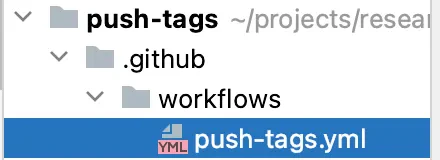
To start, we'll need to create a YAML file in the directory `workflows` within a `.github` directory at the root of our
repository as shown in the image below.
[Find out more details on why this step is necessary](https://docs.github.com/en/actions/using-workflows/about-workflows#about-workflows).
The file's name doesn't matter, but it *has* to be inside `./.github/workflows`. For this demonstration, I'll name mine
`push-tags.yml`

<img src="https://mintcdn.com/upsun-c9761871/tziXiwEbbKjwbX3l/images/posts/hands-on/guide-to-limit-deployments-to-platformsh-only-with-tags-part-one/limit_deployments_blog_1_73415aa7d1.webp?fit=max&auto=format&n=tziXiwEbbKjwbX3l&q=85&s=af368eadac100e2bdc536c4e4a7aa55e" alt="push-tags.yml" width="440" height="160" data-path="images/posts/hands-on/guide-to-limit-deployments-to-platformsh-only-with-tags-part-one/limit_deployments_blog_1_73415aa7d1.webp" />

#### **2. The event**

For this next step, go ahead and open up the file you just created. The first thing we need to do is instruct the GitHub
Actions platform on when this workflow should be triggered via a
[defined event](https://docs.github.com/en/actions/using-workflows/events-that-trigger-workflows).

To trigger this workflow when a new tag is added, we'll use the
[push event](https://docs.github.com/en/actions/using-workflows/events-that-trigger-workflows#push) with an
[event filter](https://docs.github.com/en/actions/using-workflows/triggering-a-workflow#using-filters) of
[tags](https://docs.github.com/en/actions/using-workflows/workflow-syntax-for-github-actions#onpushbranchestagsbranches-ignoretags-ignore).
If needed, we could also filter for only tags that match a certain pattern, but for this demonstration, we'll allow the
workflow to be triggered when any tag ( `‘*’` ) is added. I'm also going to add a name property so that this workflow
will be easier to identify in the repository's Actions tab.

```yaml {filename=".github/workflows/push-tags.yml"} theme={null}
name: Push to Platform.sh when tagged
    on:
      push:
        tags:
          - '*'
```

#### **3. The jobs**

Next, we need to define the [jobs](https://docs.github.com/en/actions/using-workflows/workflow-syntax-for-github-actions#jobs)
this workflow should run. While unlikely, you don't want to push tags that reference commits that are older than commits
that have already been pushed or on a branch other than our production branch[^1].

To avoid this, create two jobs `should-we-push` which will determine if the tag that was just created references a newer
commit on the correct branch, and a second job `we-should-push` which will handle pushing the new commits to Platform.sh.
All jobs require a `runs-on`
[property](https://docs.github.com/en/actions/using-workflows/workflow-syntax-for-github-actions#jobsjob_idruns-on) to
designate the OS of the
[runner](https://docs.github.com/en/actions/using-github-hosted-runners/about-github-hosted-runners/about-github-hosted-runners),
so for both, you can set them to use `ubuntu-latest`.

```yaml {filename=".github/workflows/push-tags.yml"} theme={null}
jobs:
      should-we-push:
        runs-on: ubuntu-latest
      we-should-push:
        runs-on: ubuntu-latest
```

By default, jobs run concurrently, but in this case, you want the `we-should-push` job to only run if the
`should-we-push` job determines this tag contains new commits.

To build dependency between the jobs, you need to add a `needs` property to the `we-should-push` job, and an `outputs`
property to the `should-we-push` job so that it can pass information to the `we-should-push` job. Set the
`should-we-push` job to output a value named `push` that is set by the `do-push` step—a step that doesn't exist yet, but
don’t worry, we'll create it shortly.

```yaml {filename=".github/workflows/push-tags.yml"} theme={null}
jobs:
      should-we-push:
        runs-on: ubuntu-latest
        outputs:
          push: ${{ steps.do-push.outputs.push }}
      we-should-push:
        runs-on: ubuntu-latest
        needs: should-we-push
```

#### **4. Making sure we need to Push**

Now let's start building out the steps in our `should-we-push` job. By default, your runner's workspace does not contain
the contents of your repository. Before we can evaluate what tags exist, we'll need to checkout our repository into the
workspace on our
[runner](https://docs.github.com/en/actions/using-github-hosted-runners/about-github-hosted-runners/about-github-hosted-runners).
We can use the [actions/checkout action](https://github.com/actions/checkout) to do this task for us.

However, this action’s default is to only fetch a single commit: the ref/SHA that triggered the workflow. We need the
tag history so we can evaluate if the tag triggering the workflow is from newer commits and on the correct branch. To
alter the behavior of this action, we'll use the `with` property and instruct it to instead checkout all history for
tags. We'll also instruct it to checkout the default (production) branch with the `ref` property. We can retrieve that
branch name with the `github` [context](https://docs.github.com/en/actions/learn-github-actions/contexts#github-context).

```yaml {filename=".github/workflows/push-tags.yml"} theme={null}
jobs:
      should-we-push:
        runs-on: ubuntu-latest
        outputs:
          push: ${{ steps.do-push.outputs.push }}
        steps:
          - uses: actions/checkout@v4
            with:
              fetch-depth: 0
              ref: ${{ github.event.repository.default_branch }}
```

Now that we have our repository checked out into our runner's workspace, we can check to see if the current tag is the
tag nearest to the most recent commit in the production branch. To do that, we'll use the git command
[describe](https://git-scm.com/docs/git-describe). This allows us to ensure we're not pushing a tag that has been added
to an old commit, or on another branch and pushing unnecessary commits over to Platform.sh.
<Note>
  **Note**: to keep the sample code short, I'm `<snip>`ing the code we've already covered. The complete workflow file is
  available at the end of this article.
</Note>

```yaml {filename=".github/workflows/push-tags.yml"} theme={null}
    <snip>
        steps:
          - uses: actions/checkout@v4
            with:
              fetch-depth: 0
              ref: ${{ github.event.repository.default_branch }}
          - id: get-latest-tag
            run: |
              latestTag=$(git describe --abbrev=0 --tags)
              echo "latest_tag=${latestTag}" >> $GITHUB_OUTPUT
```

We'll store that value in the `outputs` object of the
[steps context](https://docs.github.com/en/actions/learn-github-actions/contexts#steps-context) so we can reference it
in the next step. Now we'll create the step that we referenced earlier in the job's `outputs` property. This step will
compare the tag that triggered the workflow with the tag we just retrieved to see if they match. If they do, we'll set
the output value to true so that the `we-should-push` job can determine if it should run.

```yaml {filename=".github/workflows/push-tags.yml"} theme={null}
    steps:
          <snip>
          - id: do-push
            run: |
              push="false"
              if [[ "${{ github.ref_name }}" = "${{ steps.get-latest-tag.outputs.latest_tag }}" ]]; then
                echo "::notice::We have a new tag to push to platform"
                push="true"          
              fi
              echo "push=${push}" >> $GITHUB_OUTPUT
```

This completes the `should-we-push` and now we can move to building out the rest of the `we-should-push` job.

#### **5. Pushing to Platform.sh**

We only want this job to run if the should-we-push job determines the new tag is one we need to push. To set a
conditional on the job, we'll use the `if` property and reference the output we set in the `should-we-push` job:

```yaml {filename=".github/workflows/push-tags.yml"} theme={null}
  we-should-push:
        runs-on: ubuntu-latest
        needs: should-we-push
        if: needs.should-we-push.outputs.push == 'true'
```

Many of the steps in this job will rely on the
[Platform.sh command line interface](https://docs.platform.sh/administration/cli.html) (CLI). For us to use it in an
automated fashion, we'll need to set an environment variable
[PLATFORMSH\_CLI\_TOKEN](https://docs.platform.sh/administration/cli/api-tokens.html) at the job level so it's available
for all steps in the job.

```yaml {filename=".github/workflows/push-tags.yml"} theme={null}
  we-should-push:
        runs-on: ubuntu-latest
        needs: should-we-push
        if: needs.should-we-push.outputs.push == 'true'
        env:
          PLATFORMSH_CLI_TOKEN: ${{ secrets.PSH_TOKEN }}
```

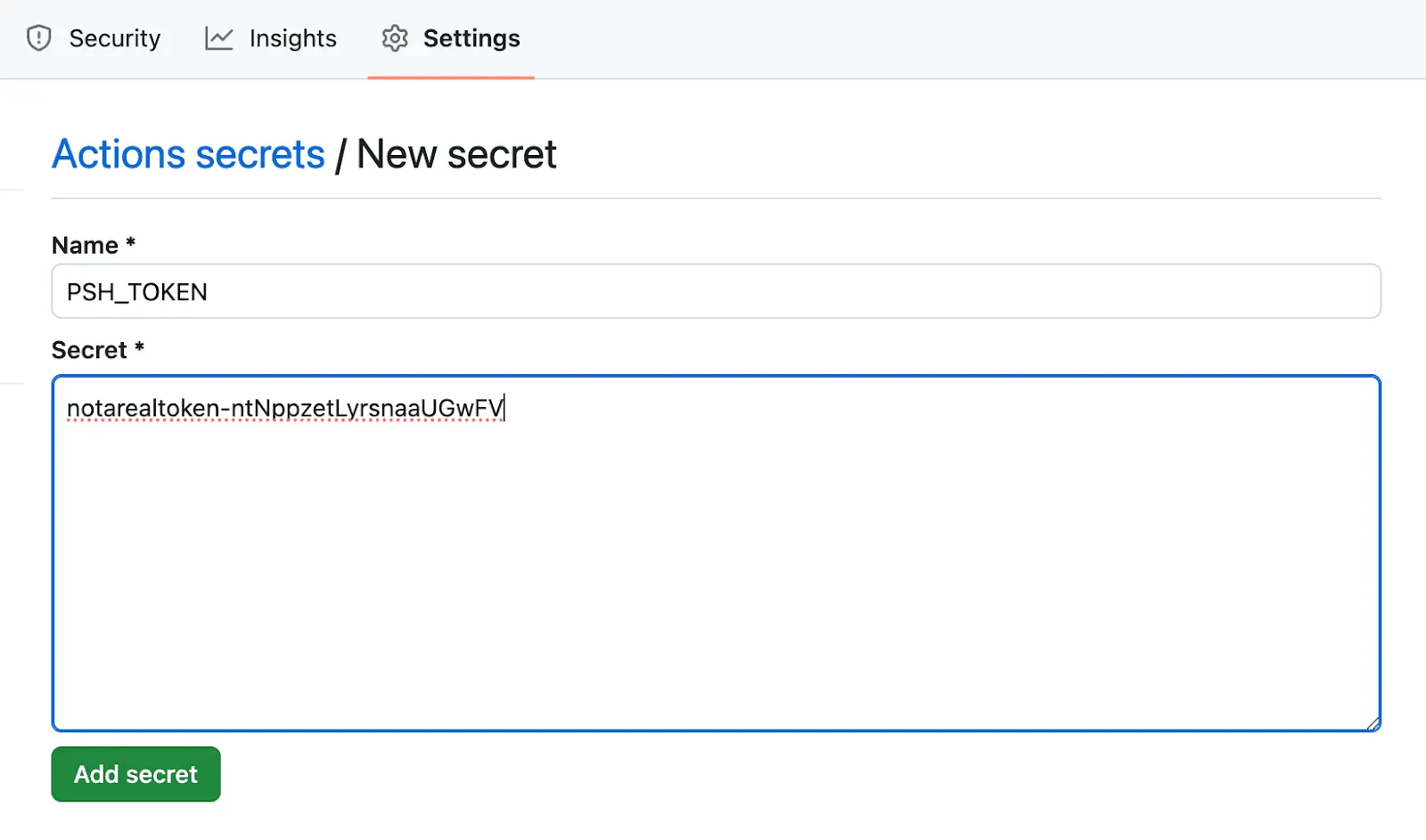
You'll notice that we’re setting the value of this environment variable to the value of the `PSH_TOKEN` in the `secrets`
[context object](https://docs.github.com/en/actions/learn-github-actions/contexts#secrets-context). For this, we're
going to need to:

* [Create a Platform.sh API token](https://docs.upsun.com/administration/cli/api-tokens.html#2-create-an-api-token)
* Add that token as a [repository secret in GitHub](https://docs.github.com/en/codespaces/managing-codespaces-for-your-organization/managing-secrets-for-your-repository-and-organization-for-github-codespaces#adding-secrets-for-a-repository)

For step 1 above, follow
[this documentation](https://docs.upsun.com/administration/cli/api-tokens.html#2-create-an-api-token) from Platform.sh on how to generate an API token. Once you have that value, follow [this documentation](https://docs.github.com/en/codespaces/managing-codespaces-for-your-organization/managing-secrets-for-your-repository-and-organization-for-github-codespaces#adding-secrets-for-a-repository) from GitHub on how to add a repository secret. You can name the secret anything you want; I've named it `PSH_TOKEN` in the sample code above, so make sure to update the name in the workflow if you decide to name it something else.

<img src="https://mintcdn.com/upsun-c9761871/tziXiwEbbKjwbX3l/images/posts/hands-on/guide-to-limit-deployments-to-platformsh-only-with-tags-part-one/limit_deployments_blog_3_a12418bc77.webp?fit=max&auto=format&n=tziXiwEbbKjwbX3l&q=85&s=9f3d65557d6e2bdefe8ed5c09c1ad254" alt="Add GitHub Repo Secret" width="1600" height="943" data-path="images/posts/hands-on/guide-to-limit-deployments-to-platformsh-only-with-tags-part-one/limit_deployments_blog_3_a12418bc77.webp" />

Please note, at a later step in the `we-should-push` job you will need to reference the Platform.sh project ID
associated with this repository.

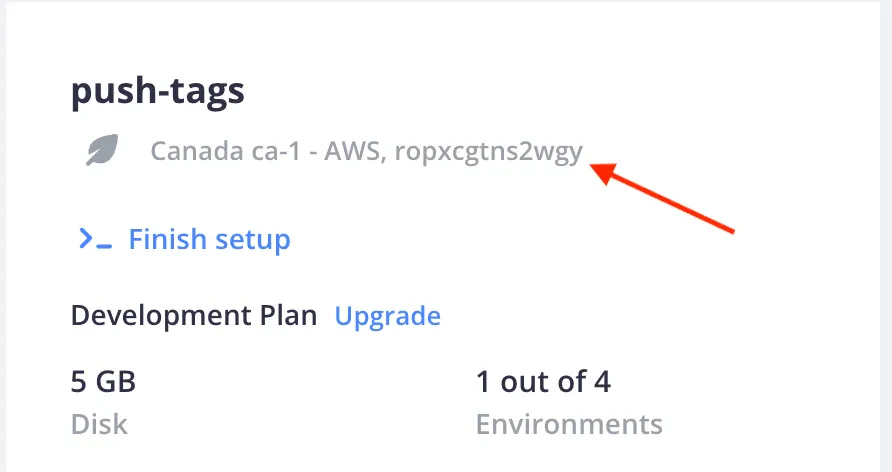
While you are in the repository secrets area of GitHub, go ahead and add another secret for the project ID. To locate
your project's ID, if you are logged into the Platform.sh
[console](https://console.platform.sh/?_utm_medium=Email&_utm_campaign=2022-09-newsletter&_utm_source=devrelcareers),
you can locate your project's ID under the title of your project, to the right of the project's region when viewing the
project's page in the console, as seen below:
<img src="https://mintcdn.com/upsun-c9761871/tziXiwEbbKjwbX3l/images/posts/hands-on/guide-to-limit-deployments-to-platformsh-only-with-tags-part-one/limit_deployments_blog_2_faca0856bf.webp?fit=max&auto=format&n=tziXiwEbbKjwbX3l&q=85&s=dc05d76a6e8c643ed77526b746114ae6" alt="Getting the PRoject ID in console" width="892" height="472" data-path="images/posts/hands-on/guide-to-limit-deployments-to-platformsh-only-with-tags-part-one/limit_deployments_blog_2_faca0856bf.webp" />

Alternatively, from the command line, when in the local copy of your project, you can run the following command:

```bash {filename="Terminal"} theme={null}
❯ platform project:info id
    ropxcgtns2wgy
```

In GitHub, add a repository secret of `PROJID`  and type/paste in your project ID.

Similar to the first step in the `should-we-push` job, we need to check out our repository into the runner workspace, as
seen below:

```yaml {filename=".github/workflows/push-tags.yml"} theme={null}
  we-should-push:
        runs-on: ubuntu-latest
        needs: should-we-push
        env:
          PLATFORMSH_CLI_TOKEN: ${{ secrets.PSH_TOKEN }}
        if: needs.should-we-push.outputs.push == 'true'
        steps:
          - uses: actions/checkout@v4
            with:
              fetch-depth: 0
```

Since `should-we-push` determined we're on the correct branch in the code snippet above, we don't need to include the
`ref` property this time. Now you need to install the Platform.sh CLI.

**Please note**: to keep the sample code below short, we’re `<snip>`ing the code we've already covered. The complete
workflow file is available at the end of this article.

```yaml {filename=".github/workflows/push-tags.yml"} theme={null}
  we-should-push:
        <snip>
        steps:
          - uses: actions/checkout@v4
            with:
              fetch-depth: 0
          - run: |
              echo "setting up the platform.sh cli"
              curl -fsSL https://raw.githubusercontent.com/platformsh/cli/main/installer.sh | bash
```

Next, we need to associate the copy of the repository with a Platform project (referencing the name of the repository
secret we created earlier):

```yaml {filename=".github/workflows/push-tags.yml"} theme={null}
    steps:
          <snip>
          - run: |
              echo "setting up the platform.sh cli"
              curl -fsSL https://raw.githubusercontent.com/platformsh/cli/main/installer.sh | bash
          - run: |
              echo "setting the remote project"
              platform project:set-remote "${{ secrets.PROJID }}"
```

This will add a `platform` remote to our checked-out copy of the repository which includes the Git address for our
mirror of the repository on Platform.sh. However, we won't be able to push until we generate a Secure Shell (SSH)
certificate to authenticate us when we push, so let's add a step to do that:

```yaml {filename=".github/workflows/push-tags.yml"} theme={null}
steps:
        <snip>
          - run: |
              echo "setting the remote project"
              platform project:set-remote "${{ secrets.PROJID }}"
          - run: |
              echo "set up a new ssh cert"
              platform ssh-cert:load --new –no-interaction
```

This command checks if a valid SSH certificate is present, and generates a new one if necessary. Certificates allow you
to make SSH connections without having previously uploaded a public key. As we've never connected to this server
location before from this runner, when we push, the SSH will not recognize the server fingerprint and prompt you to
confirm that you want to continue with connecting
([StrictHostKeyChecking](https://man.openbsd.org/ssh_config#StrictHostKeyChecking)). This will cause your step and job
to fail.

Instead, what you can do is use [ssh-keyscan](https://man.openbsd.org/ssh-keyscan.1)[^2] to retrieve the public SSH hostkey
of our Platform.sh location and add it to our known hosts before we attempt to connect. But before you can do that
you'll need to get the server address.

Since we know it has already been added as a remote Git address, we can retrieve the Platform remote address directly
from Git and then use bash [parameter substitution](https://tldp.org/LDP/abs/html/parameter-substitution.html)[^3] to
retrieve just the server location[^4]. From there we can then pass the server name to ssh-keyscan to retrieve the public
SSH key and add it into our `known_hosts` file:

```yaml {filename=".github/workflows/push-tags.yml"} theme={null}
    steps:
          <snip>
          - run: |
              echo "set up a new ssh cert"
              platform ssh-cert:load --new --no-interaction
          - run: |
              pshWholeGitAddress=$(git remote get-url platform --push)
              pshGitAddress=$(TMP=${pshWholeGitAddress#*@};echo ${TMP%:*})
              echo "Adding psh git address ${pshGitAddress} to known hosts"
              ssh-keyscan -t rsa "${pshGitAddress}" >> ~/.ssh/known_hosts
```

And now we can finally push our changes to Platform.sh. The only thing left before we push is to ensure we're pushing to
the correct production branch name on Platform.sh. Luckily, we can get that information from the Platform.sh CLI. Once
we know that information we can instruct Git to push the tag to that default branch on Platform.sh:

```yaml {filename=".github/workflows/push-tags.yml"} theme={null}
    steps:
        <snip>
          - run: |
              pshWholeGitAddress=$(git remote get-url platform --push)
              pshGitAddress=$(TMP=${pshWholeGitAddress#*@};echo ${TMP%:*})
              echo "Adding psh git address ${pshGitAddress} to known hosts"
              ssh-keyscan -t rsa "${pshGitAddress}" >> ~/.ssh/known_hosts
          - run: |
              echo "Pushing tag ${{ github.ref_name }} to Platform.sh..."
              pshDefaultBranch=$(platform project:info default_branch)
              git push platform refs/tags/${{ github.ref_name }}^{commit}:refs/heads/${pshDefaultBranch}
```

Your workflow file is now ready to commit to your repository and push to GitHub. You'll need to follow whatever workflow
path you use to get the file into your production branch, be it pushing directly, if allowed, or through a pull request
process.

### **All done!**

Now that the workflow file is committed into your production branch, any future tags that are pushed to GitHub, or
created on GitHub when creating a release will trigger the workflow.  If the tag is newer than any other tags (closest
to the current commit), it will trigger our second job, push that tag to Platform.sh, and deploy your new code base. And
just like that, you’ve limited deployment to Platform.sh only when pushing tags!

**Stay tuned for part two of our limit deployment series featuring GitLab coming soon!**

### **Additional resources**

#### **Complete workflow file**

The complete workflow file, as mentioned above, is available
[on GitHub as a gist](https://gist.github.com/platformsh-devrel/c9591a7007f46b380b8cfd183b69b69d).

#### **Bash parameter substitution explanation**

I personally do not like when an article or blog post uses something without an explanation of what is happening or
without linking to a good explanation. While I did include a link to the documentation on parameter substitution, it
might not be immediately obvious what I'm doing with the substitution I used. Since I also believe you should *never*
copy and paste something online without understanding what it does, I wanted to include a fuller explanation so you have
a clear idea of what is occurring.

The value we receive from running `git remote get-url platform --push` is going to look something like this:

```bash {filename="Terminal"} theme={null}
ah242jeyfwteo@git.ca-1.platform.sh:ah242jeyfwteo.git
```

What we need is the value that starts *after* the `@` and ends *before* the `:`. So let's break this down:

```bash {filename="Terminal"} theme={null}
pshWholeGitAddress=$(git remote get-url platform --push)
pshGitAddress=$(TMP=${pshWholeGitAddress#*@};echo ${TMP%:*})
```

We store the value returned from the Git command as `pshWholeGitAddress`. Then in the next line, we run it through
**two** parameter substitutions:

```bash {filename="Terminal"} theme={null}
TMP=${pshWholeGitAddress#*@}
${TMP%:*}
```

The first uses a substitution which we'll remove from our string (contained in the variable `pshWholeGitAddress`), the
part that matches a pattern (`*@`) from the beginning of our string, up to *and including* the pattern (indicated by the
use of the `#` after the variable). So in the case of the string returned from Git, what we match and remove will be
what is highlighted:

```bash {filename="Terminal"} theme={null}
ah242jeyfwteo@git.ca-1.platform.sh:ah242jeyfwteo.git
```

And we're left with `git.ca-1.platform.sh:ah242jeyfwteo.git` which is assigned to the variable `TMP`.  This is good, but
we don't want anything starting at `:` until going to the end of the string. To address this, the next substitution is
going to remove from our string above (stored in the variable `TMP`), the part that matches the pattern `:*` from the
*end of our string* back to and including the pattern itself (indicated by the `%` after the variable). What we match
and remove is highlighted:

```bash {filename="Terminal"} theme={null}
git.ca-1.platform.sh:ah242jeyfwteo.git
```

And what we're left with is `git.ca-1.platform.sh` which is assigned to `pshGitAddress` for us to use with ssh-keyscan.

***

[^1]: We can add a 'branches' filter to the 'push' event but this creates a logical OR between them so any push to the
    branch will trigger the workflow. This means we would still need the 'should-we-push' job to verify the event is one
    where we need to push to Platform.sh. Pushing/creating a tag happens less frequently than pushing to the default branch,
    which is why I've suggested only using the tags filter.

[^2]: We could potential alter the SSH config to set StrictHostKeyChecking to accept-new or do a quick ssh connection
    with '-o StrictHostKeyChecking=accept-new' but using ssh-keyscan with the confirmed address seems more succinct.

[^3]: Bash parameter substitution is just ONE method out of many to retrieve the server address. You could also use sed,
    grep, awk or several other methods.

[^4]: See full explanation at the end of this article [Bash Parameter Substitution Explained](#bash-parameter-explanation)