> ## Documentation Index
> Fetch the complete documentation index at: https://developer.upsun.com/llms.txt
> Use this file to discover all available pages before exploring further.
# Use Git submodules
export const DynamicCodeBlock = ({language = 'yaml', filename, icon, lines, wrap, expandable, highlight, focus, children}) => {
const STORAGE_KEY = 'upsun_versions_cache';
const COMPOSABLE_STORAGE_KEY = 'upsun_composable_cache';
const CACHE_TTL = 5 * 60 * 1000;
const API_URL = 'https://meta.upsun.com/images';
const COMPOSABLE_API_URL = 'https://meta.upsun.com/composable';
const DEBUG_PREFIX = '[DynamicCodeBlock cache]';
const [versionData, setVersionData] = useState(null);
const [versionError, setVersionError] = useState(false);
const [composableData, setComposableData] = useState(null);
const [composableError, setComposableError] = useState(false);
useEffect(() => {
const fetchData = async () => {
let cachedData = null;
let cachedEtag = null;
if (typeof localStorage !== 'undefined') {
try {
const cached = localStorage.getItem(STORAGE_KEY);
if (cached) {
const parsed = JSON.parse(cached);
cachedData = parsed?.data || null;
cachedEtag = parsed?.etag || null;
if (cachedData && Date.now() - parsed.timestamp < CACHE_TTL) {
return cachedData;
}
}
} catch (err) {
console.error('Failed to load from cache:', err);
}
}
const requestHeaders = cachedEtag ? {
'If-None-Match': cachedEtag
} : {};
console.debug(`${DEBUG_PREFIX} revalidating`, {
storageKey: STORAGE_KEY,
hasCachedData: Boolean(cachedData),
hasCachedEtag: Boolean(cachedEtag)
});
const response = await fetch(API_URL, {
headers: requestHeaders
});
if (response.status === 304 && cachedData) {
console.debug(`${DEBUG_PREFIX} revalidated (304)`, {
storageKey: STORAGE_KEY
});
if (typeof localStorage !== 'undefined') {
try {
const etag = response.headers.get('etag') || cachedEtag;
localStorage.setItem(STORAGE_KEY, JSON.stringify({
data: cachedData,
etag,
timestamp: Date.now()
}));
} catch (err) {
console.error('Failed to refresh cache metadata:', err);
}
}
return cachedData;
}
if (!response.ok) throw new Error(`API request failed: ${response.statusText}`);
const data = await response.json();
const etag = response.headers.get('etag');
console.debug(`${DEBUG_PREFIX} refreshed (200)`, {
storageKey: STORAGE_KEY,
etag
});
if (typeof localStorage !== 'undefined') {
try {
localStorage.setItem(STORAGE_KEY, JSON.stringify({
data,
etag,
timestamp: Date.now()
}));
} catch (err) {
console.error('Failed to cache data:', err);
}
}
return data;
};
fetchData().then(data => setVersionData(data)).catch(err => console.error('Failed to fetch version data:', err));
}, []);
const findHighestVersion = versionsMap => {
if (!versionsMap || Object.keys(versionsMap).length === 0) return null;
const entries = Object.entries(versionsMap);
const active = entries.filter(([, v]) => v.upsun && v.upsun.status === 'supported' || v.upsun && v.upsun.status === 'deprecated');
const candidates = active.length > 0 ? active : entries;
let [highestName] = candidates[0];
for (let i = 1; i < candidates.length; i++) {
const [currentName] = candidates[i];
const cp = currentName.split('.').map(Number);
const hp = highestName.split('.').map(Number);
for (let j = 0; j < Math.max(cp.length, hp.length); j++) {
if ((cp[j] || 0) > (hp[j] || 0)) {
highestName = currentName;
break;
} else if ((cp[j] || 0) < (hp[j] || 0)) {
break;
}
}
}
return highestName;
};
const getVersion = (lang, requestedVersion = 'latest') => {
if (lang === 'composable') {
if (!composableData || !composableData.versions || Object.keys(composableData.versions).length === 0) return null;
if (requestedVersion && requestedVersion !== 'latest') {
return (requestedVersion in composableData.versions) ? requestedVersion : null;
}
return findHighestVersion(composableData.versions);
}
if (!versionData) return null;
const imageData = versionData[lang];
if (!imageData || !imageData.versions || Object.keys(imageData.versions).length === 0) {
return null;
}
if (requestedVersion && requestedVersion !== 'latest') {
return (requestedVersion in imageData.versions) ? requestedVersion : null;
}
return findHighestVersion(imageData.versions);
};
let code = typeof children === 'string' ? children : String(children || '');
const codeLines = code.split('\n');
while (codeLines.length > 0 && codeLines[0].trim() === '') codeLines.shift();
while (codeLines.length > 0 && codeLines[codeLines.length - 1].trim() === '') codeLines.pop();
if (codeLines.length > 0) {
const indents = codeLines.filter(line => line.trim().length > 0).map(line => line.match(/^[ \t]*/)[0].length);
const minIndent = Math.min(...indents);
code = codeLines.map(line => line.slice(minIndent)).join('\n');
}
code = code.replace(/\{\{version:(.*?)\}\}/g, (match, params) => {
const parts = params.split(':');
const lang = parts[0];
const ver = parts[1] || 'latest';
const isComposable = lang === 'composable';
const hasError = isComposable ? composableError : versionError;
const dataReady = isComposable ? composableData !== null : versionData !== null;
if (hasError) return '(unavailable)';
if (dataReady) {
const resolvedVersion = getVersion(lang, ver);
return resolvedVersion || match;
}
return '...';
});
const codeBlockProps = {
language,
...filename && ({
filename
}),
...icon && ({
icon
}),
...lines !== undefined && ({
lines
}),
...wrap !== undefined && ({
wrap
}),
...expandable !== undefined && ({
expandable
}),
...highlight && ({
highlight
}),
...focus && ({
focus
})
};
return {code};
};
export const MoreIcon = () => ;
## Clone submodules during deployment
Upsun allows you to use submodules in your Git repository.
They're usually listed in a `.gitmodules` file at the root of your Git repository.
When you push via Git, Upsun tries to clone them automatically.
The following example is based on [a Bigfoot multi-app project](https://github.com/platformsh-templates/bigfoot-multiapp/tree/multiapp-subfolders-applications) which uses the following submodules:
* A [BigFoot app](https://github.com/platformsh-templates/bigfoot-multiapp-api/tree/without-platform-app-yaml)
* An [API Platform v3, Admin component](https://github.com/platformsh-templates/bigfoot-multiapp-admin/tree/without-platform-app-yaml)
* A [Gatsby frontend](https://github.com/platformsh-templates/bigfoot-multiapp-gatsby/tree/without-platform-app-yaml)
* A [Mercure Rocks server](https://github.com/platformsh-templates/bigfoot-multiapp-mercure/tree/without-platform-app-yaml)
Say you have a multi-app project that includes the following submodules:
* A BigFoot app
* An API Platform v3, Admin component
* A Gatsby frontend
* A Mercure Rocks server
To import all the submodules, run the following commands from your multiple application project's root folder:
```bash theme={null}
touch .gitmodules
git submodule add --name admin https://github.com/platformsh-templates/bigfoot-multiapp-admin.git admin
git submodule add --name api https://github.com/platformsh-templates/bigfoot-multiapp-api.git api
git submodule add --name gatsby https://github.com/platformsh-templates/bigfoot-multiapp-gatsby.git gatsby
git submodule add --name mercure https://github.com/platformsh-templates/bigfoot-multiapp-mercure.git mercure
git add .
git commit -m "Adding submodules for Bigfoot App, API Platform Admin, Gatsby frontend and Mercure Rocks server"
git push
```
Here is an example of a `.gitmodules` file:
```ini theme={null}
[submodule "admin"]
path = admin
url = https://github.com/platformsh-templates/bigfoot-multiapp-admin.git
[submodule "api"]
path = api
url = https://github.com/platformsh-templates/bigfoot-multiapp-api.git
[submodule "gatsby"]
path = gatsby
url = https://github.com/platformsh-templates/bigfoot-multiapp-gatsby.git
[submodule "mercure"]
path = mercure
url = https://github.com/platformsh-templates/bigfoot-multiapp-mercure.git
```
When you run `git push`, you can see the output of the logs:
```bash theme={null}
Validating submodules
Updating submodule ttps://github.com/platformsh-templates/bigfoot-multiapp-admin.git
Updated submodule https://github.com/platformsh-templates/bigfoot-multiapp-admin.git: 549 references updated.
Updating submodule ttps://github.com/platformsh-templates/bigfoot-multiapp-api.git
Updated submodule https://github.com/platformsh-templates/bigfoot-multiapp-api.git: 898 references updated.
Updating submodule https://github.com/platformsh-templates/bigfoot-multiapp-gatsby.git
Updated submodule https://github.com/platformsh-templates/bigfoot-multiapp-gatsby.git: 257 references updated.
Updating submodule https://github.com/platformsh-templates/bigfoot-multiapp-mercure.git
Updated submodule https://github.com/platformsh-templates/bigfoot-multiapp-mercure.git: 124 references updated.
...
```
If your submodule contains an independent app,
see [how to configure it properly](/docs/configure-apps/multi-app/project-structure#split-your-code-source-into-multiple-git-submodule-repositories).
## Update submodules
When you amend your submodules' code, make sure your changes are applied by running the following commands
before redeploying:
```bash theme={null}
git submodule update --remote [submodule]
Submodule path 'admin': checked out 'a020894cf94de6e79748890c942206bc7af752af'
Submodule path 'api': checked out 'dce6617cc2db159c1a871112909e9ea4121135ec'
Submodule path 'gatsby': checked out '012ab16b05f474278ad0f9916e1cb94fc9df5ba4'
Submodule path 'mercure': checked out '94ccae5055983004aa8ab2c17b1daabd0c0a4927'
```
To specify which submodule needs to be updated, replace `[submodule]` with your submodule path.
Tier availability
This feature is available for **Elite** and **Enterprise** customers.
[Compare the Upsun tiers](https://upsun.com/fixed-pricing/) on our pricing page,
or [contact our Sales team](https://upsun.com/contact-us/) for more information.
Automate your submodule updates using a [source operation](/docs/configure-apps/source-operations).
To do so, follow these steps:
1. Define a source operation.
Add the following configuration to your `.upsun/config.yaml` file:
```yaml .upsun/config.yaml theme={null}
applications:
# The name of the app container. Must be unique within a project.
myapp:
# The location of the application's code.
source:
operations:
rebuild:
command: |
set -e
git submodule update --init --recursive
git submodule update --remote --checkout
git add admin api gatsby mercure
if ! git diff-index --quiet HEAD; then
git commit -m "Updating submodules admin, api, gatsby and mercure"
fi
```
For multiple app projects, make sure you define your source operation
in the configuration of an app whose source code **is not** in a submodule.
If you use [Git submodules for each of your apps](/docs/configure-apps/multi-app/project-structure#split-your-code-source-into-multiple-git-submodule-repositories), define a new app at the top level of your project repository.
Don't define routes so your app isn't exposed to the web.
To define a source operation, add the following configuration to your [app configuration](/docs/configure-apps/app-reference):
{`
applications:
# The name of the app container. Must be unique within a project.
update-submodule:
# The location of the application's code.
# The type of the application to build.
type: 'nodejs:{{version:nodejs:latest}}'
# The web key configures the web server running in front of your app.
web:
# Commands are run once after deployment to start the application process.
commands:
# The command to launch your app. If it terminates, it’s restarted immediately.
# As this app will handle source operation only, no need to keep it alive (sleep)
start: |
sleep infinity
source:
operations:
update-submodules:
command: |
set -e
git submodule update --init --recursive
git submodule update --remote --checkout
git add .
if ! git diff-index --quiet HEAD; then
git commit -m "Updating submodules"
fi
# "git push" is automatic at the end of this command`
}
2. Run your source operation.
To do so, in the [Console](/docs/administration/web),
navigate to the environment where you want to run the source operation.
Click **More**.
Click **Run Source Operation**.
Select the operation you want to run.
Click **Run**.
Alternatively, to run your source operation from the [Upsun CLI](/cli),
run the following command:
```bash theme={null}
upsun source-operation:run
```
## Error when validating submodules
Using an SSH URL (`git@github.com:...`) to fetch submodules triggers the following error:
```bash theme={null}
Validating submodules.
Found unresolvable links, updating submodules.
E: Error validating submodules in tree:
- admin: Exception: commit 03567c6 not found.
This might be due to the following errors fetching submodules:
- git@github.com:platformsh-templates/bigfoot-multiapp-admin.git: HangupException: The remote server unexpectedly closed the connection.
```
This is due to the fact that the Upsun Git server can't connect to GitHub via SSH without being granted an SSH key to do so.
To solve this issue, use an HTTPS URL (`https://github.com/...`) instead.
## Use private Git repositories
When using Git submodules that are private repositories, URLs with the HTTPS protocol fail with errors such as the following:
```bash theme={null}
GitProtocolError: unexpected http resp 401 for https://bitbucket.org/myusername/mymodule.git/info/refs?service=git-upload-pack
```
To fix this, follow these steps:
1. Change your module declarations to use SSH for URLs.
Your existing declaration might look like this:
```bash .gitmodules theme={null}
[submodule "support/module"]
path = support/module
url = https://bitbucket.org/username/module.git
branch = submodule/branch
```
Change this to the following:
```bash .gitmodules theme={null}
[submodule "support/module"]
path = support/module
url = git@bitbucket.org:username/module.git
branch = submodule/branch
```
2. Add the [project's public key to your remote Git repository](/docs/development/private-repository). If there are nested
submodules in your submodule, then add the public key to those repositories as well. This allows your
Upsun project to pull the repository from the remote Git service.
Deploy keys only grant access to a single repository,
which can cause issues when attempting to pull several repositories to the same server.
If your server needs access to multiple repositories, follow these steps:
1. [Create a machine user](https://docs.github.com/en/authentication/connecting-to-github-with-ssh/managing-deploy-keys#machine-users)
with access rights to each of the private repositories.
2. Attach the deploy key to your machine user.
## Removing submodules
These steps aren't specific to Upsun, but kept as a reference for Git so that submodules are effectively removed before entering the build process.
1. In your `.gitmodules` and `.git/config` files, delete the information related to the submodule you want to remove.
```bash theme={null}
git submodule deinit -f path_to_submodule
```
2. Stage changes to `.gitmodules`:
```bash theme={null}
git add .gitmodules
```
3. Remove the submodule from the repository (without trailing slash):
```bash theme={null}
git rm --cached path_to_submodule
```
4. Remove the submodule files in `.git` from the repository (without trailing slash):
```bash theme={null}
rm -rf .git/modules/path_to_submodule
```
5. Commit the changes:
```bash theme={null}
git commit -m "Removed submodule."
```
6. Remove the submodule code locally, now no longer tracked:
```bash theme={null}
rm -rf path_to_submodule
```
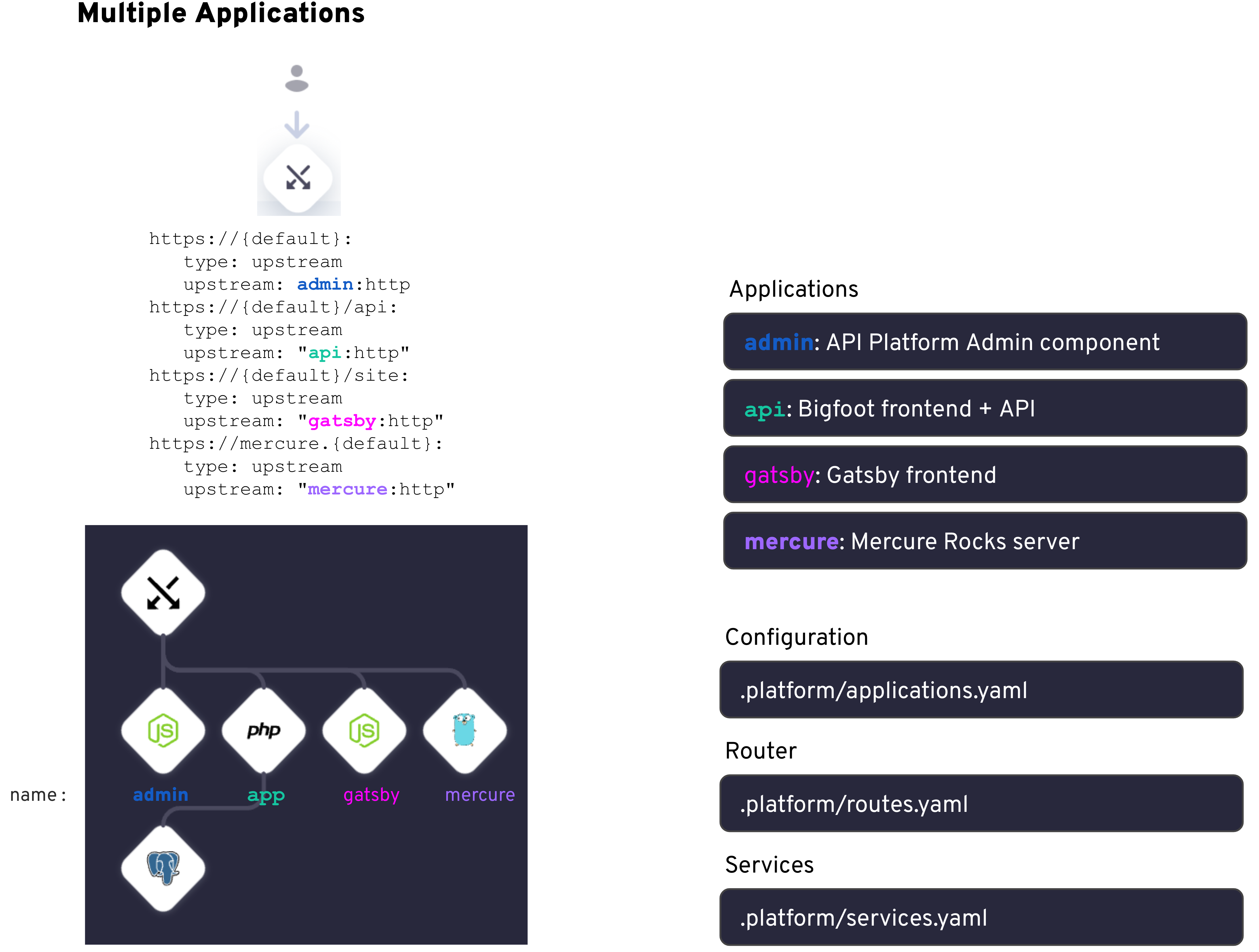 Say you have a multi-app project that includes the following submodules:
* A BigFoot app
* An API Platform v3, Admin component
* A Gatsby frontend
* A Mercure Rocks server
To import all the submodules, run the following commands from your multiple application project's root folder:
```bash theme={null}
touch .gitmodules
git submodule add --name admin https://github.com/platformsh-templates/bigfoot-multiapp-admin.git admin
git submodule add --name api https://github.com/platformsh-templates/bigfoot-multiapp-api.git api
git submodule add --name gatsby https://github.com/platformsh-templates/bigfoot-multiapp-gatsby.git gatsby
git submodule add --name mercure https://github.com/platformsh-templates/bigfoot-multiapp-mercure.git mercure
git add .
git commit -m "Adding submodules for Bigfoot App, API Platform Admin, Gatsby frontend and Mercure Rocks server"
git push
```
Here is an example of a `.gitmodules` file:
```ini theme={null}
[submodule "admin"]
path = admin
url = https://github.com/platformsh-templates/bigfoot-multiapp-admin.git
[submodule "api"]
path = api
url = https://github.com/platformsh-templates/bigfoot-multiapp-api.git
[submodule "gatsby"]
path = gatsby
url = https://github.com/platformsh-templates/bigfoot-multiapp-gatsby.git
[submodule "mercure"]
path = mercure
url = https://github.com/platformsh-templates/bigfoot-multiapp-mercure.git
```
When you run `git push`, you can see the output of the logs:
```bash theme={null}
Validating submodules
Updating submodule ttps://github.com/platformsh-templates/bigfoot-multiapp-admin.git
Updated submodule https://github.com/platformsh-templates/bigfoot-multiapp-admin.git: 549 references updated.
Updating submodule ttps://github.com/platformsh-templates/bigfoot-multiapp-api.git
Updated submodule https://github.com/platformsh-templates/bigfoot-multiapp-api.git: 898 references updated.
Updating submodule https://github.com/platformsh-templates/bigfoot-multiapp-gatsby.git
Updated submodule https://github.com/platformsh-templates/bigfoot-multiapp-gatsby.git: 257 references updated.
Updating submodule https://github.com/platformsh-templates/bigfoot-multiapp-mercure.git
Updated submodule https://github.com/platformsh-templates/bigfoot-multiapp-mercure.git: 124 references updated.
...
```
Say you have a multi-app project that includes the following submodules:
* A BigFoot app
* An API Platform v3, Admin component
* A Gatsby frontend
* A Mercure Rocks server
To import all the submodules, run the following commands from your multiple application project's root folder:
```bash theme={null}
touch .gitmodules
git submodule add --name admin https://github.com/platformsh-templates/bigfoot-multiapp-admin.git admin
git submodule add --name api https://github.com/platformsh-templates/bigfoot-multiapp-api.git api
git submodule add --name gatsby https://github.com/platformsh-templates/bigfoot-multiapp-gatsby.git gatsby
git submodule add --name mercure https://github.com/platformsh-templates/bigfoot-multiapp-mercure.git mercure
git add .
git commit -m "Adding submodules for Bigfoot App, API Platform Admin, Gatsby frontend and Mercure Rocks server"
git push
```
Here is an example of a `.gitmodules` file:
```ini theme={null}
[submodule "admin"]
path = admin
url = https://github.com/platformsh-templates/bigfoot-multiapp-admin.git
[submodule "api"]
path = api
url = https://github.com/platformsh-templates/bigfoot-multiapp-api.git
[submodule "gatsby"]
path = gatsby
url = https://github.com/platformsh-templates/bigfoot-multiapp-gatsby.git
[submodule "mercure"]
path = mercure
url = https://github.com/platformsh-templates/bigfoot-multiapp-mercure.git
```
When you run `git push`, you can see the output of the logs:
```bash theme={null}
Validating submodules
Updating submodule ttps://github.com/platformsh-templates/bigfoot-multiapp-admin.git
Updated submodule https://github.com/platformsh-templates/bigfoot-multiapp-admin.git: 549 references updated.
Updating submodule ttps://github.com/platformsh-templates/bigfoot-multiapp-api.git
Updated submodule https://github.com/platformsh-templates/bigfoot-multiapp-api.git: 898 references updated.
Updating submodule https://github.com/platformsh-templates/bigfoot-multiapp-gatsby.git
Updated submodule https://github.com/platformsh-templates/bigfoot-multiapp-gatsby.git: 257 references updated.
Updating submodule https://github.com/platformsh-templates/bigfoot-multiapp-mercure.git
Updated submodule https://github.com/platformsh-templates/bigfoot-multiapp-mercure.git: 124 references updated.
...
```